









Updating Your Windows Forms Project to Version 16.0

TX Text Control 16.0 splits the former single TXTextControl.dll into a core assembly plus platform-specific DLLs for Windows Forms and WPF. This step-by-step guide covers removing old references, adding the new assemblies in Visual Studio, updating licenses.licx, and rebuilding.

In version 16.0, the TXTextControl.dll assembly has been divided into TXTextControl.dll and TXTextControl.Windows.Forms.dll or TXTextControl.WPF.dll. TXTextControl.dll is the core assembly and the others contain the specific implementation for the different platforms.
Updating an existing project is quite easy, but you need to know how. The following easy steps explain how to do that.
-
Open your existing project in Visual Studio, select the project in the Solution Explorer and click on the Show All Files button.
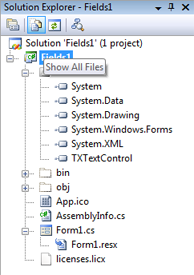
- Next, remove the Reference entry for TXTextControl.
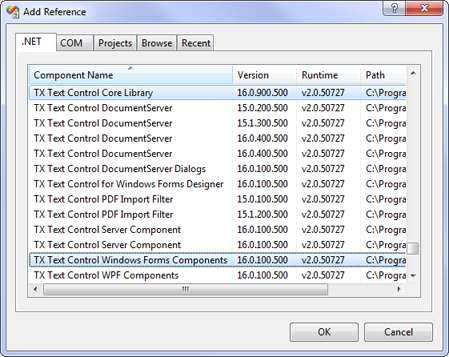
- Choose Add Reference... from the Project main menu to open the Add Reference dialog.
-
In the .NET tab page, browse for the components TX Text Control Core Library and TX Text Control Windows Forms Components, select both (use the CTRL key) and confirm with OK.
-
Open the licenses.licx file by double-clicking the file in the Solution Explorer. Replace the license entry for TXTextControl.TextControl with the following string:
TXTextControl.TextControl, TXTextControl.Windows.Forms, Culture=neutral, PublicKeyToken=6b83fe9a75cfb638
- Select Clean Solution and Rebuild Solution from the Build menu to include the new license.
Related Posts
TX Text Control 34.0 SP5 is Now Available: What's New in the Latest Version
TX Text Control 34.0 Service Pack 5 is now available, offering important updates and bug fixes for all platforms. If you use TX Text Control in your document processing applications, this service…
TX Text Control 34.0 SP4 is Now Available: What's New in the Latest Version
TX Text Control 34.0 Service Pack 4 is now available, offering important updates and bug fixes for all platforms. If you use TX Text Control in your document processing applications, this service…
TX Spell .NET 11.0 SP1 is Now Available: What's New in the Latest Version
TX Spell .NET 11.0 Service Pack 1 is now available, offering important updates and bug fixes for all platforms. If you use TX Spell .NET in your document processing applications, this service pack…
Announcing TX Text Control DS Server 5.0
We are excited to announce the release of TX Text Control DS Server 5.0. This release focuses on extensibility, plugin integration, and developer productivity while continuing to improve the…
TX Text Control 34.0 SP2 is Now Available: What's New in the Latest Version
TX Text Control 34.0 Service Pack 2 is now available, offering important updates and bug fixes for all platforms. If you use TX Text Control in your document processing applications, this service…