


Inserting MS Word Compatible FORMCHECKBOX Fields

TX Text Control .NET for Windows Forms supports MS Word compatible FORMCHECKBOX form fields for inserting and processing interactive checkboxes within documents. A companion GitHub sample project provides ready-to-run C# code for creating and handling these form elements.

Checkboxes are probably the most commonly used selection elements in paper and web-based forms and questionnaires.
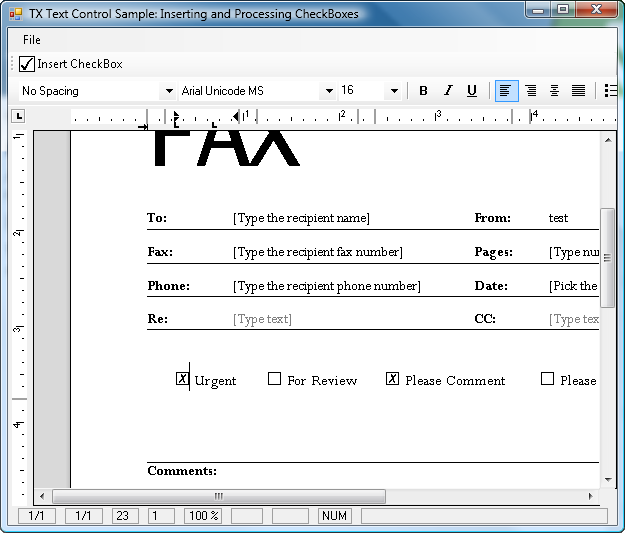
Inspired by a customer's project, I built a small sample that shows how to insert and process MS Word compatible checkbox form fields using TX Text Control .NET for Windows Forms.
Download the sample from GitHub and test it on your own.

Download and Fork This Sample on GitHub
We proudly host our sample code on github.com/TextControl.
Please fork and contribute.
Requirements for this sample
- Visual Studio 2012 or better
- TX Text Control .NET for Windows Forms (trial sufficient)
Windows Forms
Text Control combines the power of a reporting tool and an easy-to-use WYSIWYG word processor - fully programmable and embeddable in your Windows Forms application. TX Text Control .NET for Windows Forms is a royalty-free, fully programmable rich edit control that offers developers a broad range of word processing features in a reusable component for Visual Studio.
Related Posts
Official TX Text Control .NET Sample Applications Are Now Hosted on GitHub
This article gives a quick overview of the new repositories, their structure and our plans for the future.
Applying Paragraph Styles from a Master Template
A Windows Forms extension method applies paragraph styles from a master template to a target document by matching style names. A temporary ServerTextControl loads the master template, and the code…
Inserting Multipage TIFF Images into TX Text Control
Multipage TIFF images can be inserted into TX Text Control by splitting them into individual frames with .NET FrameDimension. Each frame converts to a bitmap and is placed on its own section page…
Windows Forms: Printing Multiple Pages Per Sheet
A custom MultipagePrintDocument class inheriting from System.Drawing.Printing.PrintDocument renders multiple document pages per physical sheet. It uses TX Text Control GetImage to create page…
Inserting Watermark Images to All Pages Dynamically
Dynamically insert centered watermark images on every page of a TX Text Control document. The approach tags each watermark using the Image Name property, removes existing watermarks before…