









From Milliseconds to Cloud Costs: The Real Impact of Faster Document Processing in C# .NET

Performance benchmarks usually compare milliseconds. In production systems, however, milliseconds become processing queues, infrastructure requirements, cloud costs, and waiting time for users. This article shows how to measure the real impact of faster document processing in C# .NET applications.

Performance benchmarks typically measure in milliseconds. In production systems, however, milliseconds translate into processing queues, infrastructure requirements, cloud costs, and waiting time for users.
Our previous benchmark tests compared TX Text Control Classic and TX Text Control Core using identical documents and hardware. The results showed that Core is consistently faster at generating DOCX and PDF documents. For PDF generation, Core's performance was approximately eleven times faster than Classic, depending on the document size.
Learn more
With the release of the new core version of TX Text Control, we set out to benchmark its performance against the classic version on both Windows and Linux environments. This comparison provides valuable insights into speed, efficiency and cross-platform capabilities.
Benchmarking TX Text Control: Classic vs. Core on Windows and Linux
But what do these numbers mean in a real application?
This article applies published benchmark results to real-world document processing scenarios, including invoice batches, customer portals, document conversion services, and Azure-hosted workloads.
The Published Benchmark Data
The first benchmark generated DOCX and PDF documents from plain text files of increasing size.
Plain Text to DOCX
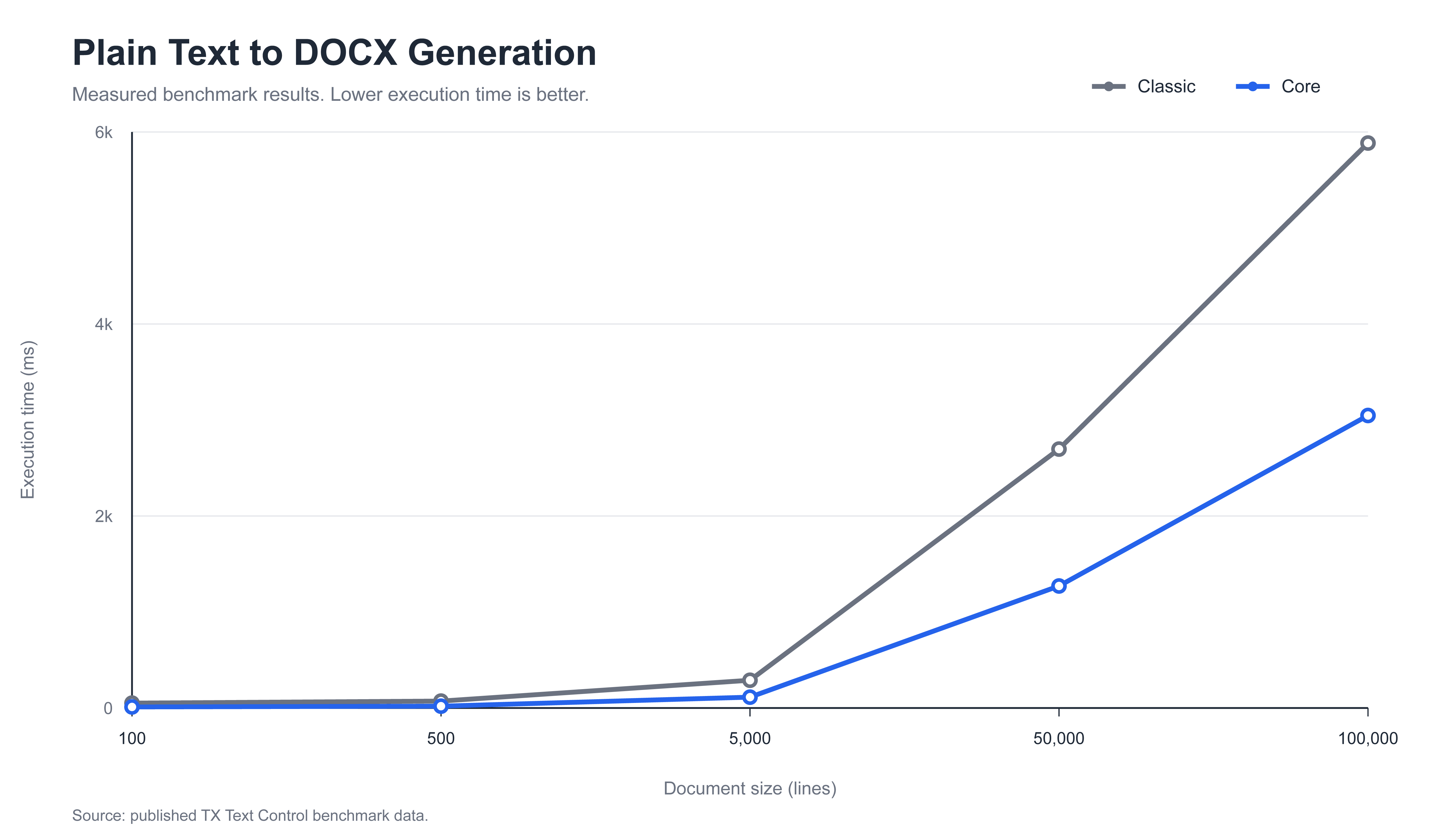
In this benchmark, the time taken to generate DOCX documents from plain text files was measured. The results are summarized in the following table:
| Lines | Classic | Core | Speed improvement |
|---|---|---|---|
| 100 | 51 ms | 11 ms | 4.6x |
| 500 | 72 ms | 19 ms | 3.8x |
| 5,000 | 289 ms | 113 ms | 2.6x |
| 50,000 | 2,697 ms | 1,271 ms | 2.1x |
| 100,000 | 5,885 ms | 3,047 ms | 1.9x |
Core is consistently faster than Classic at generating DOCX documents. The below graph shows the measured processing time for each document size.
Plain Text to PDF
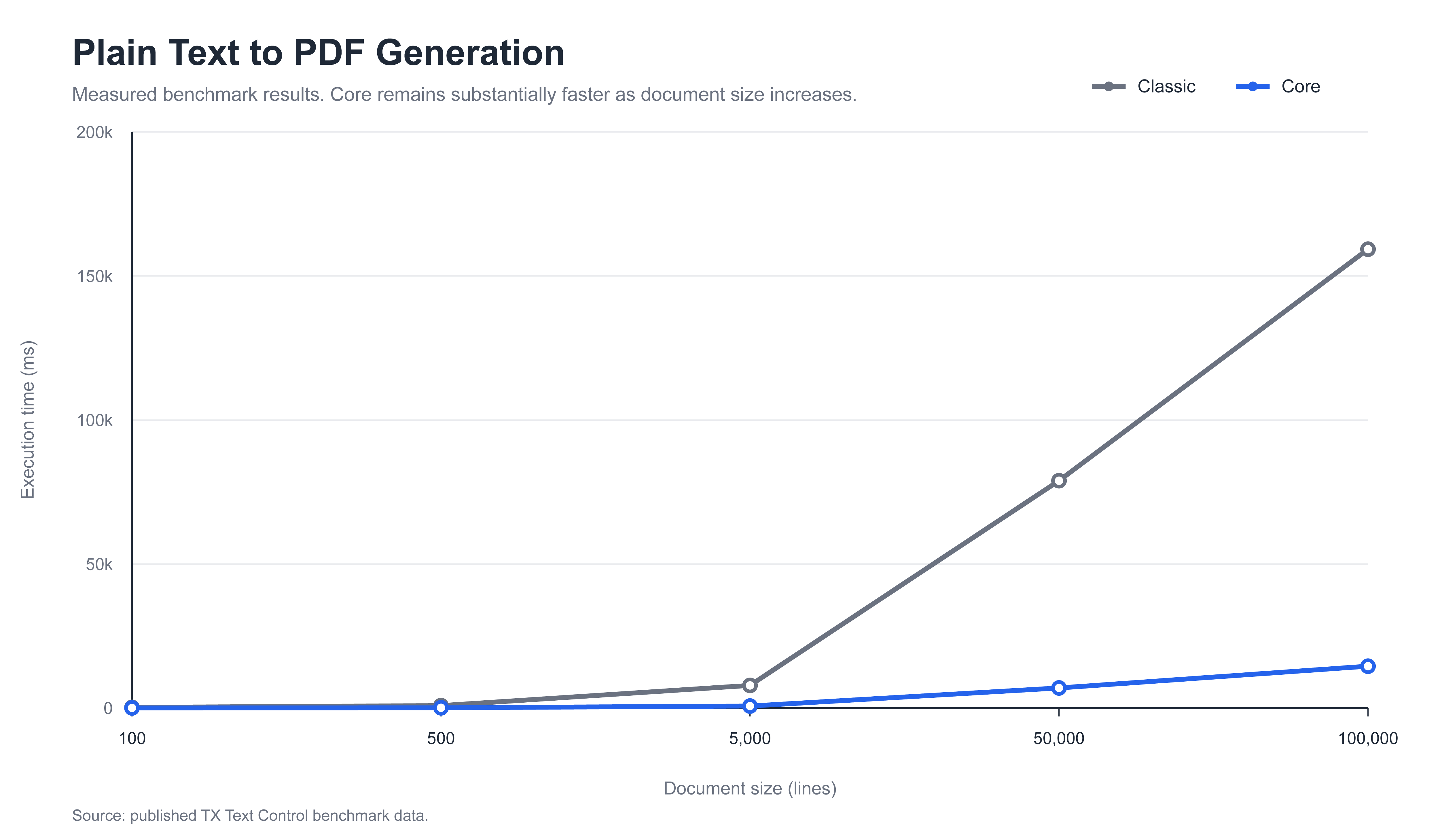
In this benchmark, the time taken to generate PDF documents from plain text files was measured. The results are summarized in the following table:
| Lines | Classic | Core | Speed improvement |
|---|---|---|---|
| 100 | 214 ms | 23 ms | 9.3x |
| 500 | 839 ms | 76 ms | 11.0x |
| 5,000 | 7,842 ms | 684 ms | 11.5x |
| 50,000 | 78,921 ms | 6,957 ms | 11.3x |
| 100,000 | 159,313 ms | 14,518 ms | 11.0x |
Core scales particularly well during PDF generation. In the 100,000-line test, it took Classic approximately 159 seconds to complete the same operation, whereas Core finished in approximately 14.5 seconds.
The following graph shows the measured processing time for each document size.
Understanding the Real-World Impact
In production systems, milliseconds translate into processing queues, infrastructure requirements, cloud costs, and waiting time for users. The following scenarios illustrate how benchmark results translate into real-world document processing scenarios.
Scenario 1: Generating Customer Documents on Demand
Consider a web application that generates a PDF when a customer downloads a statement, policy document, quote, or report.
Using the measured results for a 5,000-line PDF:
| Version | Processing time |
|---|---|
| Classic | 7.842 seconds |
| Core | 0.684 seconds |
Customers using Core receive the generated document more than seven seconds earlier.
This difference is clearly visible in an interactive application. A request lasting less than one second may feel immediate. However, a request that takes almost eight seconds may require loading indicators, longer HTTP timeouts, and additional handling for users who repeatedly click the download button.
The faster operation also frees up the processing worker sooner, enabling it to serve the next request.
Scenario 2: Processing an Invoice Batch
Now, consider an ERP system that generates 10,000 invoice PDFs during a billing run.
Using a 5,000-line benchmark document as a model, a sequential worker would need to:
| Version | Time per PDF | Time for 10,000 PDFs |
|---|---|---|
| Classic | 7.842 seconds | 21.8 hours |
| Core | 0.684 seconds | 1.9 hours |
The Core workload finishes approximately 19.9 hours sooner.
This calculation does not imply that each invoice contains precisely 5,000 lines. Real invoice complexity varies. Rather, it shows how the measured processing time difference accumulates when the same operation is repeated on a large scale.
With parallel workers, both totals would decrease. However, Core would still require substantially fewer worker hours to complete the same batch.
Scenario 3: Large Report Conversion
Some applications generate large audit reports, medical documentation, technical manuals, and regulatory records.
For the 100,000-line PDF benchmark, the measured processing times were as follows:
| Version | Time per document |
|---|---|
| Classic | 159.313 seconds |
| Core | 14.518 seconds |
For a batch of 1,000 such documents:
| Version | Time for 1,000 documents |
|---|---|
| Classic | 44.25 hours |
| Core | 4.03 hours |
Core reduces the processing time required for this specific workload by approximately 90.9%.
This is where benchmark performance becomes operationally important. A workload that would otherwise occupy a processing instance for nearly two days can now be completed in about four hours using the same benchmarked hardware.
Translating Processing Time into Azure Costs
Azure Virtual Machines are billed based on the selected VM type and how long the VM is provisioned. Similarly, AKS workloads incur compute charges for their underlying virtual machines.
Therefore, the compute cost model is straightforward.
Compute cost = required VM hours x hourly VM price
For the 1,000-document scenario above:
| Version | Required compute time | Cost formula |
|---|---|---|
| Classic | 44.25 hours | 44.25 x Azure hourly rate |
| Core | 4.03 hours | 4.03 x Azure hourly rate |
Because both versions are compared using the same assumed VM rate, the percentage difference does not depend on the selected Azure VM.
| Metric | Reduction with Core |
|---|---|
| Processing hours | 90.9% |
| Compute cost for the processing workload | 90.9% |
For example, let R represent the hourly price of the selected Azure instance:
| Version | Compute cost |
|---|---|
| Classic | 44.25 x R |
| Core | 4.03 x R |
| Saving | 40.22 x R |
With an hourly rate of $0.20, the modeled compute cost would be about $8.85 with Classic and €0.81 with Core.
At $0.50 per hour, the cost would be about $22.13 with Classic and $2.02 with Core.
These amounts are examples rather than actual Azure prices. Actual Azure costs depend on the VM family, region, operating system, pricing agreement, reservation model, storage, and networking. Azure also offers reserved VM pricing, which can reduce costs compared to pay-as-you-go pricing.
Regardless of the selected rate, the important result is that for this benchmarked workload, Core uses approximately one-eleventh of the processing time and therefore approximately one-eleventh of the compute cost when the instance can be stopped or scaled down after processing.
Scenario 4: Containerized Document Services
A document conversion service may be run in Docker containers or an Azure Kubernetes Service cluster.
Suppose the service needs to process 1,000 documents within a four-hour timeframe. Based on the 100,000-line PDF benchmark:
| Version | Sequential worker-hours required | Workers required to finish within four hours |
|---|---|---|
| Classic | 44.25 | Approximately 12 |
| Core | 4.03 | Approximately 2 |
The worker count is rounded up because it is not possible to deploy partial workers.
This is not a measured Kubernetes benchmark. Rather, it is a capacity calculation based directly on published single-operation timings. The calculation assumes that workers scale linearly and that document processing is the dominant workload.
Real deployments include additional factors such as startup time, storage access, network traffic, orchestration overhead, and concurrency limits. Nevertheless, this calculation shows how a faster document engine can reduce the infrastructure needed to meet the same processing deadline.
Scenario 5: High-Volume DOCX Generation
Not every workflow produces a PDF. Many systems generate editable DOCX documents for contracts, correspondence, case files, and downstream processing.
The published benchmark measured a 50,000-line DOCX document as follows:
| Version | Time per document |
|---|---|
| Classic | 2.697 seconds |
| Core | 1.271 seconds |
For 100,000 generated documents:
| Version | Time for 100,000 documents |
|---|---|
| Classic | 74.9 hours |
| Core | 35.3 hours |
| Time saved | 39.6 hours |
Although the performance difference is smaller than for PDF generation, at high volumes, it still eliminates nearly 40 hours of processing time from the modeled workload.
More Than File Export
A separate benchmark tested common document operations on both Windows and Linux.
| Operation | Classic on Windows | Core on Windows | Core on Linux |
|---|---|---|---|
| Insert complex tables | 11,297 ms | 7,476 ms | 7,321 ms |
| Insert 5,000 images | 952 ms | 40 ms | 34 ms |
| Apply 500 formatting operations | 1,783 ms | 86 ms | 96 ms |
Inserting an image took 952 milliseconds with Classic and just 40 milliseconds with Core on Windows. The time required for formatting operations decreased from 1,783 milliseconds to 86 milliseconds.
The following graph shows the measured processing time for each operation.
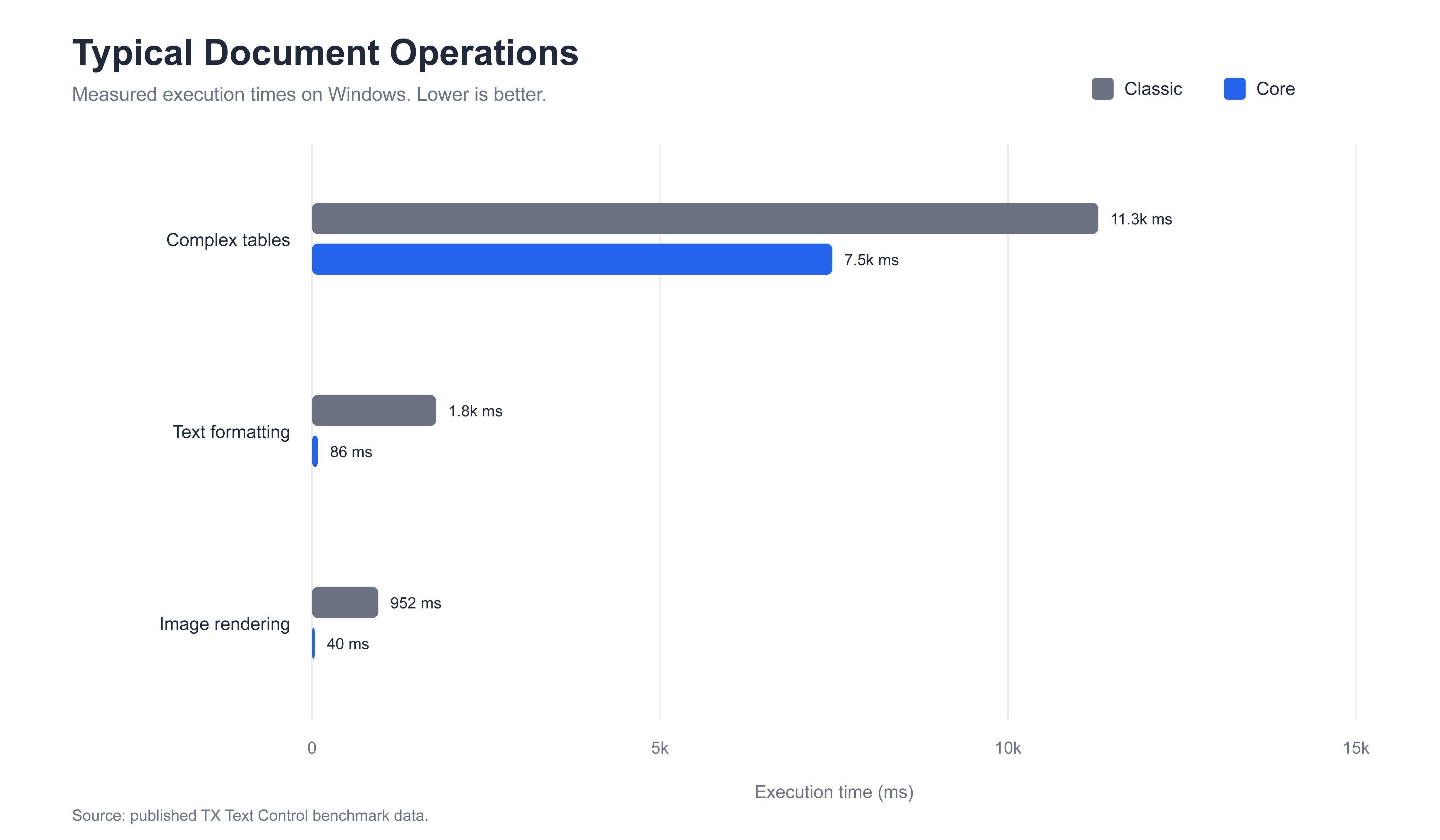
These operations are relevant to template generation, mail merging, document assembly, and automated report creation. A production document is rarely generated by a single export call. It may undergo hundreds of formatting, image, table, and layout operations before being saved.
Accelerating these individual operations can improve the entire processing pipeline.
Why Core Is Faster
Text Control Core is more than just the Classic version compiled for Linux.
Core uses a modern, platform-independent architecture with SVG-based rendering, eliminating dependencies on Windows graphics APIs. This improves portability and reduces rendering overhead in many document processing operations.
The architectural differences are particularly relevant in server and cloud environments.
It provides consistent rendering on Windows and Linux, faster PDF generation, faster image and formatting operations, better suitability for containerized deployments, and more processing capacity from the same computing resources.
Classic remains relevant for traditional Windows applications that require deep integration with Windows-specific APIs and technologies. Core is the preferred architecture for modern, cross-platform, server, Linux, container, and cloud workloads.
Understanding the Limits of These Calculations
The scenarios in this article are projections based on published benchmark timings. They are not independent production benchmarks.
Actual results depend on factors including:
- Document structure and complexity
- Fonts and embedded images
- Available CPU and memory
- Parallel processing strategy
- Storage performance
- Network and database latency
- Container and process startup time
- Azure region and VM type
The calculations intentionally keep the relationship transparent. For example:
1,000 documents x 159.313 seconds = 44.25 processing hours
This allows developers to replace the benchmark duration with their own measured document-processing time and calculate capacity and cost for their specific workload.
Conclusion
A difference measured in milliseconds can add up to hours when document processing is repeated thousands of times.
Based on published tests, TX Text Control Core provides the following:
- Approximately two to five times faster DOCX generation
- Up to approximately eleven times faster PDF generation
- More than 95% lower execution times in tested image and formatting operations
- Comparable performance on Windows and Linux
For a modeled batch of 1,000 large PDFs, the measured results translate to approximately 44.25 hours of sequential processing with Classic and 4.03 hours with Core.
This means shorter batch windows, faster interactive document generation, fewer required processing workers, and potentially substantially lower Azure compute costs.
Performance is not simply about making one document faster. It determines how many documents an application can process, how much infrastructure is required, and how efficiently it can scale.
Frequently Asked Questions
TX Text Control Core uses a modern, platform-independent document processing architecture with an SVG-based rendering engine, optimized layout processing, and a new font management system. It does not depend on Windows-specific graphics APIs, which reduces rendering overhead and enables consistent performance on Windows and Linux.
In the published plain-text-to-PDF benchmark, Core was approximately 9 to 11.5 times faster than Classic, depending on the document size. For a document containing 100,000 lines, Classic required 159,313 milliseconds, while Core completed the same operation in 14,518 milliseconds.
In the published plain-text-to-DOCX benchmark, Core was approximately 1.9 to 4.6 times faster than Classic. For a 100,000-line document, Classic required 5,885 milliseconds and Core required 3,047 milliseconds.
Yes, when the document-processing workload is the main consumer of compute resources. Azure compute costs are based largely on the selected VM type and the time it remains provisioned. If Core completes the same workload using fewer processing hours, the VM can be stopped, scaled down, or reused earlier. For the modeled workload of 1,000 large PDFs, the published timings translate into approximately 44.25 compute hours with Classic and 4.03 hours with Core.
Multiply the required processing hours by the hourly price of the selected Azure VM. For example, if a workload requires 44.25 hours with Classic and 4.03 hours with Core, the cost formulas are 44.25 × hourly VM rate and 4.03 × hourly VM rate. Storage, networking, licensing, orchestration, and other Azure services must be calculated separately.
Small differences in processing time accumulate when thousands of documents are generated. Based on the measured 5,000-line PDF benchmark, generating 10,000 documents sequentially would require approximately 21.8 hours with Classic and 1.9 hours with Core. Actual invoice times depend on the template, data, images, fonts, tables, and output settings.
Yes. Faster processing reduces the time between a user requesting a document and receiving the finished PDF or DOCX file. In the 5,000-line PDF benchmark, Core completed the operation in 684 milliseconds, compared with 7,842 milliseconds for Classic. This can make document downloads feel immediate and releases the processing worker sooner for the next request.
Potentially, yes. A faster document engine requires fewer worker-hours to complete the same workload. Based on the published 100,000-line PDF timings, processing 1,000 documents requires approximately 44.25 sequential worker-hours with Classic and 4.03 worker-hours with Core. The exact number of containers depends on the required completion window, concurrency model, CPU allocation, storage performance, and orchestration overhead.
Yes. In the published Windows benchmark, inserting 5,000 images required 952 milliseconds with Classic and 40 milliseconds with Core. Applying 500 formatting operations required 1,783 milliseconds with Classic and 86 milliseconds with Core. Creating complex tables required 11,297 milliseconds with Classic and 7,476 milliseconds with Core.
Yes. The published benchmark showed comparable Core results on both platforms. Complex table processing required 7,476 milliseconds on Windows and 7,321 milliseconds on Linux. Image processing required 40 milliseconds on Windows and 34 milliseconds on Linux, while the formatting test required 86 milliseconds on Windows and 96 milliseconds on Linux.
Not necessarily. Core is the preferred architecture for modern server, cloud, Linux, container, and cross-platform applications. Classic remains relevant for Windows-only applications that depend on deeper integration with Windows-specific APIs or technologies. The correct version depends on the application architecture, deployment platform, and required feature set.
Related Posts
Create 100,000 Documents in Under an Hour with Parallel MailMerge in .NET C#
The DocumentServer.ParallelMailMerge NuGet package makes it simple to process MailMerge jobs in parallel worker processes. This article shows when to use it, how to call it, and how worker counts…
TX Text Control Classic vs Core - When to use which Version
TX Text Control Classic and TX Text Control Core are two versions of the same product. This article explains the differences between the two versions and which version to use when.
TX Text Control Core vs. Classic Performance Comparison Plain Text to DOCX…
In this article, we compare the performance of TX Text Control Core and Classic when converting plain text to DOCX and PDF. The results show that TX Text Control Core outperforms Classic in both…