


Typical Use-Case: Invoice Generation with TX Text Control in C#

Invoice creation and processing is one of the main applications for Text Control's digital document processing components. This article summarizes the most common scenarios.

One of the most important applications for Text Control's digital document processing components is the creation and processing of invoices. With Text Control document processing technology, innovative digital workflows can be easily integrated without the need to change existing structures and implemented software systems.
E-Invoicing Process
A modern and streamlined e-invoicing process should include the following aspects of an e-invoicing solution:
-
Customizable invoice look & feel
Create and maintain your own MS Word-compliant templates based on your corporate design. Templates are not static or require developer resources to modify. Easily modify and change invoice or quote templates based on current needs and required changes. Add more information to invoices, such as QR codes, for faster payment and document validation. -
Embedded machine-readable data (electronic invoice)
A machine-readable part (such as XML) can be embedded in the PDF/A document. The receiving processing application is not specialized in reading PDF documents, but is able to extract the structured attachment, which is then processed by the commercial software capable of reading this attachment. -
Modernized distribution
Deliver invoices to your customers in the way they prefer. Send invoices as an email attachment, provide a link to view the invoice online, or provide access to an invoice portal that lists all orders, invoices, and payment status information. -
Invoice tracking
Providing your customers with a streamlined way to access their invoices gives you additional benefits, such as invoice tracking. You get the ability to know when an invoice has been opened and accessed. -
Dispute collaboration
Give your customers a way to start a dispute process on an invoice. Give them a tool to add comments to invoices to suggest changes or errors, and collect that data to speed up the process. A streamlined process saves time and significantly accelerates the order-to-cash process.
Streamline the Billing Process
All of the above help to streamline the entire billing process, improve the customer experience, and reduce the time it takes to get paid. Deliver invoices to your customers in the way they prefer. Send invoices as an email attachment, provide a link to view the invoice online, or provide access to an invoice portal that lists all orders, invoices, and payment status information. Giving users a streamlined way to access their invoices provides additional benefits such as invoice tracking. You get the ability to know when an invoice has been opened and accessed.
Use QR Codes
Over the next few years, you may still be required to send printed invoices. Whether it is a legal requirement or a customer request to receive a printed version of your invoice. By offering a combination of offline and online, users get the best of both worlds and can adapt to electronic delivery strategies.
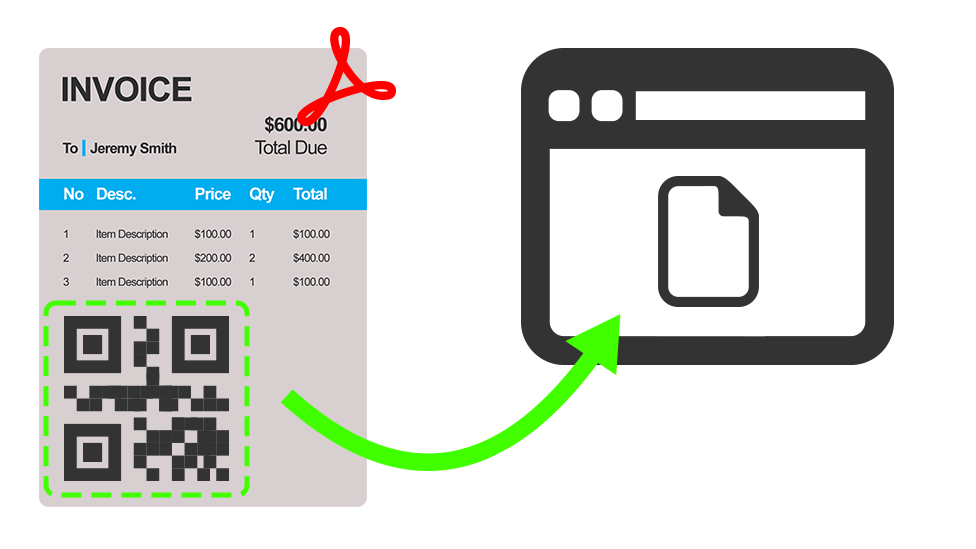
With TX Text Control, creating QR codes is a built-in feature and as simple as inserting text into merge field placeholders. QR codes can be used as placeholders in invoice templates.
Learn More
Invoice delivery is a critical process in an organization to get paid on time and also to provide customers with a perfect user experience. Reducing the barriers to accessing, sharing and disputing invoices is a key aspect.
Electronic Invoices (PDF/A-3)
PDF/A-3 allows attachments of any format to be added to PDF documents. The standard doesn't standardize the embedded documents themselves, but the way they are embedded into the PDF structure. This allows applications to reliably extract the attached document from the PDF document, allowing readers to extract only the embedded documents without having to open the entire PDF document itself.
The human-readable version can now be ignored by applications that read the data in the document. Applications can extract the machine-readable portion of the PDF document for processing. A PDF/A-3 document can contain an unlimited number of embedded documents for different processes. According to the specification, software applications can extract embedded files without explicit knowledge of the PDF document itself.
Th following sample code the Mail
public static class Invoice {
  public static byte[] Create(Order order) {

    TXTextControl.SaveSettings saveSettings = new TXTextControl.SaveSettings();

    var metaData = System.IO.File.ReadAllText("metadata.xml");

    // create a new embedded file
    var zugferdInvoice = new TXTextControl.EmbeddedFile(
      "ZUGFeRD-invoice.xml",
      order.ZugferdXML,
      metaData);

    zugferdInvoice.Description = "ZUGFeRD-invoice";
    zugferdInvoice.Relationship = "Alternative";
    zugferdInvoice.MIMEType = "application/xml";
    zugferdInvoice.LastModificationDate = DateTime.Now;

    // set the embedded files
    saveSettings.EmbeddedFiles = new TXTextControl.EmbeddedFile[] { zugferdInvoice };

    byte[] document;

    using (TXTextControl.ServerTextControl tx = new ServerTextControl()) {
      tx.Create();

      tx.Load("template.tx", StreamType.InternalUnicodeFormat);

      using (MailMerge mailMerge = new MailMerge()) {
        mailMerge.TextComponent = tx;
        mailMerge.MergeObject(order);
      }

      // export the PDF
      tx.Save(out document, TXTextControl.BinaryStreamType.AdobePDFA, saveSettings);

      return document;
    }
  }
}
Learn More
The ZUGFeRD and Factur-X standards are hybrid electronic invoice formats regulated and required by some European government.
Creating 100% Compliant ZUGFeRD and Factur-X Invoices using MailMerge in C#
Creating Invoices Templates

TX Text Control provides all required tools to implement the complete invoice generation process including:
- Template creation
- Data merging
- PDF generation
The following animation is alternating between the template with placeholders and with merged data:
Learn More
This tutorial shows how to create an invoice using TX Text Control .NET Server from scratch including creating a template, merging data and to generate the resulting PDF.
ASP.NET
Integrate document processing into your applications to create documents such as PDFs and MS Word documents, including client-side document editing, viewing, and electronic signatures.





- Angular
- Blazor
- React
- JavaScript
- ASP.NET MVC, ASP.NET Core, and WebForms
Related Posts
Why HTML to PDF Conversion is Often the Wrong Choice for Business Documents…
In this article, we explore the challenges of HTML to PDF conversion for business documents in C# .NET and present alternative solutions that offer better performance and reliability. Discover why…
A Complete Guide to Converting Markdown to PDF in .NET C#
Learn how to convert Markdown to PDF in .NET C# using Text Control's ServerTextControl component. This guide covers setup, conversion process, and customization options for generating high-quality…
ASP.NETASP.NET CoreDocument Creation
Why PDF Creation Belongs at the End of the Business Process
This article discusses why placing PDF creation at the end of the business process is important for ensuring accuracy and efficiency. The most scalable systems delay PDF generation until the…
Designing the Perfect PDF Form with TX Text Control in .NET C#
Learn how to create and design interactive PDF forms using TX Text Control in .NET C#. This guide covers essential features and best practices for effective form design.
Why Defining MIME Types for PDF/A Attachments Is Essential
The PDF/A standard was created to ensure the long-term reliable archiving of digital documents. An important aspect of the standard involves properly handling embedded files and attachments within…