


This blog post contains outdated information.
The cited code snippets may be workarounds, and be part of the official API in the meantime.
MVC: Adding an Electronic Signature to Documents in Web.TextControl

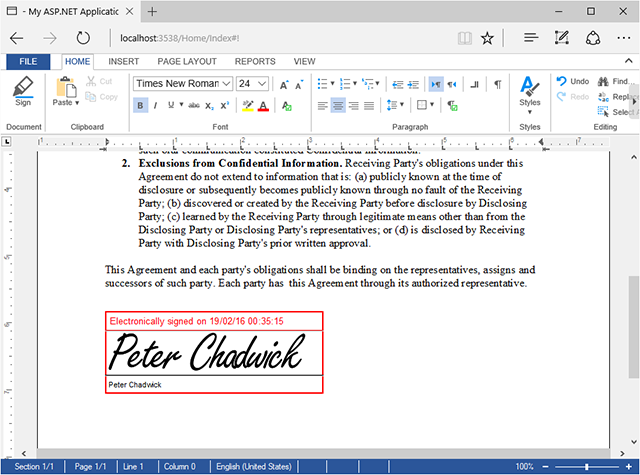
An MVC sample uses the MailMerge class to populate a signature template with the signer name and image, then inserts it into a named text frame in a contract document. An async controller method handles the merge and uses Selection.Load to place the signature at the target location.

An electronic signature is in many processes legally sufficient to prove an identity. According to the U.S. Federal ESIGN Act passed in 2000, an electronic signature is an:
Electronic sound, symbol, or process, attached to or logically associated with a contract or other record and executed or adopted by a person with the intent to sign the record.
This sample project shows how to use the MailMerge class to populate a signature template with a signature image and the name of the signer. This merged template is then loaded into a text frame with a specific name placed in a contract document.
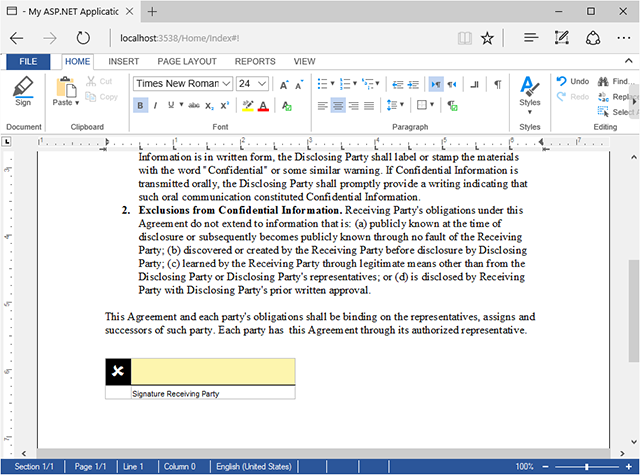
After clicking the button Sign in the added ribbon group Document of the ribbon tab Home, a dialog is opened:

The (demo) name of the signer is coming from an MVC model that would be filled with the user name in a real-world application. When clicking on the Sign button, the controller method SignDocument is called with an asynchronous call. This method merges the signature template with the model data in order to place this signature box into the document by searching for a text frame with the specific name txsig. The Selection.Load method then loads the signature box into the text frame at the proper location:
[HttpPost]
public string SignDocument(Document model)
{
    byte[] document =
        Convert.FromBase64String(model.BinaryDocument);
    byte[] signatureDocument = null;

    using (ServerTextControl tx = new ServerTextControl())
    {
        tx.Create();

        // use MailMerge to merge the signature template
        using (MailMerge mailMerge = new MailMerge())
        {
            mailMerge.TextComponent = tx;
            mailMerge.SearchPath = Server.MapPath("/Signature_Images/");
            mailMerge.LoadTemplate(
                Server.MapPath("/App_Data/documents/signature_template.tx"),
                FileFormat.InternalUnicodeFormat);

            // create a new signature object
            Signature signature = new Signature();
            signature.Name = "Peter Chadwick";
            signature.SignatureImage =
                signature.Name.ToLower().Replace(" ", "_") + ".png";

            // merge and save the resulting document
            mailMerge.MergeObject(signature);
            mailMerge.SaveDocumentToMemory(
                out signatureDocument,
                BinaryStreamType.InternalUnicodeFormat,
                null);
        }

        // load the original document from the editor
        tx.Load(document, BinaryStreamType.InternalUnicodeFormat);

        // find the "signature" text frame with the name "txsig"
        foreach (TextFrame frame in tx.TextFrames)
        {
            if (frame.Name == "txsig")
            {
                frame.Tables.Clear();
                frame.Selection.Start = 0;
                frame.Selection.Length = -1;

                // load the merged signature template into the
                // text frame and save the complete document
                frame.Selection.Load(signatureDocument,
                    BinaryStreamType.InternalUnicodeFormat);
                tx.Save(out document, BinaryStreamType.InternalUnicodeFormat);
                break;
            }
        }

    }

    // finally, return the signed document
    return Convert.ToBase64String(document);
}
The following screenshot shows the inserted signature box at the end of the document:
Download the sample from GitHub and test it on your own.

Download and Fork This Sample on GitHub
We proudly host our sample code on github.com/TextControl.
Please fork and contribute.
Requirements for this sample
- Visual Studio 2012 or better
- TX Text Control .NET Server (trial sufficient)
ASP.NET
Integrate document processing into your applications to create documents such as PDFs and MS Word documents, including client-side document editing, viewing, and electronic signatures.





- Angular
- Blazor
- React
- JavaScript
- ASP.NET MVC, ASP.NET Core, and WebForms
Related Posts
MVC: Loading a Data Source from a View Model
When merging templates with business objects, the Reports ribbon drop-downs in Web.TextControl can be populated from a serialized view model. The controller serializes a class model with the…
MVC: Merging Templates in a Controller HttpPost Method
The MailMerge engine and Web.TextControl combine to merge templates server-side in an MVC application. A JavaScript function saves the document as a Base64 string, posts it to an HttpPost…
MailMerge Class Settings Explained
The MailMerge class provides four properties to control merge output: RemoveEmptyFields, RemoveEmptyLines, RemoveEmptyBlocks, and RemoveEmptyImages. Each property handles unmatched or missing data…
MailMerge: Conditional Table Cell Colors using Filter Instructions
The TX Text Control MailMerge FieldMerged event exposes TableCell instances during merge for conditional formatting. A CellFilterInstructions class parses filter rules from merge field names and…
MailMerge: Using Filters to Remove Unwanted Rows
TX Text Control merge block filters remove unwanted rows from repeating data during the mail merge process without modifying the underlying source. Filter conditions applied to merge blocks…