


MVC: Loading a DataSet from the ViewBag

The MVC HTML5 editor Reports ribbon tab can pre-populate merge field and merge block drop-downs using the LoadDataSet method. The controller creates a DataSet from a data source and stores it in the ViewBag. The view then calls LoadDataSet to load the data into the editor.

The HTML5 based editor and template designer is typically used to create mail merge templates in web applications.
The data source for the Reports ribbon tab can be pre-loaded in the view using the LoadDataSet method. Using this data source, the available merge field and merge block drop-down lists are populated.
The following code shows how to create a DataSet in the controller that is stored in the ViewBag:
public ActionResult Index()
{
    DataSet ds = new DataSet();

    // create the outer table that has a relation
    // to the child table "product"
    DataTable dtReport = new DataTable("report");
    dtReport.Columns.Add("report_id",
        Type.GetType("System.Int32"));
    dtReport.Rows.Add(new object[] { 0 });
    ds.Tables.Add(dtReport);

    // create a table "products"
    DataTable dtProduct = new DataTable("product");

    dtProduct.Columns.Add(new DataColumn("report_id",
        Type.GetType("System.Int32")));
    dtProduct.Columns.Add(new DataColumn("Product_ID",
        Type.GetType("System.Int32")));
    dtProduct.Columns.Add(new DataColumn("Product_Name",
        Type.GetType("System.String")));
    dtProduct.Columns.Add(new DataColumn("product_Price",
        Type.GetType("System.Int32")));

    dtProduct.Rows.Add(new object[] { 0, 1, "Product 1", 1000 });
    dtProduct.Rows.Add(new object[] { 0, 2, "Product 2", 2000 });
    dtProduct.Rows.Add(new object[] { 0, 3, "Product 3", 3000 });

    ds.Tables.Add(dtProduct);

    // create the relation
    ds.Relations.Add(new DataRelation("relation1",
        dtReport.Columns["report_id"],
        dtProduct.Columns["report_id"], false));

    // fill the ViewBag and return the view
    ViewBag.dataSet = ds;
    return View();
}
In the view, the LoadDataSet method is used to load the stored DataSet from the ViewBag.
@Html.TXTextControl().TextControl().LoadDataSet(
    (System.Data.DataSet)ViewBag.dataSet).Render()
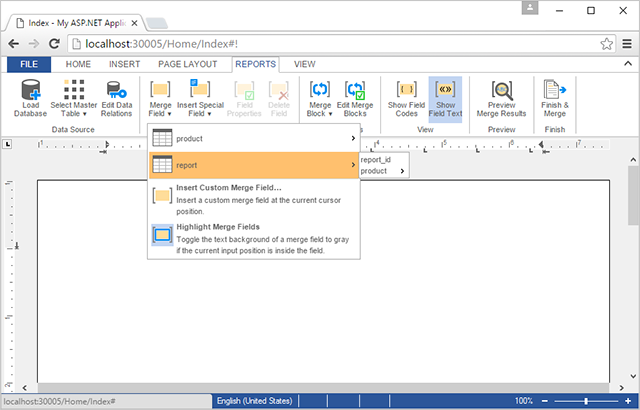
The drop-down lists are now pre-populated with the available merge fields and merge blocks:
ASP.NET
Integrate document processing into your applications to create documents such as PDFs and MS Word documents, including client-side document editing, viewing, and electronic signatures.





- Angular
- Blazor
- React
- JavaScript
- ASP.NET MVC, ASP.NET Core, and WebForms
Related Posts
MailMerge Class Settings Explained
The MailMerge class provides four properties to control merge output: RemoveEmptyFields, RemoveEmptyLines, RemoveEmptyBlocks, and RemoveEmptyImages. Each property handles unmatched or missing data…
MailMerge: Conditional Table Cell Colors using Filter Instructions
The TX Text Control MailMerge FieldMerged event exposes TableCell instances during merge for conditional formatting. A CellFilterInstructions class parses filter rules from merge field names and…
MailMerge: Using Filters to Remove Unwanted Rows
TX Text Control merge block filters remove unwanted rows from repeating data during the mail merge process without modifying the underlying source. Filter conditions applied to merge blocks…
Different Ways to Create Documents using Text Control Products
Text Control offers four document creation paths: building from scratch via the ServerTextControl API, merging pre-designed templates with MailMerge using IEnumerable or DataSet sources, editing…
MVC: Adding an Electronic Signature to Documents in Web.TextControl
An MVC sample uses the MailMerge class to populate a signature template with the signer name and image, then inserts it into a named text frame in a contract document. An async controller method…