


Web.TextControl X13: Improved Merge Field Insertion

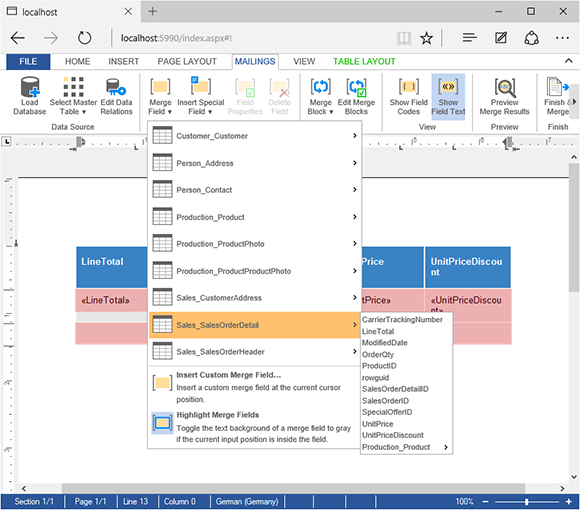
Web.TextControl X13 redesigns merge field insertion with a data-aware dropdown that highlights related tables in orange based on the selected master table. Fields inside merge blocks are restricted to columns from the block table or its related tables through defined data relations.

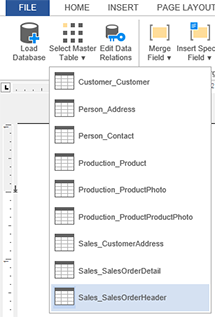
After loading a database excerpt file into the Mailings tab of Web.TextControl, a master table must be selected to perform the report preview. This is the same master table that is used when merging the template using the Merge method of the reporting engine MailMerge.
This master table is used to match the merge fields with database columns. All nested blocks must have a relation to this master table in order to be merged properly. Merge fields from child tables can be inserted using the "dot notation" by adding the table names as prefixes to the merge field names.
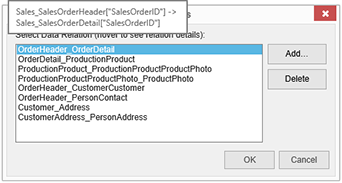
But each and every field or merge block must have a relation to the selected master table. To help users to select the right tables when inserting merge fields or merge blocks, the drop-down items that have a relation are colored in orange in version X13 (23.0). The relations can be added in the dialog Edit Data Relations. The following screenshot shows the relations of the sample database and the main relation between Sales_SalesOrderHeader and Sales_SalesOrderDetail.
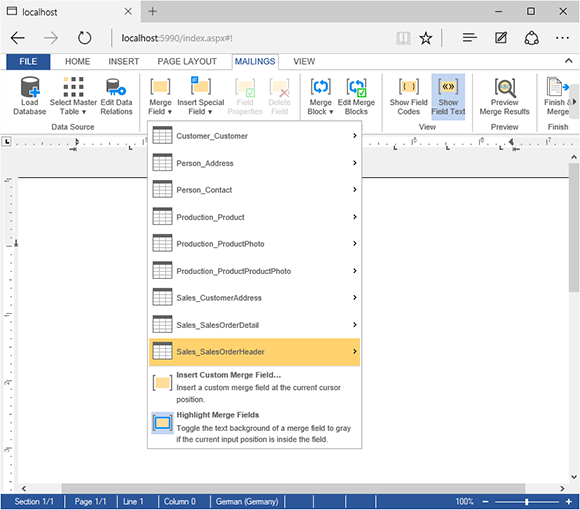
In the first screenshot, Sales_SalesOrderHeader is selected as the master table. When opening the Merge Field drop-down list now, the table Sales_SalesOrderDetail is colored in orange which implicates that fields from this table have a direct relation to the selection master table:
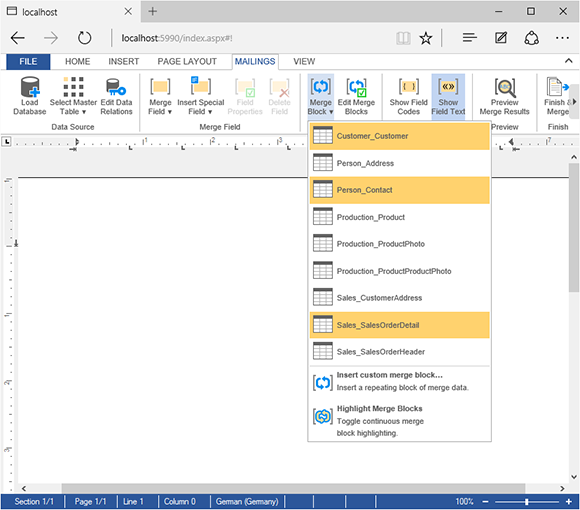
The same concept is used for the Merge Block drop-down which highlights all related tables in orange:
This concepts helps specifically inside of merge blocks. Fields inside a merge block must be part of the merge block table or a related table. The following screenshot shows the opened Merge Field drop-down when the input position is inside an inserted merge block:
Stay tuned for more helpful features of TX Text Control .NET Server X13.
Did you already pre-order your licenses? Make sure to get your free spell checking license.
Related Posts
Announcing TX Text Control DS Server 5.0
We are excited to announce the release of TX Text Control DS Server 5.0. This release focuses on extensibility, plugin integration, and developer productivity while continuing to improve the…
TX Text Control 34.0 SP2 is Now Available: What's New in the Latest Version
TX Text Control 34.0 Service Pack 2 is now available, offering important updates and bug fixes for all platforms. If you use TX Text Control in your document processing applications, this service…
TX Text Control 34.0 SP1 is Now Available: What's New in the Latest Version
TX Text Control 34.0 Service Pack 1 is now available, offering important updates and bug fixes for all platforms. If you use TX Text Control in your document processing applications, this service…
Introducing TX Text Control 34.0: Your Next Leap in Document Processing
We are happy to announce the release of TX Text Control 34.0. This version is packed with new features and enhancements that will elevate your document processing experience. This version…
PDF/UA vs. PDF/A-3a: Which Format Should You Use for Your Business Application?
In this blog post, we will explore the differences between PDF/UA and PDF/A-3a, helping you choose the right format for your business needs. We will discuss the key features, benefits, and use…