


Windows Forms: Printing Multiple Pages Per Sheet

A custom MultipagePrintDocument class inheriting from System.Drawing.Printing.PrintDocument renders multiple document pages per physical sheet. It uses TX Text Control GetImage to create page thumbnails, calculates grid layout from the page count, and tiles scaled Metafile images.

This sample project implements the class MultipagePrintDocument that inherits from System.Drawing.Printing.PrintDocument to print multiple pages of a document per sheet.
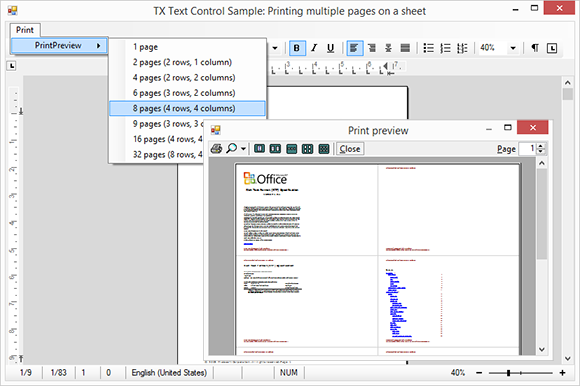
The constructor of MultipagePrintDocument accepts an instance of TXTextControl.TextControl that is used to create the page thumbnails in the printing process, the number of pages per sheet and a boolean value to specify whether the light gray border should be printed or not between the pages.
/*----------------------------------------------------------
** MultipagePrintDocument class
**--------------------------------------------------------*/
class MultipagePrintDocument : PrintDocument
{
  /*------------------------------------------------------
  ** Constructor
  ** description: Initializes the private data fields
  **----------------------------------------------------*/
  public MultipagePrintDocument(TXTextControl.TextControl textControl,
      PagePerSheet pagesPerSheet,
      bool drawPageBorders)
  {
      if (textControl == null)
          throw new ArgumentNullException(
              "An object of type TXTextControl.TextControl must be defined.");

      m_textControl = textControl;
      m_pagesPerSheet = pagesPerSheet;
      m_drawPageBorders = drawPageBorders;
  }
}
The OnBeginPrint method is overridden to check for specified PrinterSettings:
/*------------------------------------------------------
** OnBeginPrint
** description: This method overrides the standard
**              OnBeginPrint method and sets the from
**              and to page values
**
** parameters: standard PrintEventArgs
**----------------------------------------------------*/
protected override void OnBeginPrint(PrintEventArgs e)
{
    base.OnBeginPrint(e);

    // if PrinterSettings have been specified, check the print ranges
    switch (PrinterSettings.PrintRange)
    {
        case PrintRange.AllPages:
            m_currentPage = 0;
            m_toPage = m_textControl.Pages - 1;
            break;
        case PrintRange.SomePages:
            m_currentPage = PrinterSettings.FromPage - 1;
            m_toPage = PrinterSettings.ToPage - 1;
            break;
        default:
            throw new InvalidOperationException("This print range is not valid.");
    }

    // switch the page size values based on the page orientation
    m_paperSize = (PrinterSettings.DefaultPageSettings.Landscape) ?
        new Size(
            PrinterSettings.DefaultPageSettings.PaperSize.Height,
            PrinterSettings.DefaultPageSettings.PaperSize.Width) :
        new Size(
            PrinterSettings.DefaultPageSettings.PaperSize.Width,
            PrinterSettings.DefaultPageSettings.PaperSize.Height);
}
The overridden method OnPrintPage contains the main logic and controls the printing process. Based on the specified number of pages, the width and height of the available columns and rows per sheet are calculated and for each page, a thumbnail image is created using TX Text Control's GetImage method. The image is scaled to the width of the defined columns to create a multipage document.
Finally, the created Metafile images are rendered on the Graphics object of each page in the PrintDocument.
/*------------------------------------------------------
** OnPrintPage
** description: This method overrides the standard
**              OnPrintPage method and implements the
**              rendering of more pages on a single
**              sheet
**
** parameters:  standard PrintPageEventArgs
**----------------------------------------------------*/
protected override void OnPrintPage(PrintPageEventArgs e)
{
  base.OnPrintPage(e);

  // set the internal unit to point to be compatible with Text Control's units
  e.Graphics.PageUnit = GraphicsUnit.Point;

  // retrieve the thumbnail rows and columns for selected number of pages
  ThumbnailGrid szThumbnailValuePair = GetThumbnailValuePair(m_pagesPerSheet);

  // set the thumbnail size (page size divided by number of cols / rows)
  SizeF szfThumbnailSize = new SizeF(
      HundredthsOfAnInchToPoint(m_paperSize.Width) / szThumbnailValuePair.Columns,
      HundredthsOfAnInchToPoint(m_paperSize.Height) / szThumbnailValuePair.Rows);

  // get the last thumbnail page that is printed on the current page
  int iLastPage = Math.Min(m_currentPage + (int)m_pagesPerSheet - 1, m_toPage);

  // iterate through the selected pages
  for (int iCurrentPage = m_currentPage; iCurrentPage <= iLastPage; iCurrentPage++) {
    // get the page from TextControl
    TXTextControl.Page txPage = m_textControl.GetPages()[iCurrentPage + 1];

    // get the current row and column
    int iCurrentColumn;
    int iCurrentRow = Math.DivRem(iCurrentPage - m_currentPage,
      szThumbnailValuePair.Columns, out iCurrentColumn);

    PointF pfThumbnailLocation = new PointF(
      iCurrentColumn * szfThumbnailSize.Width,
      iCurrentRow * szfThumbnailSize.Height);

    // create the Metafile image from current page in TextControl
    // using the Pages collection
    Metafile mfPageImage = txPage.GetImage(TXTextControl.Page.PageContent.All);

    // calculate the scale factor
    float fScaleFactor =
      (m_textControl.Sections[txPage.Section].Format.Landscape == true) ?
      (szfThumbnailSize.Width / txPage.Bounds.Width) :
      (szfThumbnailSize.Height / txPage.Bounds.Height);

    // draw the Text Control page onto the existing PrintDocument Graphics
    // at the calculated location and size
    e.Graphics.DrawImage(mfPageImage, new RectangleF(pfThumbnailLocation.X,
      pfThumbnailLocation.Y,
      txPage.Bounds.Width * fScaleFactor,
      txPage.Bounds.Height * fScaleFactor));

    // print page borders
    if (m_drawPageBorders)
      e.Graphics.DrawRectangle(Pens.LightGray,
        pfThumbnailLocation.X,
        pfThumbnailLocation.Y,
        szfThumbnailSize.Width,
        szfThumbnailSize.Height);
  }

  // more pages?
  m_currentPage = m_currentPage + (int)m_pagesPerSheet;
  e.HasMorePages = (m_currentPage <= m_toPage);
}
The method GetThumbnailValuePair returns the required grid size based on the given number of pages per sheet:
/*------------------------------------------------------
** GetThumbnailValuePair
** description: Returns a ThumbnailGrid value pair based
**              on the enum value 'PagePerSheet'
**
** parameters:  enum PagePerSheet pagesPerSheet
**----------------------------------------------------*/
private ThumbnailGrid GetThumbnailValuePair(PagePerSheet pagesPerSheet)
{
    ThumbnailGrid szColRowSize;

    // return the number of rows and columns as a ThumbnailGrid value pair
    switch (pagesPerSheet)
    {
        case PagePerSheet.EightByFour: szColRowSize = new ThumbnailGrid(8, 4); break;
        case PagePerSheet.FourByFour: szColRowSize = new ThumbnailGrid(4, 4); break;
        case PagePerSheet.ThreeByThree: szColRowSize = new ThumbnailGrid(3, 3); break;
        case PagePerSheet.FourByTwo: szColRowSize = new ThumbnailGrid(4, 2); break;
        case PagePerSheet.ThreeByTwo: szColRowSize = new ThumbnailGrid(3, 2); break;
        case PagePerSheet.TwoByTwo: szColRowSize = new ThumbnailGrid(2, 2); break;
        case PagePerSheet.TwoByOne: szColRowSize = new ThumbnailGrid(2, 1); break;
        default: szColRowSize = new ThumbnailGrid(1, 1); break;
    }

    // if landscape, switch the values
    if (m_paperSize.Width < m_paperSize.Height)
        return new ThumbnailGrid(szColRowSize.Rows, szColRowSize.Columns);

    return szColRowSize;
}
This code shows how to call the MultipagePrintDocument and how to open a PrintPreviewDialog with the results:
// create a new instance of the MultipagePrintDocument
MultipagePrintDocument mpPrintDocument = new MultipagePrintDocument(
    textControl1,
    pagesPerSheet,
    true);

// use a PrintPreviewDialog to preview the created PrintDocument
PrintPreviewDialog dlg = new PrintPreviewDialog();
dlg.Document = mpPrintDocument;
dlg.ShowDialog();
Download the sample from GitHub and test it on your own.

Download and Fork This Sample on GitHub
We proudly host our sample code on github.com/TextControl.
Please fork and contribute.
Requirements for this sample
- Visual Studio 2012 or better
- TX Text Control .NET for Windows Forms (trial sufficient)
Reporting
The Text Control Reporting Framework combines powerful reporting features with an easy-to-use, MS Word compatible word processor. Users can create documents and templates using ordinary Microsoft Word skills. The Reporting Framework is included in all .NET based TX Text Control products including ASP.NET, Windows Forms and WPF.
Related Posts
Inserting Watermark Images to All Pages Dynamically
Dynamically insert centered watermark images on every page of a TX Text Control document. The approach tags each watermark using the Image Name property, removes existing watermarks before…
MailMerge: Conditional INCLUDETEXT Fields
The TX Text Control MailMerge engine supports INCLUDETEXT fields for inserting formatted sub-templates during merge operations. By handling the IncludeTextMerging event and checking a flag in the…
Merging Documents with RESTful Web API's
Build a RESTful ASP.NET Web API endpoint that accepts a TX Text Control template in InternalUnicodeFormat and a JSON data object, then executes a server-side MailMerge to return the merged…
ReportingWindows FormsTutorial
Reporting: Sorting Merge Block Rows by Column Name
TX Text Control MailMerge accepts pre-shaped data, but sorting can be added in the template by appending parameters to merge block names. A DataSelector class parses block names for orderby…
Reporting: Merging MS Word Documents with DocVariables
TX Text Control can merge MS Word documents containing DOCVARIABLE fields by converting them to MERGEFIELD types. The code iterates through all ApplicationFields, changes the TypeName from…