


Checking Browser HTML5 Capabilities

TX Text Control .NET Server X11 relies on three HTML5 features: WebSockets, Canvas 2D graphics, and JSON encoding, all supported in modern desktop and mobile browsers. An embeddable browser-check widget verifies HTML5 compatibility directly within ASP.NET Web applications.


TX Text Control .NET Server X11 comes with an HTML5 based Web editor and template designer. The project http://html5test.com is measuring the progress the producers of the top browsers are making implementing HTML5 features over the last years.
The following diagram shows the progress over the last 6 years.
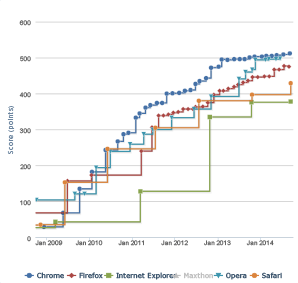
Nowadays, all modern browsers including Chrome, Firefox, Safari and Internet Explorer support the majority of HTML5 features. The TX Text Control Web editor uses 3 major features of HTML5:
- WebSockets
- Canvas 2D Graphics
- JSON Encoding and Decoding
These features are supported by all top browsers since many versions. A detailed list, sorted by the required features can be found here:
A look at this list will show that most desktop browsers, tablet and mobile browsers as well as TV and gaming consoles support these required features.
To provide your users a simple browser check, we implemented a widget that can be embedded or integrated directly into your Web application. The following IFRAME is the widget that is linked to our server:
Browser check widget in an IFRAME linked to http://labs.textcontrol.com/html5check
The following HTML code is required to integrate this widget to your Web application:
<iframe src="http://labs.textcontrol.com/html5check" scrolling="no" frameborder="0" style="padding-top: 13px; padding-left: 13px; border: 1px solid #c2c2c2; width: 567px; height: 130px;"></iframe>You can download the Visual Studio project for this widget to integrate this browser check directly into your Web application.
In case you did not test the HTML5 based editor yet, have a look at our Live Sample and create documents online in your browser.
Related Posts
X15: Adding MS Word Compatible Fields and Form Elements to TXTextControl.Web
TX Text Control X15 adds JavaScript API support for inserting and modifying MS Word compatible fields in the HTML5-based ASP.NET editor. MergeFields, TextFields, and ApplicationFields can be…
X15: Inserting Client-Side Images using JavaScript
TX Text Control X15 adds JavaScript ImageCollection methods to insert client-side images into the HTML5-based ASP.NET editor. A local file is read and converted to a Base64 string, then placed…
Sneak Peek X15: Copy to Local Clipboard Support in ASP.NET Version
TX Text Control X15 introduces local clipboard support for the HTML5 ASP.NET editor. A toggle switches between the server-side clipboard with full formatting and the client-side HTML clipboard.…
Sneak Peek X15: Custom Field Overlays in HTML5-based Text Control
TX Text Control X15 introduces a bounds property on fields in Web.TextControl, returned through the textFieldEntered event. Developers can position custom HTML overlays at field locations to…
ASP.NET: Protected SubTextParts in TXTextControl.Web
SubTextParts in TX Text Control define named text ranges with Start, Length, and Name properties. Version X14 adds subTextPartEntered and subTextPartLeft events to the HTML5-based Web.TextControl,…