


TX Spell .NET: Ignore Word List Using User Dictionaries

TX Spell .NET supports multiple simultaneous dictionaries for spell checking, including both language and user dictionaries. By creating a secondary UserDictionary with IsEditable set to false, developers can define a persistent ignore list of terms that the spell checker skips.

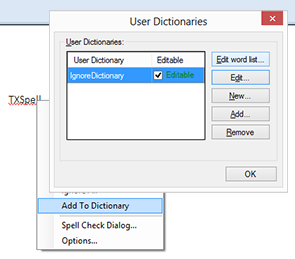
A unique feature of TX Spell .NET is the possibility to use multiple dictionaries at the same time for the spell checking process. This is valid for language dictionaries and user dictionaries.
Based on that feature, you can realize lists with words that should be completely ignored by TX Spell .NET. Simply create an additional UserDictionary and set the IsEditable property to false. This indicates whether words can be added to the dictionary using the context menu or spell checking dialog or not.
The following code creates those two user dictionaries:
// Regular, editable user dictionary
UserDictionary userDict = new UserDictionary();
txSpellChecker1.Dictionaries.Add(userDict);

userDict.Language = new CultureInfo("en-US");

// Additional, non-editable user dictionary
UserDictionary ignoreDict = new UserDictionary();
txSpellChecker1.Dictionaries.Add(ignoreDict);

ignoreDict.Language = new CultureInfo("en-US");
ignoreDict.AddWord("TXTextControl");
ignoreDict.AddWord("TXSpell");
ignoreDict.AddWord("TXBarcode");

ignoreDict.IsEditable = false;
Happy coding!
Related Posts
Web.TextControl and Spell Checking
TX Spell .NET integrates spell checking into the HTML5-based Web.TextControl editor running on TX Text Control .NET Server. Once deployed alongside the web server service, it provides…
ProofingSpell CheckingTutorial
TX Spell .NET: Not Only a Spell Checker
TX Spell .NET integrates spell checking, hyphenation, and language detection into Windows Forms, WPF, and ASP.NET applications. It offers spell-as-you-type with red underlines, correction dialogs,…
AutoCorrect: TWo INitial CApitals
TX Spell .NET enables AutoCorrect for words with two initial capitals by hooking into the Changed event of TX Text Control. The handler checks each misspelled word for leading uppercase pairs,…
TX Spell .NET ActiveX Package Released - Spell Checking in VB6
The TX Spell .NET ActiveX Package wraps .NET-based spell checking functionality for Visual Basic 6 through a COM wrapper control. Setup requires installing the package, compiling the AxTXSpell…
Porting RapidSpell to TX Spell .NET
TX Spell .NET serves as a direct replacement for RapidSpell in existing projects. This migration guide covers differences in dictionary handling, dialog box integration, and spell-as-you-type…