


Special Offer: Add Spell Checking and Save 20%

TX Spell .NET integrates spell checking for over 80 languages into TX Text Control applications with zero code. Developers connect the TXSpellChecker component to TextControl using the Visual Studio designer, enabling built-in context menus, spell check dialogs, and user dictionaries.


Easy to use and effortless to integrate: Using TX Spell .NET, you can easily integrate professional spell checking into your TX Text Control based applications.
Add spell checking for more than 80 languages without writing a single line of code.
Limited to March 2013, we are offering a 20% discount for all TX Spell .NET licenses.
TX Spell .NET enjoys a deep integration within TX Text Control. Integrating TX Spell .NET into TX Text Control requires no code - it can be easily connected using the Visual Studio designer. The following steps are required to add spell checking to your applications:
-
Start Visual Studio .NET and create a new project. Select either Visual Basic or C# as a project type, and Windows Application as a template.
-
Find the TX Text Control 18.0 toolbox tab that was created automatically. Drag and drop an instance of TextControl to your form.
-
Find the TX Spell 3.0 toolbox tab in Visual Studio. Drag and drop an instance of TXSpellChecker to your form. It is displayed in the component tray at the bottom of the form.
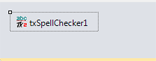
-
Select the inserted TextControl and find the SpellChecker property in the Properties window. Click on the drop-down box and select the inserted TXSpellChecker instance.
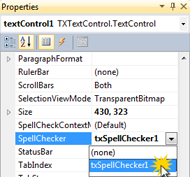
-
In the same window, find the IsSpellCheckingEnabled property of TextControl and set it to true.
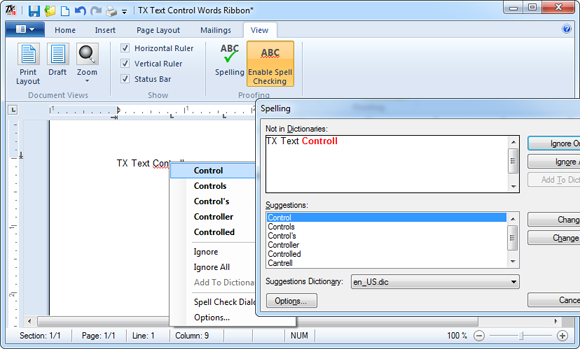
Using these easy steps, you have access to the integrated context menu, spell check dialog and the options dialog to add and modify user dictionaries.
Simply contact us and ask for your personal quote:
Related Posts
Service Pack 1 for TX Spell .NET 7.0 Released
Text Control released Service Pack 1 for TX Spell .NET 7.0, covering both the Windows Forms and WPF editions. The update addresses known issues since the initial release. Users should review the…
Proofing Tools Available As ReportingCloud Web API Endpoints
ReportingCloud introduces three proofing Web API endpoints for cloud-based spell checking. The proofing/check endpoint detects misspelled words and duplicates, proofing/suggestions returns ranked…
HyphenationServerTextControlSpell Checking
Using TX Spell .NET with ServerTextControl
TX Spell .NET integrates with ServerTextControl for server-side spell checking by referencing TXSpell.dll and updating the licenses.licx file. After creating a TXSpell instance and assigning it to…
HTML5: Enable Spell Checking Using Javascript
TX Spell .NET spell checking is disabled by default in Web.TextControl. A JavaScript command after the ribbonTabsLoaded event enables it on load. TX Spell .NET must be installed on the server, and…
Web.TextControl and Spell Checking
TX Spell .NET integrates spell checking into the HTML5-based Web.TextControl editor running on TX Text Control .NET Server. Once deployed alongside the web server service, it provides…