


TX Barcode .NET: Sample Screenshots, Feature Overview

TX Barcode .NET generates 1D and 2D barcodes in Windows Forms and WPF with fixed-size rendering suited for documents. It integrates with TX Text Control to insert barcodes via the API, supports mail merge data replacement through the Barcodes collection, and includes a settings dialog.

TX Barcode .NET is planned to be release in the next months and will be presented at the DevIntersection in Las Vegas. Currently, we are working on some initial sample applications that shows how to use the barcode controls in Windows Forms and WPF.
There are many different applications for barcode controls:
- Barcode integration in TX Text Control
- Barcodes in reporting and mail merge templates
- Barcode image creation without a view (e.g. server-side)
- Barcode visualization for on-screen scanning and many more
TX Barcode .NET has been designed for the specific requirements when integrated in documents such as invoices. In these cases, the barcode size must be fixed, even if the barcode length differs. TX Barcode .NET implements very smart ways to control the actual barcode size and alignment.
TX Barcode .NET enjoys a deep integration into TX Text Control. Barcodes can be inserted from the TX Text Control API just like a TextFrame or an image. It can be completely programmed and adjusted like any other supported object. You can easily control the text flow, z-order, size and object alignment.
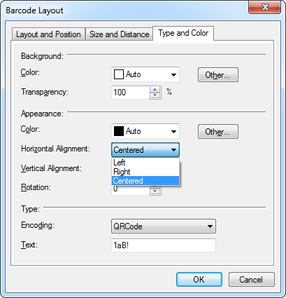
TX Text Control will be shipped with an out-of-the-box barcode settings dialog that can be used to change the type, text, color or angle:

All settings can be done programmatically as well, so that other variations of such dialogs are possible. This following dialog is part of a sample application that comes with TX Barcode .NET:

Barcodes can be used as placeholders in reporting templates. Each barcode object can get an unique ID and Name in order to visualize actual data during the merge process. This can be done by iterating through the Barcodes collection in TX Text Control or automatically when the MailMerge component is used.
The following screenshot shows the data replacement in a sample application:
TX Barcode .NET is the perfect product to integrate barcodes into .NET based applications - especially for barcodes in documents and reports. It enjoys a seamless integration into TX Text Control and can be easily used with the Windows Forms and WPF products.
Related Posts
Pre-Order X16 Today and Get TX Barcode .NET Free
Pre-ordering TX Text Control X16 with a Subscription includes free TX Barcode .NET licenses matching the order quantity. The offer covers full versions, updates, and renewals. Subscribers receive…
Announcing TX Text Control DS Server 5.0
We are excited to announce the release of TX Text Control DS Server 5.0. This release focuses on extensibility, plugin integration, and developer productivity while continuing to improve the…
TX Text Control 34.0 SP2 is Now Available: What's New in the Latest Version
TX Text Control 34.0 Service Pack 2 is now available, offering important updates and bug fixes for all platforms. If you use TX Text Control in your document processing applications, this service…
TX Text Control 34.0 SP1 is Now Available: What's New in the Latest Version
TX Text Control 34.0 Service Pack 1 is now available, offering important updates and bug fixes for all platforms. If you use TX Text Control in your document processing applications, this service…
Introducing TX Text Control 34.0: Your Next Leap in Document Processing
We are happy to announce the release of TX Text Control 34.0. This version is packed with new features and enhancements that will elevate your document processing experience. This version…