


Spell Checking, MailMerge and UserDictionaries

After a MailMerge operation, merged field text from the data source can trigger false spell-check errors in TX Spell .NET. By capturing each merged word in the FieldMerged event handler and adding it to a temporary UserDictionary, those terms are excluded from the spell checker.

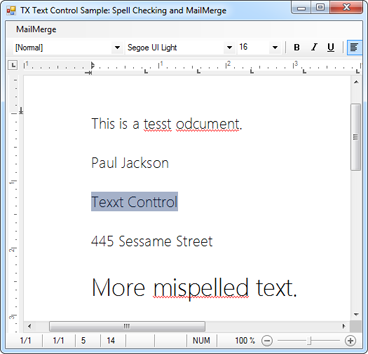
Today, we received an interesting request from a TX Text Control user. The requirement was straightforward:
A template should be prepared by merging data using the MailMerge component. The resulting document has to be presented to the end-user to allow final changes or to add additional text.
But the merged text, that comes directly from the data source, shouldn't be marked as incorrect by TX Spell .NET, even if the field text is misspelled. This requirement can be easily solved using a UserDictionary. TX Spell .NET can be used with an umlimited number of UserDictionaries thus allows you to use them for other purposes as well.
In this case, we would like to store all words from the mail merge process in a separate UserDictionary. This can be achieved in the FieldMerged event of the MailMerge class:
TXTextControl.Proofing.UserDictionary user =
    new TXTextControl.Proofing.UserDictionary();

private void mailMerge1_FieldMerged(object sender,
    TXTextControl.DocumentServer.MailMerge.FieldMergedEventArgs e)
{
    MergeField field = e.MailMergeFieldAdapter as MergeField;

    foreach (string word in field.Text.Split(\' \'))
    {
        user.AddWord(word);
    }
}
These words are now ignored automatically and you can remove the temporary UserDictionary when merging the next document.
Related Posts
Interactive Spelling Suggestions Using TX Spell .NET
TX Spell .NET generates real-time spelling suggestions suitable for touch-enabled interfaces. A sample project renders suggestion labels in a FlowLayoutPanel, and clicking a label calls…
TX Spell .NET: Creating Custom Context Menus
Custom spell checking context menus in TX Spell .NET use the SpellCheckContextMenuStrip property and MisspelledWords.GetItem method to detect the word at the mouse position. The code dynamically…
Porting RapidSpell to TX Spell .NET
TX Spell .NET serves as a direct replacement for RapidSpell in existing projects. This migration guide covers differences in dictionary handling, dialog box integration, and spell-as-you-type…
Using the WSpell ActiveX Spelling Checker with TX Text Control
The WSpell ActiveX spelling checker from Wintertree Software integrates directly with TX Text Control to add spell checking to your application. This article provides sample source code that…
Create a Table of Contents in Windows Forms using C#
This article explains how to create a table of contents in Windows Forms using the ribbon or programmatically. Creating a table of contents is required to organize large documents.