


Using TX Text Control in Windows Azure

Deploying TX Text Control Server for ASP.NET on Windows Azure requires creating a Visual Studio Azure project, adding TXTextControl.dll and TXTextControl.Server.dll with Copy Local set to True, bundling bin64 files, configuring licenses.licx, and publishing the package to Azure.


While creating a sample application that shows the stunning improvements of our Adobe PDF import functionality, I thought to revisit how TX Text Control Server for ASP.NET can be used in a Windows Azure environment.
Windows Azure is the perfect environment to host, scale, and manage web applications. TX Text Control Server for ASP.NET is Azure Ready and can be easily used in Microsoft datacenters.
Tutorial: Azure Hosted Service with TX Text Control
-
Ensure that the Windows Azure Tools for Visual Studio are installed, start Visual Studio 2010 and create a new project. The Windows Azure Tools for Visual Studio can be downloaded on this dedicated website:
 Get Started with Windows Azure
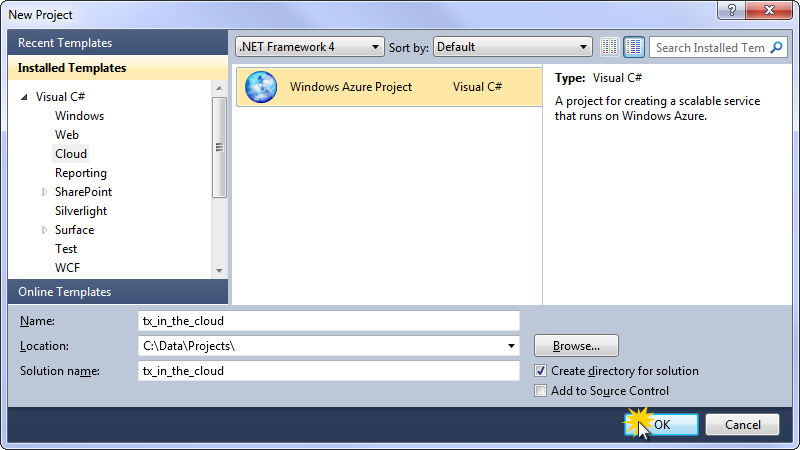
From the installed project templates, choose Windows Azure Project from the Cloud category.
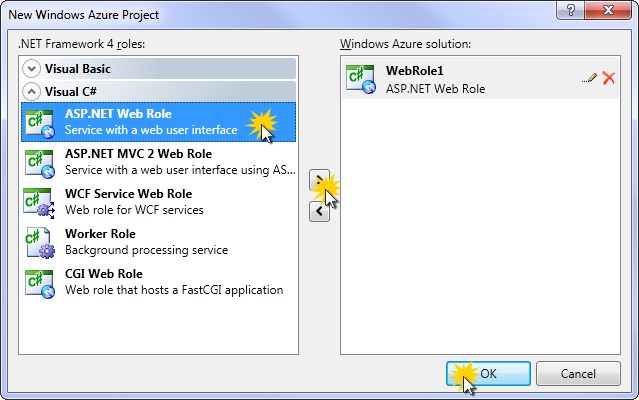
In the next dialog box, choose an appropriate role for this new project. For this tutorial, we will select ASP.NET Web Role. Add this role to the solution and confirm with OK.
-
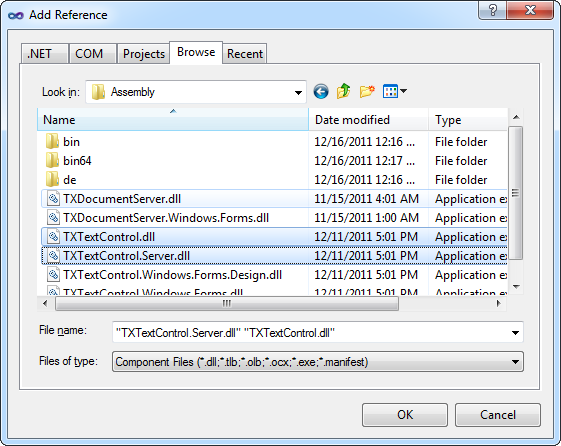
Select the web application (WebRole1) in the Solution Explorer and select Add Reference... from the Project main menu. Browse for the TXTextControl.dll and the TXTextControl.Server.dll from the Assembly folder of the TX Text Control installation directory.
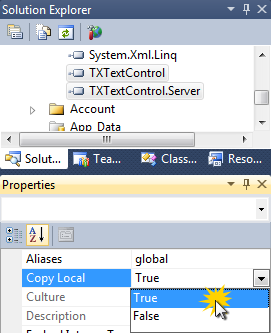
Select the added references in the Solution Explorer and set their Copy Local property to True.
-
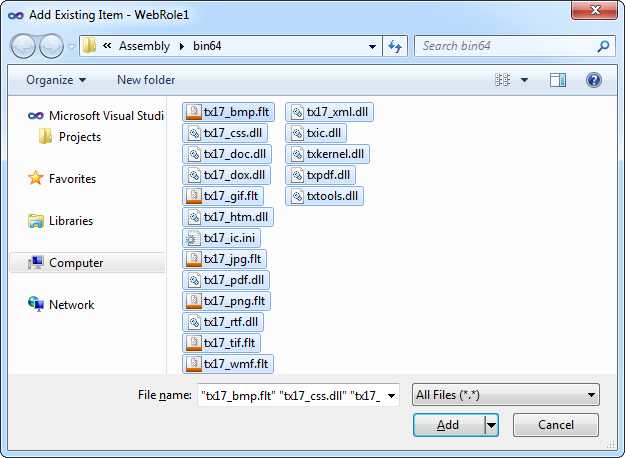
Select the web application (WebRole1) in the Solution Explorer again and choose Add Existing Item... from the Project main menu. Browse for the TX Text Control installation folder (default: C:\Program Files\Text Control GmbH\TX Text Control 17.0.NET for Windows Forms\Assembly\bin64), select all files from the bin64 folder and confirm with Add.
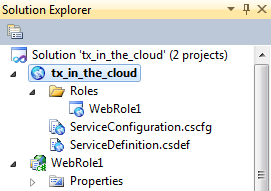
Now, select all newly added files in the Solution Explorer and set their properties Build Action to Content and Copy to Output Directory to Copy always.
-
A 'licenses.licx' file must exist in the 'Properties' folder (C#) or the 'My Project' folder (VB.NET). To build such a file, create a new text file in this folder and name it 'licenses.licx'. Open the file and add the following string:
TXTextControl.ServerTextControl, TXTextControl.Server, Version=17.0.200.500, Culture=neutral, PublicKeyToken=6b83fe9a75cfb638 -
Open the Split view of the Default.aspx page and remove the default content between the MainContent placeholder tags.
Add a simple button to the page and double-click it to open the code-behind automatically. Add the following code to the button click event:
using (TXTextControl.ServerTextControl tx = new TXTextControl.ServerTextControl()) { byte[] data = null; tx.Create(); tx.Text = "This is a sample text."; tx.Save(out data, TXTextControl.BinaryStreamType.AdobePDF); Response.Clear(); Response.ContentType = "application/pdf"; Response.BinaryWrite(data); Response.End(); } -
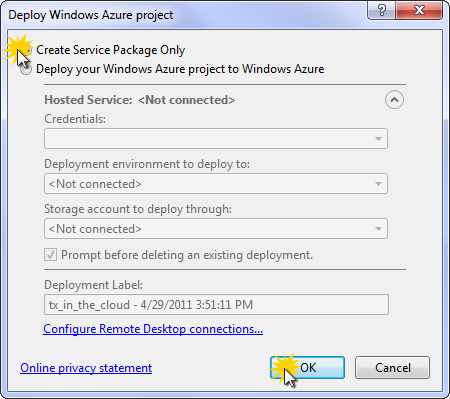
Select the Windows Azure Project in the Solution Explorer and select Publish [tx_in_the_cloud] from the Build main menu.
In the opened dialog box, select Create Service Package Only and confirm with OK.
Visual Studio is opening a folder with two created files.
-
Open the Windows Azure Management Portal:
If you did not create an account for Windows Azure yet, follow the required steps on their website.
-
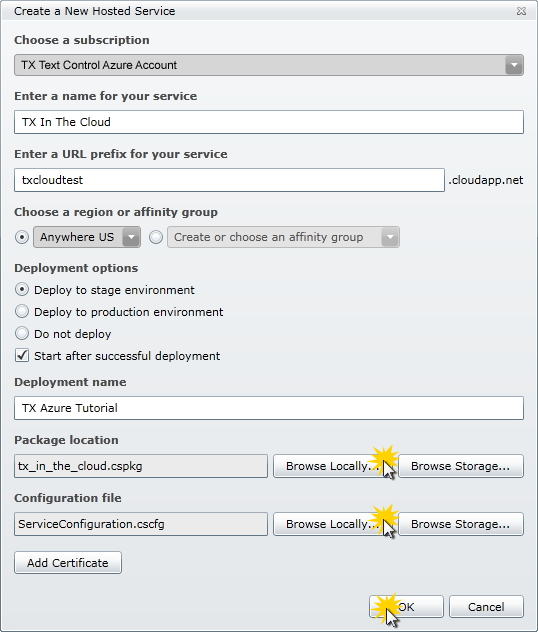
Choose New Hosted Service from the Common Tasks. Complete the form fields in the opened dialog box describing the name and URL of the newly created application. Browse for the Package location and the Configuration file by clicking the Browse Locally... buttons. Choose the files that have been created by Visual Studio. Upload the project by clicking OK.
The uploading and finalizing by Windows Azure might take some time. Depending on the size of the project up to 30 minutes or more.
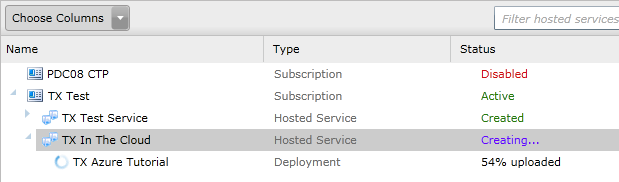
-
If the upload process is successful, the hosted service is displayed in the list as shown in the following screenshot:

Now, the application is available "in the cloud" using the given URL (e.g. http://txcloudtest.cloudapp.net/).
Related Posts
Porting RapidSpell to TX Spell .NET
TX Spell .NET serves as a direct replacement for RapidSpell in existing projects. This migration guide covers differences in dictionary handling, dialog box integration, and spell-as-you-type…
Windows FormsGetting StartedTutorial
Windows Forms Tutorial: Create Your First Windows Forms C# Application
This tutorial shows how to create your first Windows Forms application with C# using TX Text Control .NET for Windows Forms in Visual Studio 2022.
How to Mail Merge MS Word DOCX Documents in ASP.NET Core C#
Mail merge is the process of merging data, such as Json or IEnumerable objects, into a template document, such as a DOC or DOCX file. This tutorial is a walkthrough of the steps necessary to…
Creating an Angular Document Editor Application with a Node.js WebSocket Server
This tutorial shows how to create an Angular application that uses the Document Editor with a Node.js WebSocket server.
Create a Table of Contents in Windows Forms using C#
This article explains how to create a table of contents in Windows Forms using the ribbon or programmatically. Creating a table of contents is required to organize large documents.