


TX Spell: Performance Considerations

TX Spell .NET benchmarks demonstrate approximately 75,000 words checked per second and suggestion generation in under 0.035 seconds per word using the US English dictionary. This linear performance scaling supports real-time spell-as-you-type checking in documents with hundreds of pages.

TX Spell .NET has been built from ground up to match the key principles of performance, reliability and accuracy. Based on our experience in word processing applications, we were able to develop a spell checking component that is tailored to the special requirements of such applications.
Especially when working with large files with hundreds of pages, the spell checking engine must be fast -- really fast. When enabling the spell-as-you-type functionality, the whole text must be checked. To avoid long waiting times when users load large documents or when longer text is pasted into an existing document, a fast and at the same time accurate spell checking engine should be used.
When loading a long document, the initial check must be finished quickly. On checking the whole text, every word is checked based on the used dictionaries. Misspelled words are added to the IncorrectWordCollection and, when used in combination with TX Text Control, underlined with a red wiggly line.
The following diagram shows the linear performance on checking 25.000, 50.000, 100.000 and 200.000 words based on the standard US English dictionary:
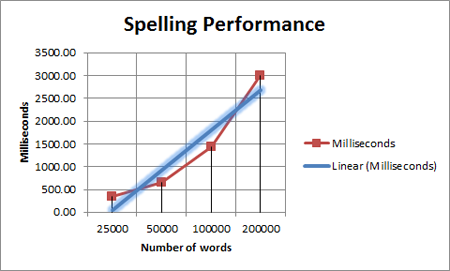
The above diagram shows that TX Spell .NET is able to check about
75.000 words in about a second.
In a word processing application, the end user uses a context menu or a spell checking dialog to correct misspelled words. In such a menu or dialog, TX Spell .NET shows suggestions for a misspelled word. In real-life, this performance indicator is not that important as a single word is processed at a time. Nevertheless, performance is important in this step as well.
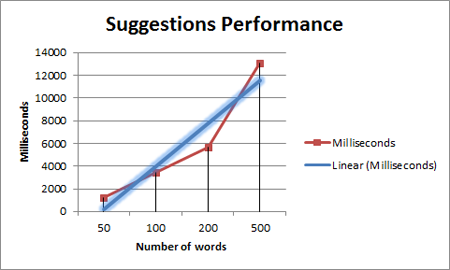
Based on the US English dictionary and a 5 characters long word, TX Spell .NET takes less than 0.035 seconds on average per word to create the appropriate suggestions. Based on these numbers, the suggestions can be calculated on-the-fly when opening a context menu. Of course, all numbers depend on the used dictionaries and the words themselves. But these numbers show that the reached performance is nearly unrivaled.
You haven't tested TX Spell .NET yet? Download a free trial version now!
Related Posts
Spell CheckingTechnical Article
Deploying TX Spell .NET in an XBAP Browser Application
XBAP enables deploying full WPF applications in the browser via .NET Framework. This tutorial covers creating a WPF Browser Application project, configuring TXSpellChecker in Page.Resources,…
Service Pack 1 for TX Spell .NET 7.0 Released
Text Control released Service Pack 1 for TX Spell .NET 7.0, covering both the Windows Forms and WPF editions. The update addresses known issues since the initial release. Users should review the…
Proofing Tools Available As ReportingCloud Web API Endpoints
ReportingCloud introduces three proofing Web API endpoints for cloud-based spell checking. The proofing/check endpoint detects misspelled words and duplicates, proofing/suggestions returns ranked…
HyphenationServerTextControlSpell Checking
Using TX Spell .NET with ServerTextControl
TX Spell .NET integrates with ServerTextControl for server-side spell checking by referencing TXSpell.dll and updating the licenses.licx file. After creating a TXSpell instance and assigning it to…
HTML5: Enable Spell Checking Using Javascript
TX Spell .NET spell checking is disabled by default in Web.TextControl. A JavaScript command after the ribbonTabsLoaded event enables it on load. TX Spell .NET must be installed on the server, and…