









Sample Code: Getting the Page Content Rectangle

The Page class in TX Text Control returns TextBounds covering the full printable area, not just the region containing actual content. This C# method calculates the true content rectangle by combining the page text bounds origin with the bottom coordinate of the last line.

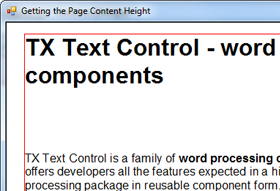 I have just found this code snippet that was provided by our support department to help a user to get a text rectangle of a specific page.
Using TX Text Control's Page class, you can get the page bounds and the text bounds. This, however, is a rectangle of possible text on a page and not the text that has been added to the page. Thankfully, getting the value we want is pretty easy.
The following function returns the actual text of a specific page:
// [C#]
private Rectangle GetPageContentRect(int Page)
{
    Graphics g = textControl1.CreateGraphics();
    int dpiX = (int)(1440 / g.DpiX);

    TXTextControl.Page page = textControl1.GetPages()[Page];
    TXTextControl.Line lastLine = textControl1.Lines.GetItem(page.Start +
                                    page.Length - 2);

    Rectangle rRect = new Rectangle(page.TextBounds.X / dpiX,
                                    page.TextBounds.Y / dpiX,
                                    page.TextBounds.Width / dpiX,
                                    lastLine.TextBounds.Bottom / dpiX -
                                        page.TextBounds.Top / dpiX);

    return rRect;
}Related Posts
Create a Table of Contents in Windows Forms using C#
This article explains how to create a table of contents in Windows Forms using the ribbon or programmatically. Creating a table of contents is required to organize large documents.
Official TX Text Control .NET Sample Applications Are Now Hosted on GitHub
This article gives a quick overview of the new repositories, their structure and our plans for the future.
ASP.NETJavaScriptDocument Editor
Detect Toggle Button Changes Using a MutationObserver
This article shows how to detect changes of toggle buttons in the ribbon of the web editor using a MutationObserver. The state of a toggle button in the ribbon visualizes the state of a certain…
Two Ways to Restart Numbered Lists in TX Text Control
In TX Text Control, numbered lists are continued by default and need to be reset when required. There is more than one way if you want to restart numbered lists in a document. In this article, two…
Zoom Tricks: Disabling CTRL + MOUSE WHEEL and More
This article shows how to disable CTRL + MOUSE WHEEL, implement zooming with keyboard and reset the zoom factor to its default value.