


A Deeper Look at TX Text Control .NET for Windows Forms's Page Class

The Page class in TX Text Control .NET for Windows Forms, available since version 14.0, represents a single formatted document page. It provides Bounds, Start, and Section properties along with GetImage and Select methods for page scrolling, selection, and bitmap rendering.

The Page class has been part of TX Text Control's API since version 14.0. In case you either didn't use it or you were not aware of such a class, this post should give you an overview of it and it's benefits.
The Page object represents a formatted page of the current document. Even though a document in TX Text Control is represented by floating text, the Page object is a view of a specific page in the current state.
Prior the introduction of this class, it was quite tricky to select a complete page, to scroll to a specific page or to get the bounding rectangle associated with a page.
The members of the Page class are listed in the following diagram:
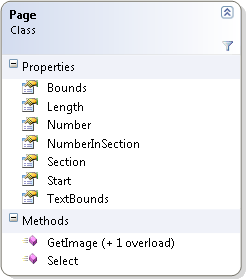
| Property | Description |
|---|---|
| Bounds | Gets the bounding rectangle of the page, in twips, relative to the top of the document. |
| Length | Gets the number of characters of the page, including the page break character at the end of the page. |
| Number | Gets the page's number. |
| NumberInSection | Gets the page number relative to the beginning of the section the page belongs to. |
| Section | Gets the number, one-based, of the section the page belongs to. |
| Start | Gets the number (one-based) of the page's first character. |
| TextBounds | Gets the bounding rectangle of the page's text, in twips, relative to the top of the document. |
| Method | Description |
| GetImage | Gets an image of the page's contents. |
| Select | Selects the text of the page. |
To get a specific page of the collection, you can use the indexer of the PageCollection. The following code returns the start position (character index) of the second page:
// [C#]
int iStartValue = textControl1.GetPages()[2].Start;
Now, how to use this class to scroll to a specific page? The Bounds property of the Page class returns a bounding rectangle of the page relative to the top of the document. This value can be used with the ScrollLocation property. The following code can be used to scroll to the top of page 2:
// [C#]
textControl1.ScrollLocation = new Point(textControl1.ScrollLocation.X,
                  textControl1.GetPages()[2].Bounds.Top);
Additionally, the GetImage method can be used to create a bitmap or metafile representation of the current page:
// [C#]
Bitmap bmpPage = textControl1.GetPages()[2].GetImage(100,
     TXTextControl.Page.PageContent.All);
An important notice at the end: The PageCollection is only available, if the TextControl.ViewMode property has been set to PageView.
Related Posts
Building Dashboard Reports with TX Text Control
A stock dashboard report template built in TX Text Control Words connects to a data source and uses merge fields, conditional IF fields for positive and negative values, and embedded 2D and 3D…
TX Text Control, Windows 8 and Visual Studio 11: It Simply Works!
TX Text Control .NET 17.0 runs on Windows 8 Consumer Preview for both Windows Forms and WPF desktop applications. Visual Studio 11 Beta is fully compatible, and ActiveX controls remain supported.…
TX Text Control's Smart Selection Interface
TX Text Control includes built-in mouse and keyboard assignments for text selection and navigation. This reference details double-click word selection, triple-click line selection, drag-and-drop…
Spell CheckingTechnical Article
Deploying TX Spell .NET in an XBAP Browser Application
XBAP enables deploying full WPF applications in the browser via .NET Framework. This tutorial covers creating a WPF Browser Application project, configuring TXSpellChecker in Page.Resources,…
Spell CheckingTechnical Article
TX Spell: Performance Considerations
TX Spell .NET benchmarks demonstrate approximately 75,000 words checked per second and suggestion generation in under 0.035 seconds per word using the US English dictionary. This linear…