









Smart Documents: Embed Document Versions in PDF/A-3 Containers

TX Text Control can embed and extract embedded files into and from PDF documents. This can be used to create intelligent document containers consisting of the original document for editing.

PDF/A-3 allows files of any format to be embedded. PDF/A-3 documents enable the transition from electronic paper to an electronic container that contains both human- and machine-readable versions of a document. Applications can extract the machine-readable portion of the PDF document for processing. A PDF/A-3 document can contain an unlimited number of embedded documents for different processes.
Smart Document Container
This standard can also be used to store different versions of a document in the same container. This container is a PDF/A-3 document, where the cover document is always the latest version of the document. This human-readable version can be viewed in any PDF reader, and editable versions are attached to the document. When a new version is created, the editable version is attached and the cover document is replaced.
The following illustration shows the layers of a PDF/A-3 document with the PDF cover document (human readable) and additional attached editable documents. This illustration shows an additional annotation layer representing JSON data added by the TX Text Control Document Viewer.
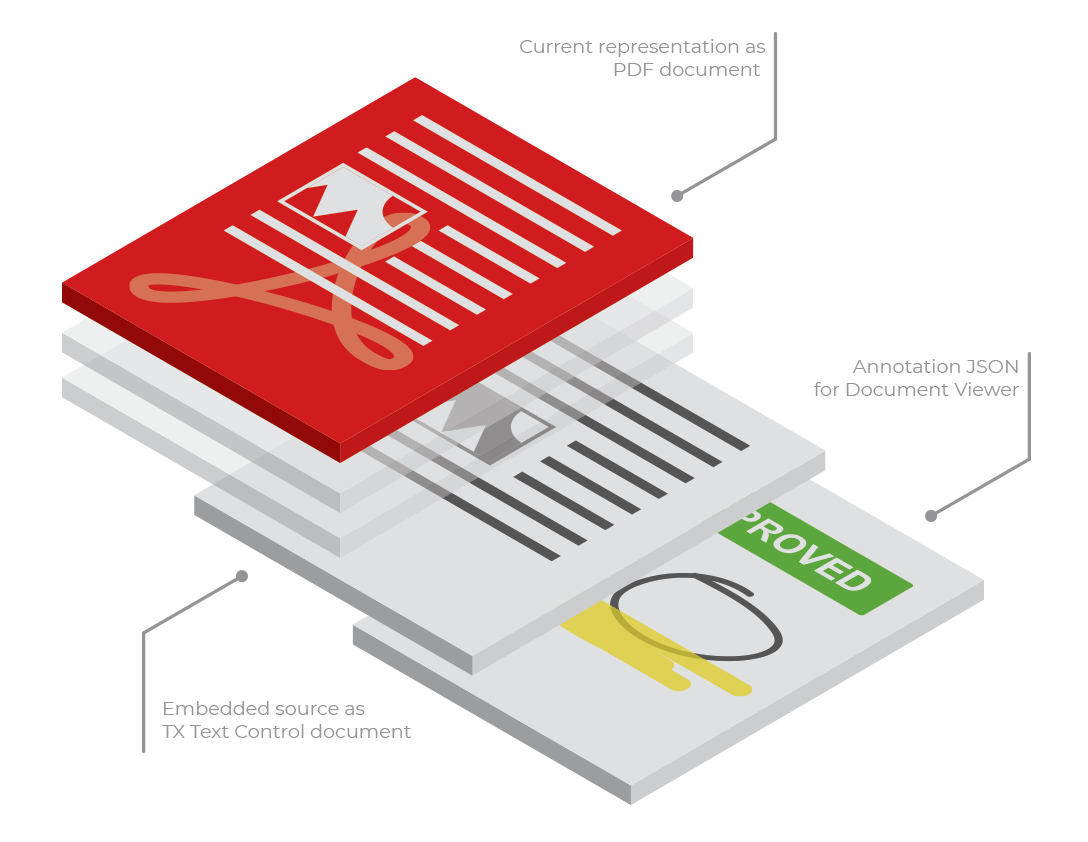
The advantage of this scenario is that the PDF can be sent to anyone outside your infrastructure, and the current version of the document is always visible to anyone with a simple Acrobat Reader. The viewable version is always the most current version.
Create the Container
The following code shows how to use the Server
public string CreateNewDocument(byte[] document) {

  var DocumentName = Guid.NewGuid().ToString() + ".pdf";

  using (TXTextControl.ServerTextControl tx = new TXTextControl.ServerTextControl()) {
    tx.Create();
    tx.Load(document, BinaryStreamType.InternalUnicodeFormat);

    byte[] dataTx;

    // save the blank document in the internal TX format
    tx.Save(out dataTx, TXTextControl.BinaryStreamType.InternalUnicodeFormat);

    // create an attachment
    EmbeddedFile embeddedFile = new EmbeddedFile("original.tx", dataTx, null);
    embeddedFile.Relationship = "Source";

    TXTextControl.SaveSettings saveSettings = new TXTextControl.SaveSettings() {
      EmbeddedFiles = new EmbeddedFile[] { embeddedFile }
    };

    // save a PDF with the attached Text Control document embedded
    tx.Save(DocumentName,
      TXTextControl.StreamType.AdobePDF,
      saveSettings);
  }

  return DocumentName;
}
Extract the Editable Document
The ExtractSmartDocument method loads a PDF/A-3 document and extracts the most recent original TX Text Control document from the attached files, which is returned as a byte array.
public byte[] ExtractSmartDocument(string DocumentName) {

  using (TXTextControl.ServerTextControl tx = new TXTextControl.ServerTextControl()) {

    tx.Create();

    // the load PDF document
    TXTextControl.LoadSettings loadSettings = new LoadSettings();
    tx.Load(DocumentName,
      TXTextControl.StreamType.AdobePDF,
      loadSettings);

    // loop through all attachments to find the original document
    // and the annotations
    foreach (EmbeddedFile file in loadSettings.EmbeddedFiles.Reverse()) {

      if (file.FileName == "original.tx")
        return (byte[])file.Data;
    }
  }

  return null;
}
Update the Container
The UpdateDocument method loads the smart PDF document to add a new original document to the list of attachments. A timestamp is automatically stored, so the above method ExtractSmartDocument only needs to check for the last added document.
public string UpdateDocument(string DocumentName, byte[] document) {

  using (TXTextControl.ServerTextControl tx = new TXTextControl.ServerTextControl()) {
    tx.Create();

    // the load PDF document
    TXTextControl.LoadSettings loadSettings = new LoadSettings();
    tx.Load(DocumentName,
      TXTextControl.StreamType.AdobePDF,
      loadSettings);

    List<EmbeddedFile> embeddedFiles = loadSettings.EmbeddedFiles.ToList();

    // create an attachment
    EmbeddedFile embeddedFile = new EmbeddedFile("original.tx", document, null);
    embeddedFile.Relationship = "Source";

    embeddedFiles.Add(embeddedFile);

    TXTextControl.SaveSettings saveSettings = new TXTextControl.SaveSettings() {
      EmbeddedFiles = embeddedFiles.ToArray()
    };

    tx.Load(document, BinaryStreamType.InternalUnicodeFormat);

    // save a PDF with the attached Text Control document embedded
    tx.Save(DocumentName,
      TXTextControl.StreamType.AdobePDF,
      saveSettings);
  }

  return DocumentName;
}ASP.NET
Integrate document processing into your applications to create documents such as PDFs and MS Word documents, including client-side document editing, viewing, and electronic signatures.





- Angular
- Blazor
- React
- JavaScript
- ASP.NET MVC, ASP.NET Core, and WebForms
Related Posts
ASP.NETASP.NET CoreDocument Viewer
Native PDF Annotation Support Is Coming to the TX Text Control Document Viewer
The next version of the TX Text Control Document Viewer will introduce an important enhancement to PDF workflows: native support for PDF-compatible annotations. Users will be able to add…
Building a Browser-Based PDF Workflow for Medical Billing using .NET C#
Learn how to create a browser-based PDF workflow for medical billing with .NET C# and TX Text Control. TX Text Control .NET Server offers different components optimized for the individual parts of…
AI Natural Language Document Generation with MCP and TX Text Control .NET
This article explains how AI agents can use natural language to create documents through an MCP server. Instead of letting a language model generate documents directly, the AI translates prompts…
C# Document Generation: A Developer's Guide for .NET
Document generation refers to the automatic creation of documents from application data. The success or complexity of a document generation workflow often depends on a single early architectural…
ASP.NETAccessibilityASP.NET Core
Validating PDF/UA Documents in .NET C#: A Practical Guide
This article explains how to validate PDF/UA documents in .NET C# using the TXTextControl.PDF.Validation NuGet package. It shows how to inspect validation status, generate JSON reports, handle…