


Feature Announcement: Enabling External PDF Renderer PDF.js in TX Text Control DocumentViewer

We are working on a feature that supports the enabling of external document renderers such as PDF.js to render PDF documents. This article gives a quick overview of the possibilities.

PDF.js is a JavaScript library maintained by Mozilla and other individual contributors. In a future release of our TX Text Control Document Viewer, we will introduce the option to enable external renderers such as PDF.js to provide the document rendering information.
Define the Renderer
In one of the next updates, it will be possible to define the location of PDF.js in the Document
@Html.TXTextControl().DocumentViewer(settings => {
   settings.DocumentPath = Server.MapPath("~/App_Data/Documents/test.pdf");
   settings.Dock = DocumentViewerSettings.DockStyle.Fill;
   settings.IsSelectionActivated = true;
   settings.ShowThumbnailPane = true;
   settings.DocumentLoadSettings.PDFJS.BasePath = "https://cdnjs.cloudflare.com/ajax/libs/pdf.js/3.2.146";
}).Render()
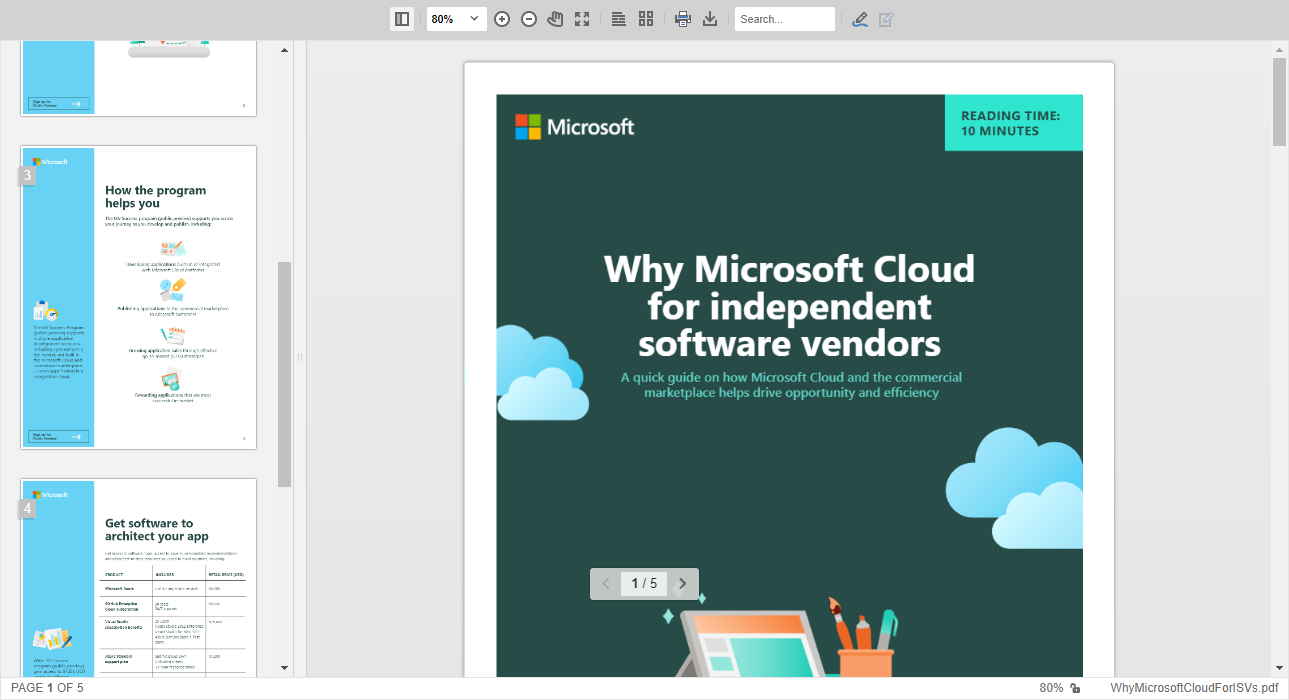
After loading the document, the PDF is rendered in the Document Viewer using PDF.js.
Advantages over pure PDF.js
After PDF.js is enabled, the document is rendered in the Document Viewer like any other supported file type including the thumbnail sidebar, zooming, annotations and the two page view mode:
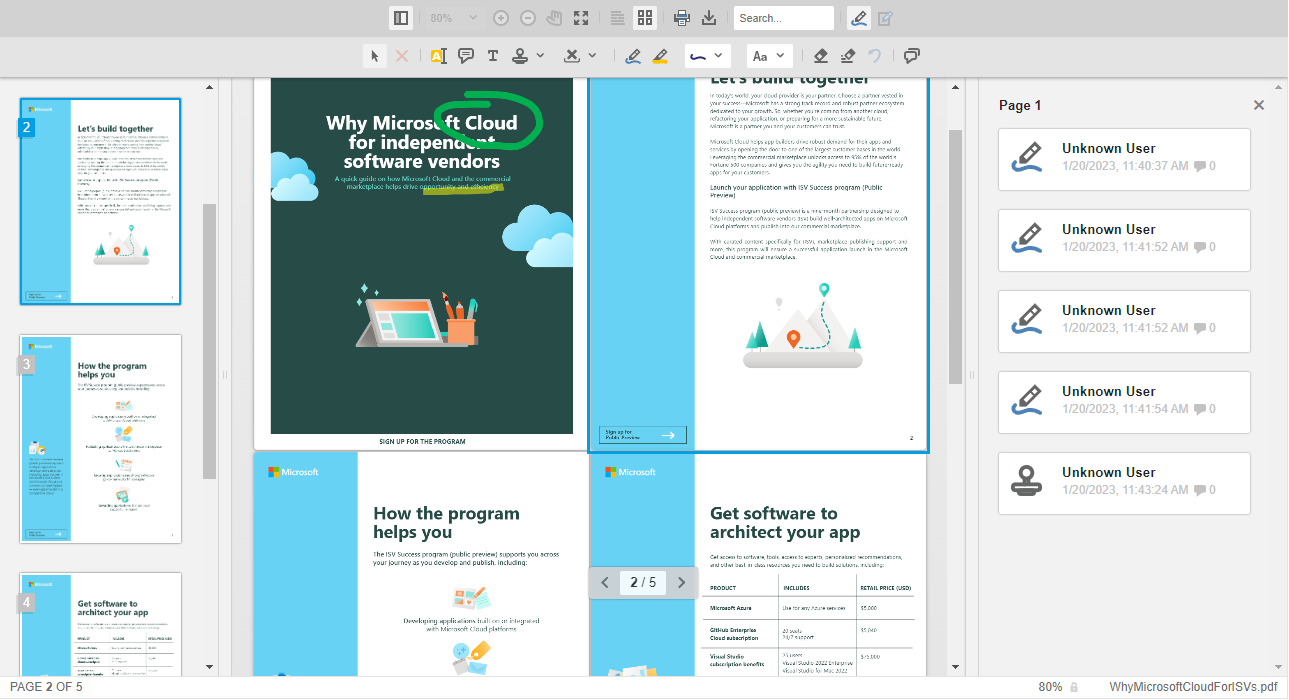
This provides users a consistent look and feel when viewing all types of documents in web applications.
When is PDF.js Better as a Renderer?
The answer is quite simple: TX Text Control doesn't provide a PDF renderer. When loading a PDF document into TX Text Control, the PDF is "imported". The idea is to import elements such as paragraphs, tables, and text and do further processing on such documents. Additionally, the TX Text Control PDF import provides the following features:
- Full text search on PDF documents
- Retrieve positions and coordinates of elements
- Extract form field data
- Radial search for strings and numbers
- Extract structured documents such as ZUGFeRD
For pure rendering, the PDF.js renderer provides better results.
When not to use PDF Documents
The Document Viewer is mainly used to render documents in the supported formats DOC, DOCX, RTF and the internal Text Control format to help with the following tasks:
- Document sharing
- Document collaboration (annotations)
- Document signing (electronic signatures)
- Forms completion
- Document reviewing
All of the above processes should use another document format than PDF to be as flexible as possible. A document should be editable as long as possible as a dynamic structure that should be updatable at any time. PDF is the worst format for these purposes.
When should a PDF be produced in a business workflow?
The answer is very simple: As late as possible.
Learn More
PDFs can be found everywhere: Invoices, brochures, contracts and agreements. It is a very reliable, portable format than became the clear industry standard for exchanging documents. This article suggests when to use this format and why.
When to use PDF Documents
When is a good time to create a PDF that is basically "write only"? Although, it is possible to make changes to a created PDF document like replacing small bits of text or removing complete pages. But when thinking about a PDF in a way like a printed paper sheet, you will get the idea of how dynamic digital document processing should be.
A document should be editable as long as possible. It is a dynamic structure that should be updatable at any time until the process is finished and a document is created for further processing or archiving.
You should use PDF documents in case there is no other option and your resulting documents are only stored in the PDF format or you would like to render incoming PDF documents from third-party sources. Specifically in these cases, PDF.js provides a high quality rendering result. To extract information such as form field data or attached documents, TX Text Control can be used directly.
ASP.NET
Integrate document processing into your applications to create documents such as PDFs and MS Word documents, including client-side document editing, viewing, and electronic signatures.





- Angular
- Blazor
- React
- JavaScript
- ASP.NET MVC, ASP.NET Core, and WebForms
Related Posts
ASP.NETASP.NET CoreDocument Viewer
Use PDF.js to Render PDF Documents within the Document Viewer
With the release of the latest release candidate of the Document Viewer, we released the ability to use PDF.js to render PDF documents. This article shows how to use this new feature.
Why HTML to PDF Conversion is Often the Wrong Choice for Business Documents…
In this article, we explore the challenges of HTML to PDF conversion for business documents in C# .NET and present alternative solutions that offer better performance and reliability. Discover why…
A Complete Guide to Converting Markdown to PDF in .NET C#
Learn how to convert Markdown to PDF in .NET C# using Text Control's ServerTextControl component. This guide covers setup, conversion process, and customization options for generating high-quality…
ASP.NETASP.NET CoreDocument Creation
Why PDF Creation Belongs at the End of the Business Process
This article discusses why placing PDF creation at the end of the business process is important for ensuring accuracy and efficiency. The most scalable systems delay PDF generation until the…
Designing the Perfect PDF Form with TX Text Control in .NET C#
Learn how to create and design interactive PDF forms using TX Text Control in .NET C#. This guide covers essential features and best practices for effective form design.