


Introducing Groups for ReportingCloud Extreme Users

ReportingCloud introduces Groups for Extreme license holders. Account managers create groups, assign templates from storage, and invite template designers who receive dedicated logins. Designers edit and create templates within their assigned group, sharing the main account quota.

In the ReportingCloud Portal, account holders can upload and manage templates that are used for merge processes using the ReportingCloud Web API. Our users requested a functionality that other users can be assigned to edit and create templates for a specific group in the template storage. These template designers get their own login and can create and modify templates in their dedicated group.
Therefore, we implemented ReportingCloud Groups. This feature has been rolled-out to the portal today and is available for all users with an Extreme license.
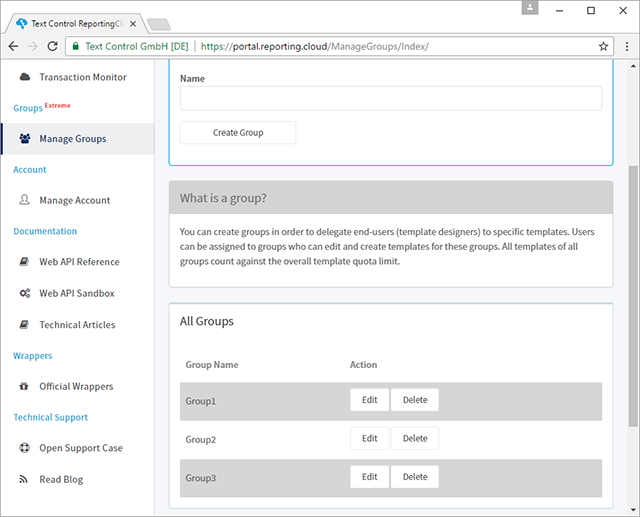
The side menu received the new entry Manage Groups which opens a view to create and manage groups.
When a group has been created, templates in the template storage can be assigned to one of the created groups:
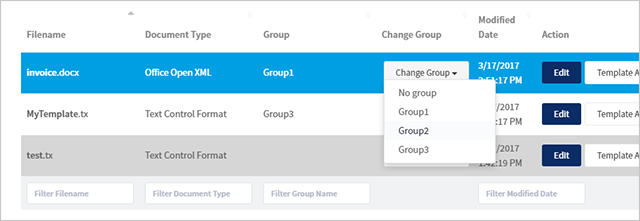
This helps to organize templates as the template list can be filtered by these groups. But the real advantage of these group assignments is that users in your group can access these templates as well (and only these). Therefore, main account holders (manager role) can invite template designers to their created groups:
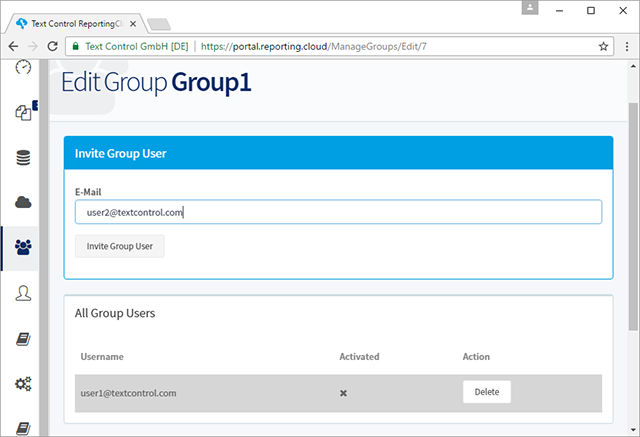
These invited template designers are getting e-mail invitations to create a ReportingCloud account. These accounts are bound to the account holder's group. The template designer is now able to edit and create templates inside this group. As all group user accounts are bound to the main account, the same template quota is valid for all templates in all groups.
Test this on your own and create a ReportingCloud account today.
Happy coding!
Cloud
Are we moving to the cloud? This question is changing from "if" to "when" and "how". Text Control ReportingCloud brings complete reporting functionality to the cloud so all developers can use it, irrespective of the platform or language they're using. Its highly RESTful API can be used to merge Microsoft Word compatible templates with JSON data from all clients including .NET, Javascript, PHP, Node.JS, jQuery, Ruby, Python, Android, Java and iOS.
Related Posts
ReportingCloud Monthly Payment Available
ReportingCloud now supports monthly subscription plans that auto-renew each billing cycle until cancelled. Subscribers manage active plans and view payment invoices through the online store…
Proofing Tools Available As ReportingCloud Web API Endpoints
ReportingCloud introduces three proofing Web API endpoints for cloud-based spell checking. The proofing/check endpoint detects misspelled words and duplicates, proofing/suggestions returns ranked…
All Google Fonts Now Available in ReportingCloud
ReportingCloud now includes over 2000 Google Fonts on its servers, ensuring consistent rendering across merged documents. The fonts/list endpoint returns all available font names for programmatic…
New ReportingCloud MergeSettings Option: Merge HTML Content into Merge Fields
ReportingCloud adds a mergeHtml property to MergeSettings that accepts formatted HTML inside merge field data. Supported tags include strong, em, and u wrapped in an html root element. The…
Retrieving Template Information Using the ReportingCloud Web API
The ReportingCloud template/info endpoint returns a TemplateInfo object containing hierarchical merge field names, format strings, and nested merge block structures. This metadata enables dynamic…