


ReportingCloud: Conditional Text Blocks Based on Merge Blocks

Conditional text rendering in ReportingCloud uses merge blocks combined with the RemoveEmptyBlocks setting. When the data source provides an empty object for a named block and RemoveEmptyBlocks is set to true, the complete block is stripped from the merged document output.

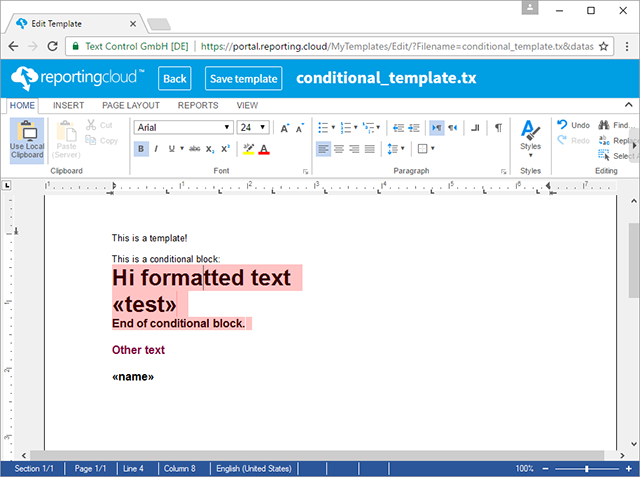
In several applications, it is required to render or to remove a complete text block in a template based on specific conditions. The following screenshot shows a template with a merge block (highlighted in red) that should be rendered, if the merge data contains data for this specific block with the name conditional:
Consider, we have the following classes as the data source in C# .NET:
public class Report
{
    public string name { get; set; }
    public Conditional conditional { get; set; }
}

public class Conditional
{
    public string test { get; set; }
}
The following code creates a new instance of the data class Report and an empty Conditional class. In the MergeSettings object, which is part of the ReportingCloud MergeBody, the RemoveEmptyBlocks property is set to true.
Report report = new Report();
report.name = "Name";
report.conditional = new Conditional();

ReportingCloud rc = new ReportingCloud("username", "password");

MergeBody body = new MergeBody();
body.MergeData = report;
body.MergeSettings = new MergeSettings() {
    RemoveEmptyBlocks = true
};

List<byte[]> docs = rc.MergeDocument(body, "conditional_template.tx", ReturnFormat.TX);

In case, the data for the merge block conditional is empty, the complete merge block gets removed, if RemoveEmptyBlocks is set to true. The following animation shows the result for both cases:
The logic that defines which block gets rendered or removed is not part of the template, but your data source and therefore, part of your application.
Cloud
Are we moving to the cloud? This question is changing from "if" to "when" and "how". Text Control ReportingCloud brings complete reporting functionality to the cloud so all developers can use it, irrespective of the platform or language they're using. Its highly RESTful API can be used to merge Microsoft Word compatible templates with JSON data from all clients including .NET, Javascript, PHP, Node.JS, jQuery, Ruby, Python, Android, Java and iOS.
Related Posts
ReportingCloud: Uploading Templates Vs. Sending Templates Inside MergeBody
ReportingCloud offers two template delivery methods: uploading to persistent storage via the /templates/upload endpoint, or embedding Base64-encoded template data in the MergeBody POST request.…
MailMerge: Table Headers and Repeating Blocks
Repeating table headers appear at the top of each page when tables span multiple pages during a MailMerge process. When combining table headers with nested merge blocks, the complete table must be…
Web API Test Sandbox Released on ReportingCloud Portal
The ReportingCloud portal includes a Web API Test Sandbox for running endpoint calls against your own account data and template storage without affecting document quota. Each endpoint in the Web…
ReportingCloud: New Test Parameter for Document Quota Related Endpoints
ReportingCloud merge, convert, and findandreplace endpoints now accept an optional test parameter. Test calls bypass the document quota and produce watermarked output with a TEST MODE label,…
ReportingCloud: The MergeData JSON Object Format Explained
ReportingCloud merge operations accept a JSON object containing data for all merge fields and blocks. The .NET wrapper serializes typed business objects to JSON automatically via MergeBody and…