


MailMerge: Merge Hyperlinks into Merge Fields

The MailMerge FieldMerged event allows replacing standard merge fields with hyperlinks during the merge process. A unique identifier in the XML data source marks fields for conversion. A temporary ServerTextControl creates the hyperlink and returns it to the MailMerge engine.


The Text Control Reporting Framework consists of the classes part of the namespace TXTextControl.DocumentServer including the MailMerge component, field adapters and WYSIWYG template editors for the platforms ASP.NET, Windows Forms and WPF.
The MailMerge class is a very flexible framework and can be used as your basis for all types of document automation processes. Typically, a mail merge template is merged with data from a specified data source. But thanks to the flexibility, you can control the merge process and inject your custom code.
This sample shows how to replace a merge field with a hyperlink with a defined text and target. The template itself consists only of normal merge fields:
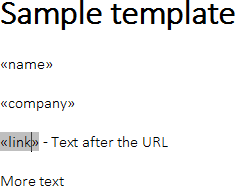
The merge field link should be populated with a hyperlink that is defined in the data source. The sample data source is a simple XML file:
<report>
    <name>Bill Gates</name>
    <company>Microsoft</company>
    <link>%LINK%,http://www.microsoft.com/</link>
</report>
A unique identifier is used as part of the merge data. The string "%LINK%" indicates that this merge field should be replaced with a hyperlink. In the FieldMerged event, which returns the already merged field, the Text property is checked, whether it contains the unique identifier "%LINK%".
In case, the field contains the unique identifier, the content is loaded into a temporary ServerTextControl and converted into a hyperlink. The results are loaded back into the original field position of the mail merge process.
private void mailMerge1_FieldMerged(object sender,
    TXTextControl.DocumentServer.MailMerge.FieldMergedEventArgs e)
{
    byte[] data;

    if(e.MailMergeFieldAdapter.TypeName == "MERGEFIELD")
    {
        MergeField field = new MergeField(
            e.MailMergeFieldAdapter.ApplicationField);

        // if the merge field starts with "%LINK%", we want to convert it
        // to a hyperlink
        if (field.Text.StartsWith("%LINK%") == true)
        {
            // create a temporary ServerTextControl
            using (TXTextControl.ServerTextControl tx =
                new TXTextControl.ServerTextControl())
            {
                tx.Create();

                // load the merge field to clone the formatting
                tx.Load(e.MergedField,
                    TXTextControl.BinaryStreamType.InternalUnicodeFormat);

                // remove the content
                tx.ApplicationFields.Clear(true);
                tx.SelectAll();
                tx.Selection.Text = "";

                // add a new hyperlink with the text part of the hyperlink
                tx.HypertextLinks.Add(new TXTextControl.HypertextLink(
                    field.ApplicationField.Text.Split(\',\')[1],
                    field.ApplicationField.Text.Split(\',\')[1]));

                // save the content
                tx.Save(out data,
                    TXTextControl.BinaryStreamType.InternalUnicodeFormat);
            }

            // return the hyperlink to the merge process
            e.MergedField = data;
        }
    }
}
Download the sample from GitHub and test it on your own.

Download and Fork This Sample on GitHub
We proudly host our sample code on github.com/TextControl.
Please fork and contribute.
Requirements for this sample
- Visual Studio 2012 or better
- TX Text Control .NET Server (trial sufficient)
ASP.NET
Integrate document processing into your applications to create documents such as PDFs and MS Word documents, including client-side document editing, viewing, and electronic signatures.





- Angular
- Blazor
- React
- JavaScript
- ASP.NET MVC, ASP.NET Core, and WebForms
Related Posts
Official TX Text Control .NET Sample Applications Are Now Hosted on GitHub
This article gives a quick overview of the new repositories, their structure and our plans for the future.
MVC: Adding an Electronic Signature to Documents in Web.TextControl
An MVC sample uses the MailMerge class to populate a signature template with the signer name and image, then inserts it into a named text frame in a contract document. An async controller method…
MVC: Loading a Data Source from a View Model
When merging templates with business objects, the Reports ribbon drop-downs in Web.TextControl can be populated from a serialized view model. The controller serializes a class model with the…
MVC: Merging Templates in a Controller HttpPost Method
The MailMerge engine and Web.TextControl combine to merge templates server-side in an MVC application. A JavaScript function saves the document as a Base64 string, posts it to an HttpPost…
Reporting: Styling the DocumentViewer for ASP.NET
The DocumentViewer component in TX Text Control .NET Server displays merged reports in a cross-browser viewer. Its appearance is fully customizable through CSS, including button backgrounds,…