


Roadmap X12: Web.TextControl Enhancements in Detail

Web.TextControl X12 adds client clipboard support, file and image drag-and-drop, an Office 2013-style ribbon, a spell-check dialog, direct browser printing, a server-side Document Access API, and full localization for all UI elements including dialog boxes and error messages.

We already presented first impressions of the next TX Text Control version at several conferences. All of our developer teams are working on new features and improvements for all products and modules including ASP.NET, WPF and Windows Forms.
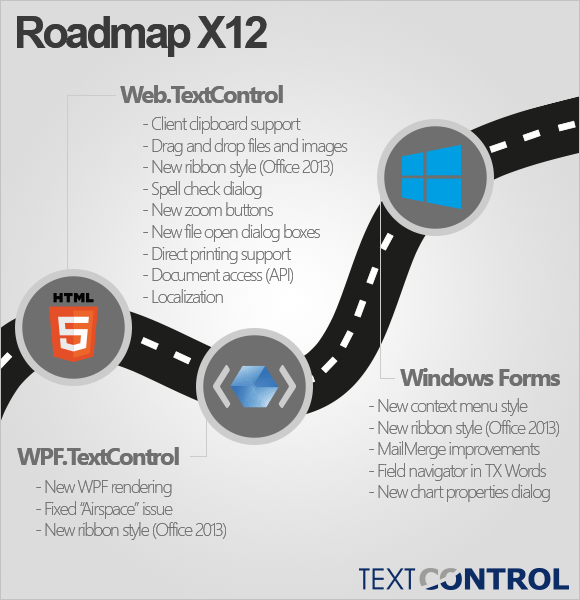
Today, we would like to list some of the new features of Web.TextControl - the HTML5-based, true WYSIWYG rich text editor for ASP.NET.
- Client clipboard support
Copy and paste formatted content from the client (MS Word, OpenOffice, browser, ...) to the editor. - Drag and drop support
Drag and drop files and images to the editor. - New ribbon style
New Office 2013 ribbon icons and style - collapsible and scrollable. - Spell check dialog
Fully featured spell-check dialog for Web.TextControl in combination with TX Spell .NET. - Direct printing support
Opens the browser's print dialog without the external Window and PDF printing. - Document Access (API)
Server-side API to edit the content of the document programmatically. - Localization support
Translate the Web.TextControl to various languages incl. dialog boxes, ribbon, error messages and information messages.
We will publish details, screenshots and live demos soon. Stay tuned!
Related Posts
X15: Adding MS Word Compatible Fields and Form Elements to TXTextControl.Web
TX Text Control X15 adds JavaScript API support for inserting and modifying MS Word compatible fields in the HTML5-based ASP.NET editor. MergeFields, TextFields, and ApplicationFields can be…
X15: Inserting Client-Side Images using JavaScript
TX Text Control X15 adds JavaScript ImageCollection methods to insert client-side images into the HTML5-based ASP.NET editor. A local file is read and converted to a Base64 string, then placed…
Sneak Peek X15: Copy to Local Clipboard Support in ASP.NET Version
TX Text Control X15 introduces local clipboard support for the HTML5 ASP.NET editor. A toggle switches between the server-side clipboard with full formatting and the client-side HTML clipboard.…
Sneak Peek X15: Custom Field Overlays in HTML5-based Text Control
TX Text Control X15 introduces a bounds property on fields in Web.TextControl, returned through the textFieldEntered event. Developers can position custom HTML overlays at field locations to…
ASP.NET: Protected SubTextParts in TXTextControl.Web
SubTextParts in TX Text Control define named text ranges with Start, Length, and Name properties. Version X14 adds subTextPartEntered and subTextPartLeft events to the HTML5-based Web.TextControl,…