


Cross-browser Report Template Designer

TX Text Control Reporting uses WYSIWYG template design where the rendered output matches the final PDF or printed page exactly. Version X11 introduces an HTML5-based cross-browser template designer for ASP.NET that requires no browser plugins and works across all devices and platforms.


Conventional banded report designers are complex - Text Control reporting is easy to understand and thanks to WYSIWYG, the template is rendered exactly the same like on paper or in an Adobe PDF.
Last week, we announced a new technology to create and modify templates in all typical browsers. This concept allows developers to deploy a reporting system where end-users are able to create and modify MS Word compatible templates across all platforms, devices and browsers.
The following illustration gives an overview of the typical process: Templates are created in Windows or Web applications, stored and merged on a server using the Text Control Reporting engine DocumentServer.MailMerge. Resulting documents can be exported to Adobe PDF or all other supported formats, printed and displayed in a browser.
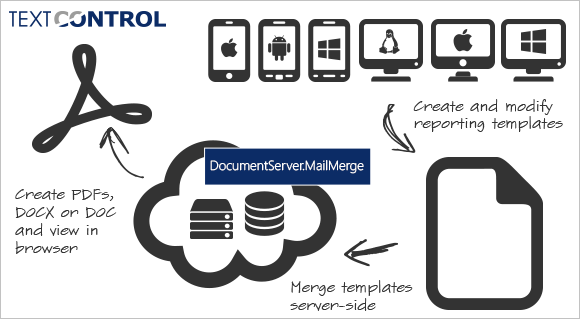
Text Control Reporting provides the same template designer functionality for Windows Forms, WPF or the Web - one concept, all platforms. This way, you can fulfill your customer requirements with one technology.
HTML5-based, WYSIWYG Web Template Designer
In the next version X11, which is targeted for Q3 2014, an HTML5-based, cross-browser template designer will be part of the ASP.NET server version of TX Text Control .NET. This editor doesn't require any client-side browser plug-ins, but pure HTML5 and Javascript. Zero footprint - no plug-ins.
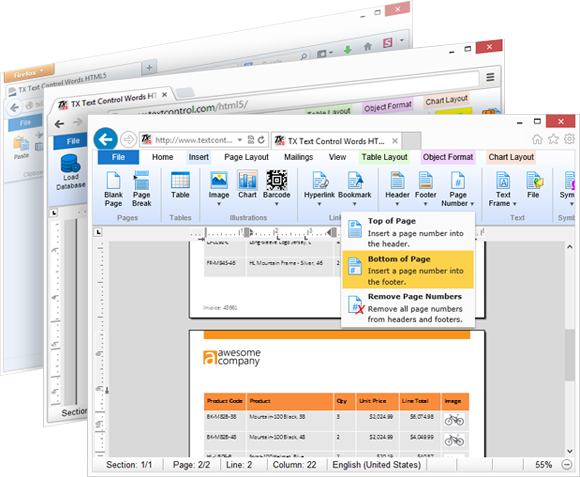
The new cross-browser HTML5-based Web editor and template designer runs in Firefox, Chrome and Internet Explorer.
In order to deploy this editor, no browser settings must be changed, no client-side security settings must be adjusted. You can simply integrate the editor into your ASP.NET Web application.
Get more information and screenshots in our HTML Roadmap. Stay tuned for more details and upcoming online demos.
Reporting
The Text Control Reporting Framework combines powerful reporting features with an easy-to-use, MS Word compatible word processor. Users can create documents and templates using ordinary Microsoft Word skills. The Reporting Framework is included in all .NET based TX Text Control products including ASP.NET, Windows Forms and WPF.
Related Posts
Sneak Peek X15: Custom Field Overlays in HTML5-based Text Control
TX Text Control X15 introduces a bounds property on fields in Web.TextControl, returned through the textFieldEntered event. Developers can position custom HTML overlays at field locations to…
X13: Using IMEs and Localization in Web.TextControl
Web.TextControl X13 supports Input Method Editors for entering Chinese, Japanese, and other CJK characters in the HTML5 editor. The new UICulture property sets the control language per instance,…
X13: New Web Forms DocumentViewer Style
The Web.TextControl DocumentViewer in X13 receives a visual update with new toolbar buttons, a radial gradient background, rounded document corners, and page-flip animation. Properties control the…
Sneak Peek X13: New Features in Web.TextControl
Web.TextControl X13 adds MS Word-compatible shapes and drawings with a contextual Shape Format ribbon tab, new symbol and bookmark dialogs, and redesigned merge block insertion using SubTextParts.…
Web.TextControl X12: Fully Programmable API
Web.TextControl X12 exposes a programmable API that manipulates document content via server-side ServerTextControl instances. The Selection object can be edited and sent back to the HTML5 editor,…