


Sneak Peek Reporting X10: Image Placeholder Merging

TX Text Control X10 Reporting supports image placeholder merging in templates. Named image objects accept binary byte arrays, System.Drawing.Image instances, file paths, or hex strings as input data. Merged images automatically scale to match the placeholder dimensions set in templates.

This is always the most exciting time of the year: When I am getting hands-on a new version and I am able to test the first new features of an upcoming new release.
Today, I would like to introduce image placeholder merging. In the current version, images can be merged into a special textual merge field type that refers to a physical image location.
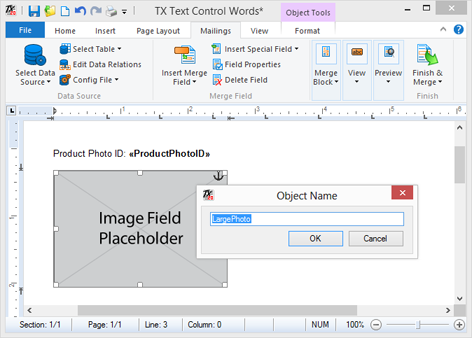
In the upcoming version X10, an image object can be added to the template with a given name. The data column must contain either the binary image data as a byte array, an object of type System.Drawing.Image, a file name or a hex string beginning with X'. These options cover most typical image representations in databases.
Merged images are scaled up or down to match the width of the placeholder image in the template. The following screenshot shows a placeholder image and the Object Name dialog:
After the template is merged, the image is scaled to match the placeholder image size.
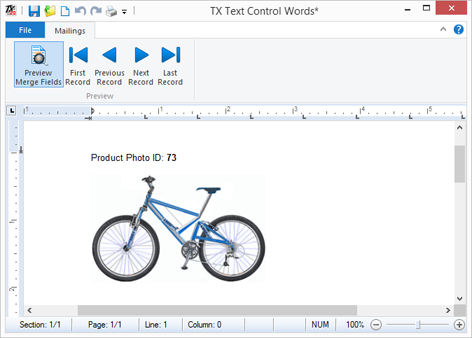
This new concept allows the creation of templates in a true WYSIWYG manner - you see how your final document looks like while creating your report template.
Another great feature of TX Text Control X10 - stay tuned for more.
Related Posts
Announcing TX Text Control DS Server 5.0
We are excited to announce the release of TX Text Control DS Server 5.0. This release focuses on extensibility, plugin integration, and developer productivity while continuing to improve the…
TX Text Control 34.0 SP2 is Now Available: What's New in the Latest Version
TX Text Control 34.0 Service Pack 2 is now available, offering important updates and bug fixes for all platforms. If you use TX Text Control in your document processing applications, this service…
TX Text Control 34.0 SP1 is Now Available: What's New in the Latest Version
TX Text Control 34.0 Service Pack 1 is now available, offering important updates and bug fixes for all platforms. If you use TX Text Control in your document processing applications, this service…
Introducing TX Text Control 34.0: Your Next Leap in Document Processing
We are happy to announce the release of TX Text Control 34.0. This version is packed with new features and enhancements that will elevate your document processing experience. This version…
PDF/UA vs. PDF/A-3a: Which Format Should You Use for Your Business Application?
In this blog post, we will explore the differences between PDF/UA and PDF/A-3a, helping you choose the right format for your business needs. We will discuss the key features, benefits, and use…