


TX Text Control 16.0: A Deeper Look at Table Headers

TX Text Control 16.0 introduces repeating table header rows that automatically appear at the top of each page when a table spans multiple pages. The new TableRow.IsHeader property controls this behavior in code, and header cells support nested tables, images, and text frames.

Tables are used to arrange large amounts of tabular data, for example in a sales report. As the maximum length of a table on a page can only be the maximum height of the page (minus margins and headers and footers), it is necessary to divide the table every time a page break occurs.
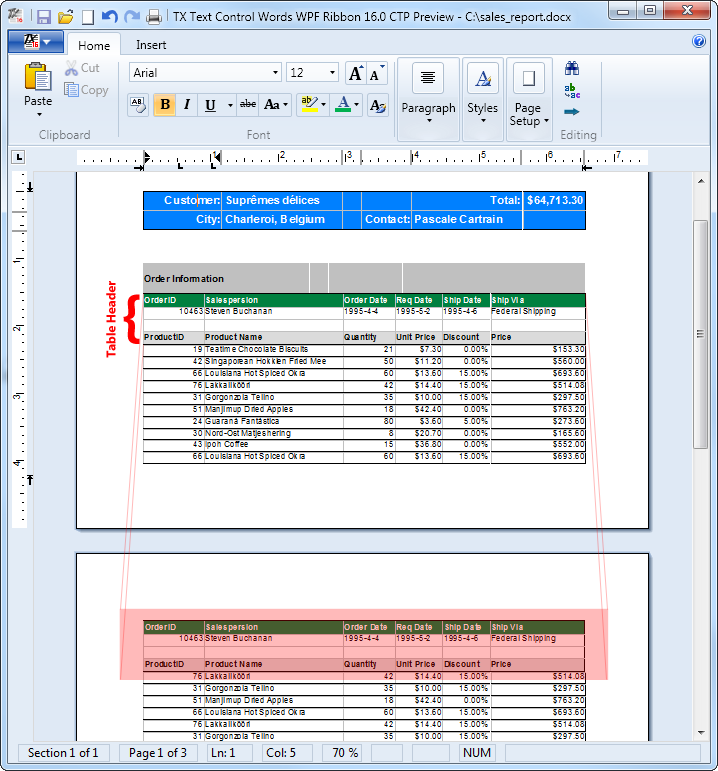
As of TX Text Control .NET 16.0 (Windows Forms and WPF), n contiguous rows in a table can be automatically added to the top of each table, right after a page break has occurred. This new feature ensures that tables always have a table header on every page, regardless of how long they may become.
And there are no limits: The cells of these table header rows can contain more document elements than just text such as other nested tables, images or text frames. This enables you to create professional reports in a very easy way. The following screenshot illustrates how the first row of the table is being repeated at the top of each successive page:
The TableRow class has been extended with the IsHeader property that gets or sets a value specifying whether the table row is part of the table's header or not.
// C#
public bool IsHeader { get; set; }
// Visual Basic
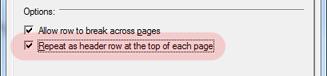
Public Property IsHeader() As BooleanThis property can be also adjusted in the shipped table attribute dialog using a new checkbox:
You want to test it on your own? Feel free to download the fully featured 30 day trial versions here:
TX Text Control Trial VersionsRelated Posts
Announcing TX Text Control DS Server 5.0
We are excited to announce the release of TX Text Control DS Server 5.0. This release focuses on extensibility, plugin integration, and developer productivity while continuing to improve the…
TX Text Control 34.0 SP2 is Now Available: What's New in the Latest Version
TX Text Control 34.0 Service Pack 2 is now available, offering important updates and bug fixes for all platforms. If you use TX Text Control in your document processing applications, this service…
TX Text Control 34.0 SP1 is Now Available: What's New in the Latest Version
TX Text Control 34.0 Service Pack 1 is now available, offering important updates and bug fixes for all platforms. If you use TX Text Control in your document processing applications, this service…
Introducing TX Text Control 34.0: Your Next Leap in Document Processing
We are happy to announce the release of TX Text Control 34.0. This version is packed with new features and enhancements that will elevate your document processing experience. This version…
PDF/UA vs. PDF/A-3a: Which Format Should You Use for Your Business Application?
In this blog post, we will explore the differences between PDF/UA and PDF/A-3a, helping you choose the right format for your business needs. We will discuss the key features, benefits, and use…