


MailMerge: New Features Announced (coming in 16.0)

The MailMerge component in version 16.0 introduces two features. Nested merge blocks support master-detail relationships for one-to-many reporting layouts, and image merge fields allow templates to include placeholders that get replaced with logos or signatures during merging.

Today, I talked to our DocumentServer developer team, which is responsible for the MailMerge component, part of TX Text Control Server for ASP.NET (incl. Windows Forms). They are currently working on new features for version 16.0. Today, I would like to announce two improvements:
- Master-Detail: Nested Merge Blocks
- Image Merge Fields
A master-detail relationship is a 1:n (one-to-many) type relationship. A typical example for such a relationship is a purchase order and a set of items that belongs to each purchase order. This new feature allows you to create complex nested reports in a very easy way. The following screenshot shows such a nested block:
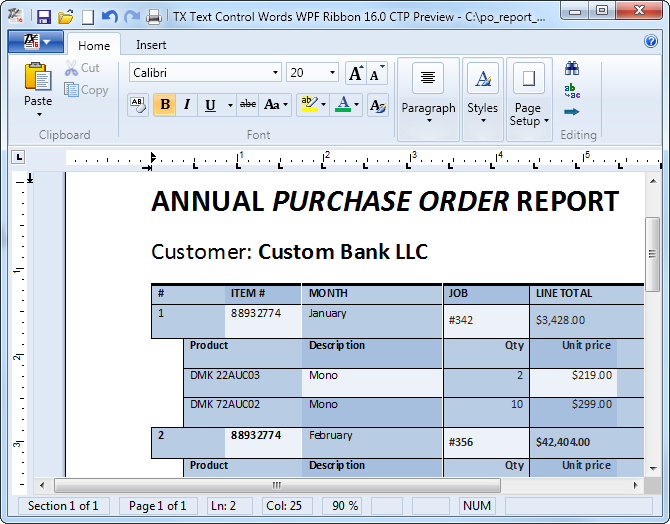
Image merge fields is another oft-requested feature. These image merge fields are normal merge fields with a special indicator. Such fields can be replaced with images during the merge process. This enables you to create templates with placeholders for company logos or signature images.
As soon as I get a pre-build version, I will publish a sample application with these great new features on TX Text Control Labs.
Related Posts
Announcing TX Text Control DS Server 5.0
We are excited to announce the release of TX Text Control DS Server 5.0. This release focuses on extensibility, plugin integration, and developer productivity while continuing to improve the…
TX Text Control 34.0 SP2 is Now Available: What's New in the Latest Version
TX Text Control 34.0 Service Pack 2 is now available, offering important updates and bug fixes for all platforms. If you use TX Text Control in your document processing applications, this service…
TX Text Control 34.0 SP1 is Now Available: What's New in the Latest Version
TX Text Control 34.0 Service Pack 1 is now available, offering important updates and bug fixes for all platforms. If you use TX Text Control in your document processing applications, this service…
Introducing TX Text Control 34.0: Your Next Leap in Document Processing
We are happy to announce the release of TX Text Control 34.0. This version is packed with new features and enhancements that will elevate your document processing experience. This version…
PDF/UA vs. PDF/A-3a: Which Format Should You Use for Your Business Application?
In this blog post, we will explore the differences between PDF/UA and PDF/A-3a, helping you choose the right format for your business needs. We will discuss the key features, benefits, and use…