









C# Document Generation: A Developer's Guide for .NET

Document generation refers to the automatic creation of documents from application data. The success or complexity of a document generation workflow often depends on a single early architectural decision. This guide will help you choose the right approach.

Many .NET business applications must generate documents such as invoices, contracts, policy schedules, patient summaries, or legal papers. The challenge lies not in creating the document itself, but in everything around it. This includes meeting layout requirements, enabling content owners to update wording or branding without developer involvement, and supporting both single and batch records. Once the document is generated, it still may have to move through conversion, archiving, or signing. These factors add complexity to most projects.
The success or complexity of a document generation workflow often depends on a single early architectural decision. This guide will help you choose the right approach.
What "Document Generation" Means in C# and .NET
Document generation refers to the automatic creation of documents from application data. This can be done by building documents in code, converting from HTML, or populating templates with data from a database, API, or user input. Existing DOCX templates can also be converted. The resulting document is typically saved as a PDF, DOCX, or HTML file.
This article covers all common approaches but focuses on the template-based model, in which a predesigned document with merge fields is populated with data at runtime.
The document flow looks like this in practice:
- Template: A predesigned layout that contains placeholders (merge fields) for the variable parts of the document.
- Merge: Your data is mapped into those placeholders, applying conditional sections, repeating regions for lists, and formatting rules.
- Output: The merged document is rendered to its final format as a PDF for distribution or a DOCX for further editing.
- Delivery: The finished document is stored, returned over an API, emailed, or routed for signature.
The major factor between these approaches is how the template is created and who can change it. This difference, rather than any feature checkbox, determines which one will serve you well over time.
Four Approaches to Document Generation
When you evaluate document generation in C#, you are really choosing between four architectural patterns. Each fits a different kind of project. This section will help you see the difference.
1. Code-Built Documents (Programmatic)
In this approach, you build the document element by element in code: add a paragraph, set a font, insert a table, position an image. Low-level PDF libraries typically work this way.
You get complete programmatic control and don't have to manage external template files. It's also a good fit for documents whose structure is entirely determined by code. The trade-off is that the layout lives inside your source. Every change to wording, branding, or spacing becomes a developer task and a redeploy, and design-heavy documents turn into long, brittle construction methods that no non-developer can touch.
Learn more
For a deeper look at the code-built model and how it compares to working from a template, see this breakdown:
TX Text Control vs iText: Understanding Template-Based Document Generation in .NET
2. HTML-to-PDF Conversion
Here, you generate an HTML document, often from a templating engine, and then convert it to a PDF using a rendering engine. This is an efficient process if you are already familiar with HTML and CSS.
The results can look great for web-styled output. The difficulty is that HTML and CSS were designed for screens, not paginated print. Precise page control, including running headers and footers, page breaks across long tables, exact margins, and reliable numbering, can be difficult to achieve. Editing still happens in markup, which keeps business users dependent on developers.
Learn more
This article covers where this approach works well and where it doesn't fit:
TX Text Control vs IronPDF for Enterprise PDF Workflows: Complete Comparison Guide
3. Headless-Format Libraries
A headless library manipulates file formats such as DOCX, XLSX, and PDF entirely in code without a user interface. Many of these libraries support mail merge, so you can populate a template programmatically on the server.
This approach offers broad format coverage, no UI dependency, and strong performance for server-side batch jobs. Its limitation is that there is no editing surface at all. If your users ever need to author or review documents, you must pair the library with a separate editor and maintain the integration between them.
4. Template-Based Generation with a Document Model and Editor
In the fourth approach, you design the template as a document in any word processor or editor, add merge fields, and let the engine merge data and generate the final output. The same document model supports both authoring and generation. It can run fully headless on the server for automated generation, while still offering an editor when users need to author or edit documents.
Since the template is a document rather than code or markup, content owners can design and maintain it with the skills they already have. Paginated layout, tables, headers, and footers are all native features, not workarounds. Editing and generation share a single engine, so there are no integration points to maintain.
TX Text Control .NET Server is built around this template-based document model, combining headless server-side generation with a full editing surface on a single document engine. It isn't limited to this approach; it can also build documents programmatically. HTML can be imported, and the document can then be exported as PDF. The only approach it doesn't take is direct HTML-to-PDF rendering via a dedicated rendering path.
When documents are central to what you build, one factor determines which approach holds up, and the next section addresses that.
The Question That Decides: Who Owns the Template?
Strip away the feature lists, and this is what separates these approaches in production: when the document needs to change, who can change it?
With code-built and HTML-to-PDF approaches, the template lives in source. Every adjustment is a developer ticket, a code review, and a deployment. In headless libraries, the template can be a separate document file, but since there is no editor in the toolkit, safely changing it still falls to a developer. In all three cases, work that isn't really engineering ends up consuming engineering capacity.
With a template-based, document model approach, the template can be a document designed in any word processor or editor. The legal team can revise a clause, the operations team can rebrand a letter, and the product management team can reorder a section. It all happens in a tool they already know how to use, without touching application code. The engine combines the power of a reporting tool with an easy-to-use document editor. In this model, the pipeline is rooted in creation rather than in the final render.
This matters because the main production challenge is not generating PDFs; it's that every change to the document requires a developer and a new release. If documents are integral to your product and require business authoring, editing, or review, the template-based document model is typically the best choice. For incidental, code-defined documents, a simpler converter may suffice.
The End-to-End Pipeline in One .NET Stack
The practical benefit of a template-based document model is that every stage, from authoring to signing, can be handled within a single coherent .NET SDK rather than assembled from separate PDF libraries, reporting tools, and third-party e-signature services.

Author
Templates can be designed in any word processor or editor, including an embeddable editor that runs on WinForms, WPF, and ASP.NET Core with JavaScript, Angular, and React front ends. Business users control the layout, while developers expose the editing surface in the application.
Learn more
Read this article for specific integration patterns:
5 Layout Patterns for Integrating the TX Text Control Document Editor in ASP.NET Core C#
Generate
The merge engine loads a template, assigns data, performs the merge, and generates the finished document. Capable engines can handle cases that simpler tools cannot: nested merge blocks for master-detail data, orders with line items, and image merge fields for content such as photos or signatures. The TX Text Control reporting technology is designed for exactly this kind of data-driven generation.
Render
The merged document can be exported as a PDF, including a PDF/A for archiving purposes. It can also be printed or exported to other formats without requiring Microsoft Office or Adobe Acrobat to be installed on the server. A common change is to fill out and flatten the form templates before exporting them.
Learn more
Learn how to fill, flatten and export DOCX form templates to PDF programmatically in C# .NET. This article provides a step-by-step guide on how to use the TX Text Control library to achieve this, along with code examples and best practice recommendations for working with DOCX templates and PDF exports.
Programmatically Fill, Flatten, and Export DOCX Form Templates to PDF in C# .NET
Sign
Finally, the same pipeline can carry the document into electronic signature workflows. This makes signing a stage of the process rather than an additional platform to integrate. SignFabric, an open-source, enterprise-ready e-sign platform built with TX Text Control, shows how that final step closes the loop.
Since every stage uses the same document model, there are no format conversions or handoffs between different tools. The document moves from the first draft to a signed PDF without ever leaving your .NET application.
Template-Based Document Generation with TX Text Control
The merge step itself is intentionally small. Generating a document from a Word template and JSON data involves three steps: load, merge, and save. The template is a document with merge fields marking where each value will go. The template is open in the TX Text Control Document Editor below. The Reporting tab provides tools for inserting merge fields and merge blocks. The same template can also be authored in Microsoft Word or created programmatically, then saved as a DOCX file.
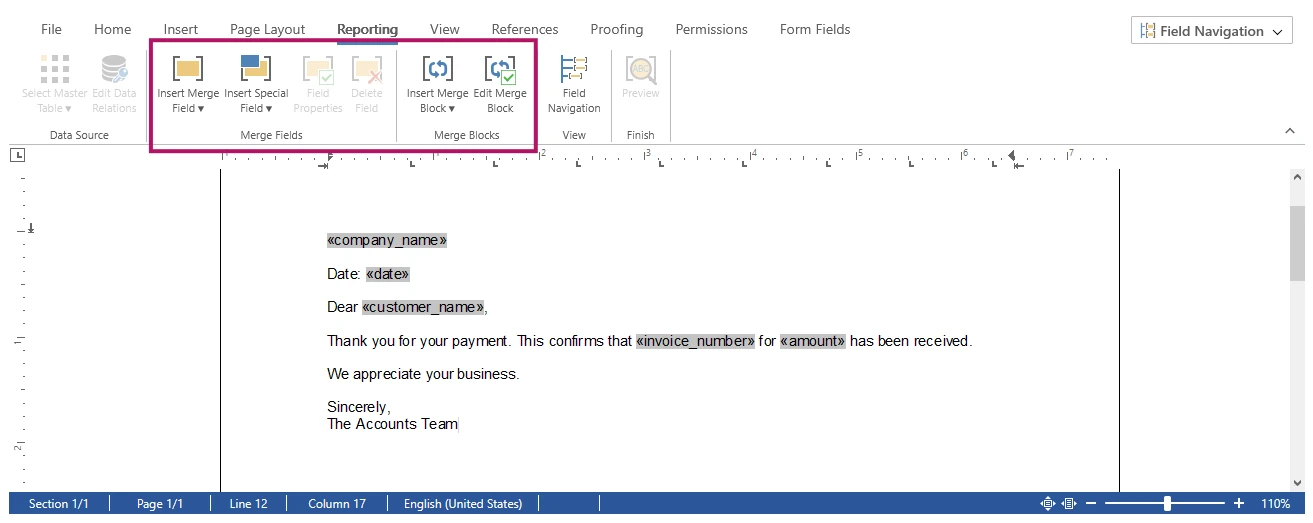
With the template saved as a DOCX file, the document can be generated using a headless ServerTextControl and the MailMerge class from TXTextControl.DocumentServer namespace:
using TXTextControl.DocumentServer;

// Recognize merge fields from the template when loading
TXTextControl.LoadSettings ls = new TXTextControl.LoadSettings()
{
    ApplicationFieldFormat = TXTextControl.ApplicationFieldFormat.MSWord
};

string jsonData = File.ReadAllText("data.json");

using (TXTextControl.ServerTextControl tx = new TXTextControl.ServerTextControl())
{
    tx.Create();

    // 1. Load the Word template
    tx.Load("template.docx", TXTextControl.StreamType.WordprocessingML, ls);

    // 2. Merge the JSON data into the template
    using (MailMerge mailMerge = new MailMerge())
    {
        mailMerge.TextComponent = tx;
        mailMerge.MergeJsonData(jsonData);
    }

    // 3. Save the result as an archivable PDF/A document
    TXTextControl.SaveSettings saveSettings = new TXTextControl.SaveSettings();
    tx.Save("result.pdf", TXTextControl.StreamType.AdobePDFA, saveSettings);
}
ServerTextControl is a non-visual document engine that runs server-side in ASP.NET applications, web services, and Windows services without a UI or Microsoft Office. Use StreamType.AdobePDFA to save a PDF/A document for long-term archiving, or AdobePDF to save a standard PDF. MergeJsonData accepts a single JSON object or an array of objects.
Running this produces the finished document, with each merge field replaced by its value and the result saved as an archivable PDF/A:
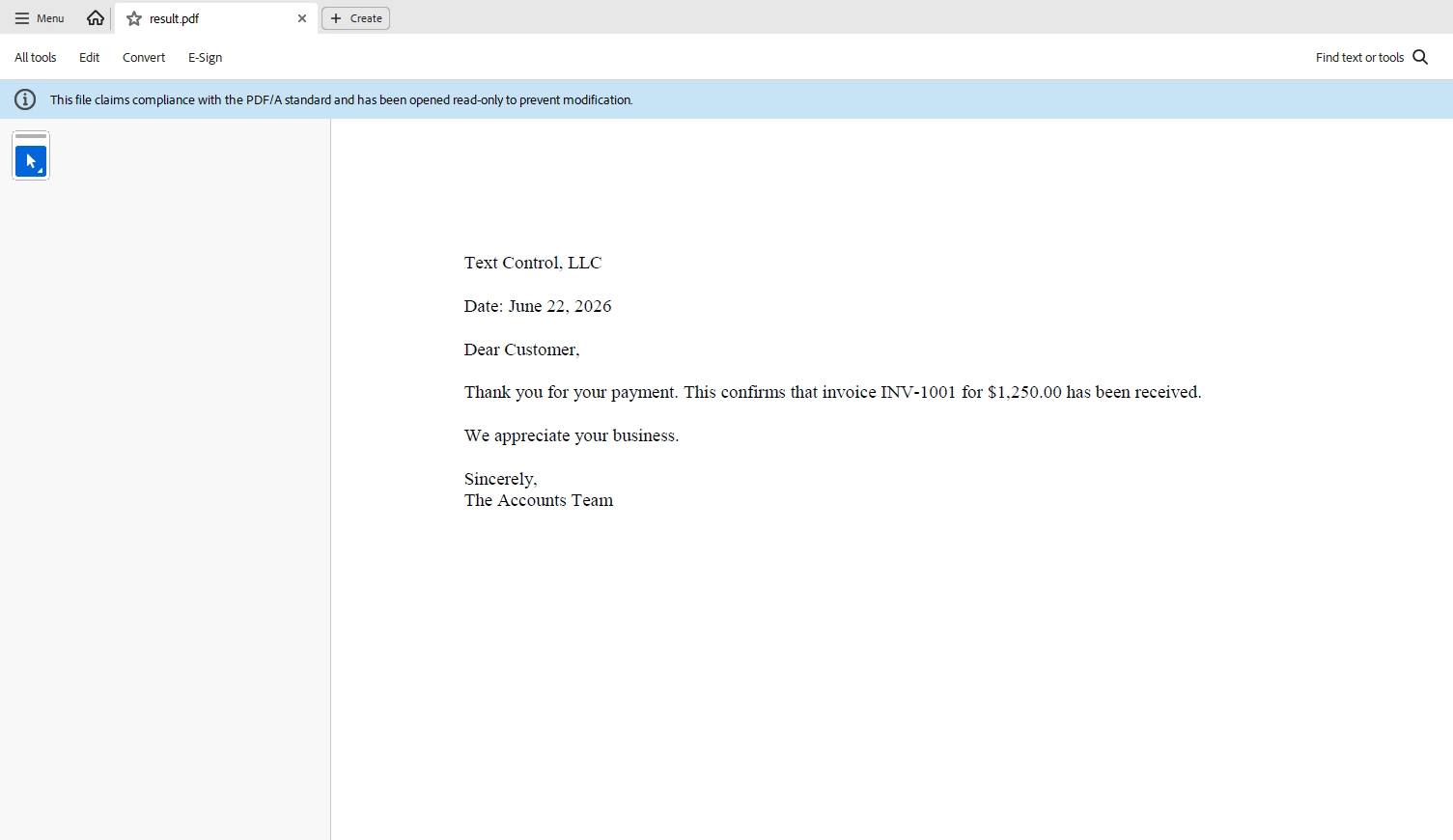
Your business owns the template, while the code remains thin. The document's wording, layout, and branding can change, but the merge logic rarely needs to. Building on this pattern, you can handle master-detail data with nested merge blocks, add image merge fields, and route the finished document to a signature workflow when required. This pattern keeps the whole process in a single pipeline.
How to Choose the Right Approach
Use this as a quick way to map an approach to your situation:
- Documents are fully defined in code -> a code-built or HTML-to-PDF library is enough.
- You only transform files server-side, no human authoring or review -> a headless format library fits.
- Humans author, edit, or review documents, and they must look exactly right -> a template-based, document model approach wins.
- The document lifecycle runs end-to-end (author, generate, render, sign), and you'd rather not stitch several vendors together -> the same template-based document model carries it through, which is the lowest-maintenance path.
Conclusion
Document generation in C# depends on where your templates live and who is allowed to change them. Code-built, HTML-to-PDF, and headless methods keep control in the hands of developers, requiring code changes for every update. A template-based document model allows content owners to design templates, while developers integrate data and manage rendering and signing within a single .NET stack. If documents are central to what you build, start by asking who edits the content, and how often. This will help you choose the right approach.
Explore TX Text Control reporting and mail merge to see template-based generation in action, review the Mail Merge component, and start a free trial to generate your first document from minimal implementation.
Frequently Asked Questions
Load a DOCX template that contains merge fields, then merge your data into it, and save the result to the format you need. With a template-based engine such as TX Text Control, the process is three steps: load, merge, and save. The template can be designed by non-developers in any word processor or document editor.
Use a mail merge engine that loads a template, merges data into it, and saves the result. With TX Text Control, you load a DOCX template containing merge fields into a headless ServerTextControl, merge your data with the MailMerge class (for example, MergeJsonData for JSON), and save the document as PDF or DOCX without Microsoft Office.
Yes. A self-contained .NET document engine converts DOCX templates to PDF (including PDF/A) directly, with no dependency on Microsoft Office or Adobe Acrobat being installed on the server.
Code-built generation defines the document structure entirely in source code, so every change requires developer involvement and redeployment. Template-based generation keeps the layout in an editable document, so business users can change wording and design without touching code while developers maintain the merge logic.
TX Text Control is well-suited to C# document generation when documents are central to your application, particularly when users author, edit, or review them. It combines template-based generation and mail merge with an embeddable Document Editor, so business users can design templates directly in your application while developers maintain the merge code and generate the documents programmatically. It runs headless on the server without Microsoft Office, outputs PDF and PDF/A, and covers the full document lifecycle from authoring to e-signature in a single .NET stack.
ASP.NET
Integrate document processing into your applications to create documents such as PDFs and MS Word documents, including client-side document editing, viewing, and electronic signatures.





- Angular
- Blazor
- React
- JavaScript
- ASP.NET MVC, ASP.NET Core, and WebForms
Related Posts
ASP.NETASP.NET CoreDocument Viewer
Native PDF Annotation Support Is Coming to the TX Text Control Document Viewer
The next version of the TX Text Control Document Viewer will introduce an important enhancement to PDF workflows: native support for PDF-compatible annotations. Users will be able to add…
Building a Browser-Based PDF Workflow for Medical Billing using .NET C#
Learn how to create a browser-based PDF workflow for medical billing with .NET C# and TX Text Control. TX Text Control .NET Server offers different components optimized for the individual parts of…
AI Natural Language Document Generation with MCP and TX Text Control .NET
This article explains how AI agents can use natural language to create documents through an MCP server. Instead of letting a language model generate documents directly, the AI translates prompts…
ASP.NETAccessibilityASP.NET Core
Validating PDF/UA Documents in .NET C#: A Practical Guide
This article explains how to validate PDF/UA documents in .NET C# using the TXTextControl.PDF.Validation NuGet package. It shows how to inspect validation status, generate JSON reports, handle…
Convert SSRS RDL Reports to DOCX and TX Text Control Templates in .NET C#
This article introduces TXTextControl.Rdl2Tx, a reusable .NET C# converter that imports SSRS RDL report definitions and creates editable DOCX and TX Text Control templates. It explains the RDL…