


True Document and PDF Text Redaction in .NET C#

Learn how to redact text in documents using TX Text Control .NET Server and export the document as a PDF. Redaction is the process of removing or obscuring sensitive or confidential information from a document before it is shared or published.

Text redaction is the process of removing or obscuring sensitive or confidential information from a document before it is shared or made public. This process ensures that private data, such as personal identifiers, financial details, or classified information, is masked to protect privacy, comply with regulatory requirements, and maintain data security. Redaction typically involves making the redacted information unreadable or inaccessible by masking or blacking out portions of text. It is widely used in various industries like:
- Legal
- Government
- Healthcare
- Finance
where secure document sharing is essential.
In digital document processing, redaction can include not only visible masking, but also the removal of underlying data to prevent unauthorized recovery. In this example, we use TX Text Control to redact selected text areas to create a 100% secure, redacted PDF document.
Redaction Process
For real redaction, the text must be completely removed and replaced with placeholders. The redaction process consists of the following steps:
- Load a document into TX Text Control.
- Identify the text areas that should be redacted.
- Replace text with dynamically created SVG images.
- Save the document as a PDF.
To do this, we will generate SVG images with the exact width and height of the text we want to remove. The TX Text Control API provides all necessary information about character boundaries and other required information. Consider the following document, where the Text
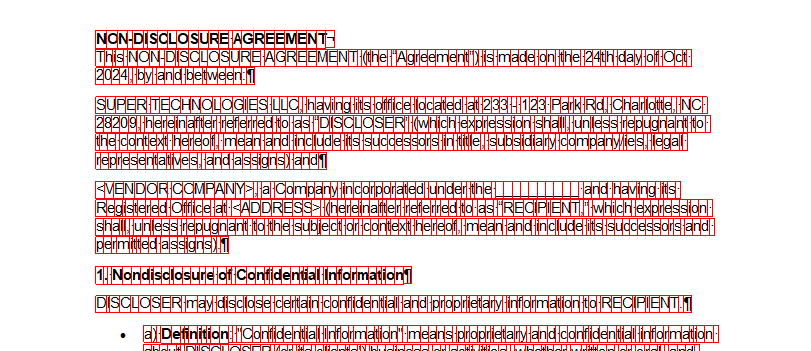
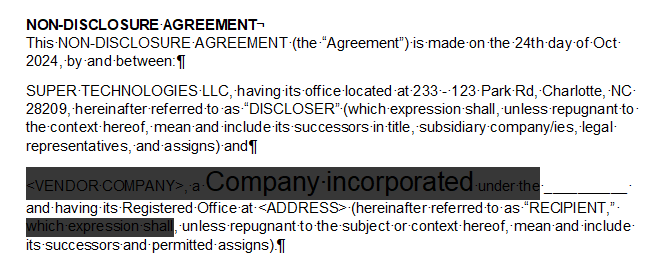
In the first step, the user selects text areas and converts them to Sub
SubTextPart subTextPart = new SubTextPart("tx_redact", 1);

subTextPart.HighlightColor = Color.FromArgb(200, Color.Black);
subTextPart.HighlightMode = HighlightMode.Always;

textControl1.SubTextParts.Add(subTextPart);
The following screenshot shows the inserted SubTextParts before conversion.
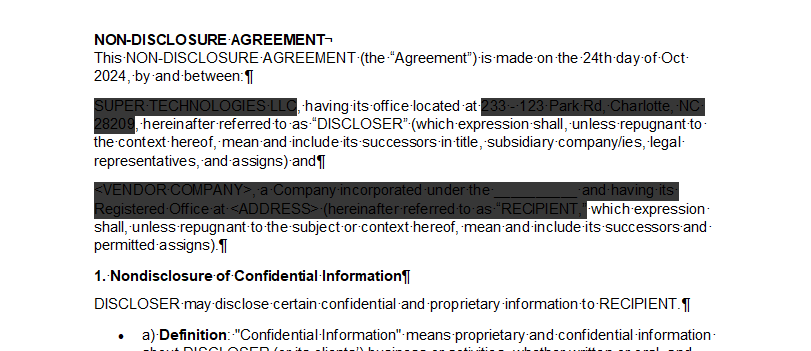
When all areas are selected, the following code iterates through all SubTextParts, stores the start and length indexes, and passes these values to the Redaction.RedactSelection method.
// store the redacted values
List<(int, int)> redactValues = new List<(int, int)>();

// get the enumerator
SubTextPartCollection.SubTextPartEnumerator enumerator = textControl1.SubTextParts.GetEnumerator();
enumerator.MoveNext();

int subTextPartCount = textControl1.SubTextParts.Count;

// iterate through all subtextparts
for (int i = 0; i < subTextPartCount; i++)
{
    SubTextPart subTextPart = (SubTextPart)enumerator.Current;

    if (subTextPart.Name == "tx_redact")
    {
        // store the redacted values
        redactValues.Add(new(subTextPart.Start - 1, subTextPart.Length));

        // remove the subtextpart
        textControl1.SubTextParts.Remove(subTextPart, true, true);
    }
}

int removedCharacterCount = 0;

// redact the values
foreach ((int start, int length) in redactValues)
{
    removedCharacterCount += Redaction.RedactSelection(start - removedCharacterCount, length, textControl1);
}
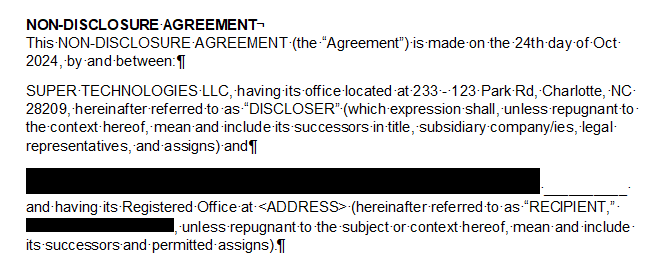
In the following screenshot you can see the dynamically generated SVGs that were inserted in red.
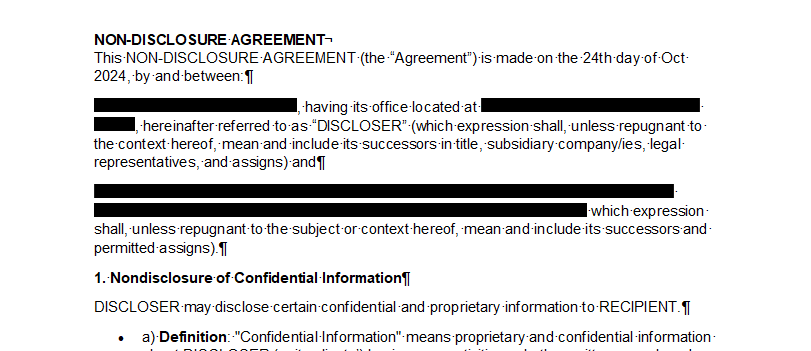
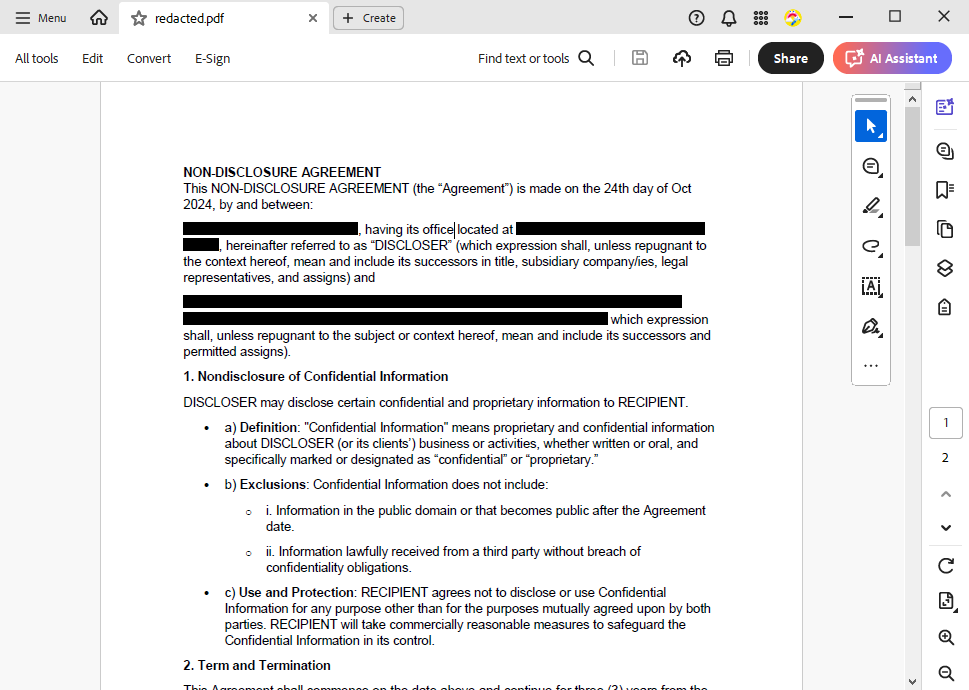
When you open the document in Acrobat Reader, the redacted text cannot be selected or copied because it has been completely removed and replaced with black SVGs.
Generating SVGs
The process itself is implemented in the Redaction class with the static method RedactSelection, which takes a start index, a length, and a ServerTextControl instance as parameters in the constructor.
using System.Text;
using TXTextControl;

public static class Redaction
{
    static int removedCharacterCount = 0;

    public static int RedactSelection(int start, int length, ServerTextControl textControl)
    {
        int currentLine = -1;
        int processLength = 0;
        int processStart = start;
        removedCharacterCount = length;

        List<RectangleF> characterBounds = new List<RectangleF>();

        for (int i = start; i < start + length; i++)
        {
            textControl.Select(i, 1);
            var curLine = textControl.Lines.GetItem(i);

            if (currentLine != curLine.Number)
            {
                if (characterBounds.Count > 0)
                {
                    // Process the accumulated line when switching lines
                    ProcessLine(textControl, ref processStart, ref processLength, characterBounds);
                    removedCharacterCount--;

                    // Adjust index and length to prevent reprocessing of characters
                    i = i - characterBounds.Count + 1;
                    processStart = i;
                    length = length - characterBounds.Count + 1;

                    currentLine = curLine.Number;
                    characterBounds.Clear();
                    processLength = 0;
                }
            }

            currentLine = curLine.Number;

            float lineBaseline = textControl.Lines[currentLine].Baseline;

            RectangleF currentCharBounds = textControl.TextChars[i + 1].Bounds;
            currentCharBounds.Height -= (currentCharBounds.Bottom - lineBaseline);

            // Add the current character bounds
            characterBounds.Add(currentCharBounds);
            processLength++;
        }

        // Process any remaining characters on the last line
        ProcessLine(textControl, ref processStart, ref processLength, characterBounds);

        return removedCharacterCount - 1;
    }

    private static void ProcessLine(ServerTextControl textControl, ref int processStart, ref int processLength, List<RectangleF> characterBounds)
    {
        if (characterBounds.Count == 0) return;

        textControl.Select(processStart, processLength);

        if (textControl.Selection.Text.EndsWith(' ') || textControl.Selection.Text.EndsWith('\n'))
        {
            textControl.Selection.Length -= 1;
            characterBounds.RemoveAt(characterBounds.Count - 1);
            removedCharacterCount--;
        }

        textControl.Selection.Text = "";

        byte[] svgBytes = GenerateSVGForChars(characterBounds);

        if (svgBytes.Length == 0) return;

        using (MemoryStream ms = new MemoryStream(svgBytes, 0, svgBytes.Length, writable: false, publiclyVisible: true))
        {
            TXTextControl.Image img = new TXTextControl.Image(ms);
            textControl.Images.Add(img, -1);
        }
    }

    private static byte[] GenerateSVGForChars(List<RectangleF> characterBounds)
    {
        if (characterBounds.Count == 0) return Array.Empty<byte>();

        var combinedBounds = GetBoundingRectangle(characterBounds);

        float baselineAdjustment = characterBounds[0].Bottom - combinedBounds.Bottom;
        combinedBounds.Height -= baselineAdjustment;

        return CreateRedactionSVG(combinedBounds.Size);
    }

    private static RectangleF GetBoundingRectangle(List<RectangleF> bounds)
    {
        float xMin = bounds.Min(b => b.Left);
        float yMin = bounds.Min(b => b.Top);
        float xMax = bounds.Max(b => b.Right);
        float yMax = bounds.Max(b => b.Bottom);
        return new RectangleF(xMin, yMin, xMax - xMin, yMax - yMin);
    }

    private static byte[] CreateRedactionSVG(SizeF size)
    {
        size.Width /= 20;
        size.Height /= 20;

        string svg = $"<svg xmlns=\"http://www.w3.org/2000/svg\" width=\"{size.Width}pt\" height=\"{size.Height}pt\"><rect width=\"100%\" height=\"100%\" fill=\"black\" /></svg>";
        return Encoding.UTF8.GetBytes(svg);
    }
}
The code basically creates images for contiguous characters for each line and replaces the text with the generated images. For performance and space reasons, contiguous characters are bundled and a new image is generated when the selection breaks a line. The generated image height is also dynamically calculated so that all font sizes are covered by the image.
The following screenshot shows the redacted text with a dynamically generated SVG. The line height is adjusted accordingly.
Live Demo
We have published this as a live demo in our online demos for you to try.
Live Demo
Try it live in our online demos and select text to redact and create a finished PDF document.
Conclusion
Text redaction is a critical process in many industries to protect sensitive information. The process of redacting text in a document can be automated using TX Text Control. The API provides all the necessary information to identify text areas and replace them with dynamically generated SVG images. The resulting PDF document is 100% secure and the redacted text cannot be selected or copied.
Download the Redaction class code from GitHub and try it yourself.

Download and Fork This Sample on GitHub
We proudly host our sample code on github.com/TextControl.
Please fork and contribute.
Requirements for this sample
- TX Text Control .NET Server
ASP.NET
Integrate document processing into your applications to create documents such as PDFs and MS Word documents, including client-side document editing, viewing, and electronic signatures.





- Angular
- Blazor
- React
- JavaScript
- ASP.NET MVC, ASP.NET Core, and WebForms
Related Posts
Why HTML to PDF Conversion is Often the Wrong Choice for Business Documents…
In this article, we explore the challenges of HTML to PDF conversion for business documents in C# .NET and present alternative solutions that offer better performance and reliability. Discover why…
A Complete Guide to Converting Markdown to PDF in .NET C#
Learn how to convert Markdown to PDF in .NET C# using Text Control's ServerTextControl component. This guide covers setup, conversion process, and customization options for generating high-quality…
ASP.NETASP.NET CoreDocument Creation
Why PDF Creation Belongs at the End of the Business Process
This article discusses why placing PDF creation at the end of the business process is important for ensuring accuracy and efficiency. The most scalable systems delay PDF generation until the…
Designing the Perfect PDF Form with TX Text Control in .NET C#
Learn how to create and design interactive PDF forms using TX Text Control in .NET C#. This guide covers essential features and best practices for effective form design.
Why Defining MIME Types for PDF/A Attachments Is Essential
The PDF/A standard was created to ensure the long-term reliable archiving of digital documents. An important aspect of the standard involves properly handling embedded files and attachments within…