


Adding Fold Marks and Punch Marks to Documents using Drawings in C#

This article shows how to add fold marks and punch marks to documents using drawings in C#. The sample shows how to create a drawing with fold marks and punch marks and how to add this drawing to a document.

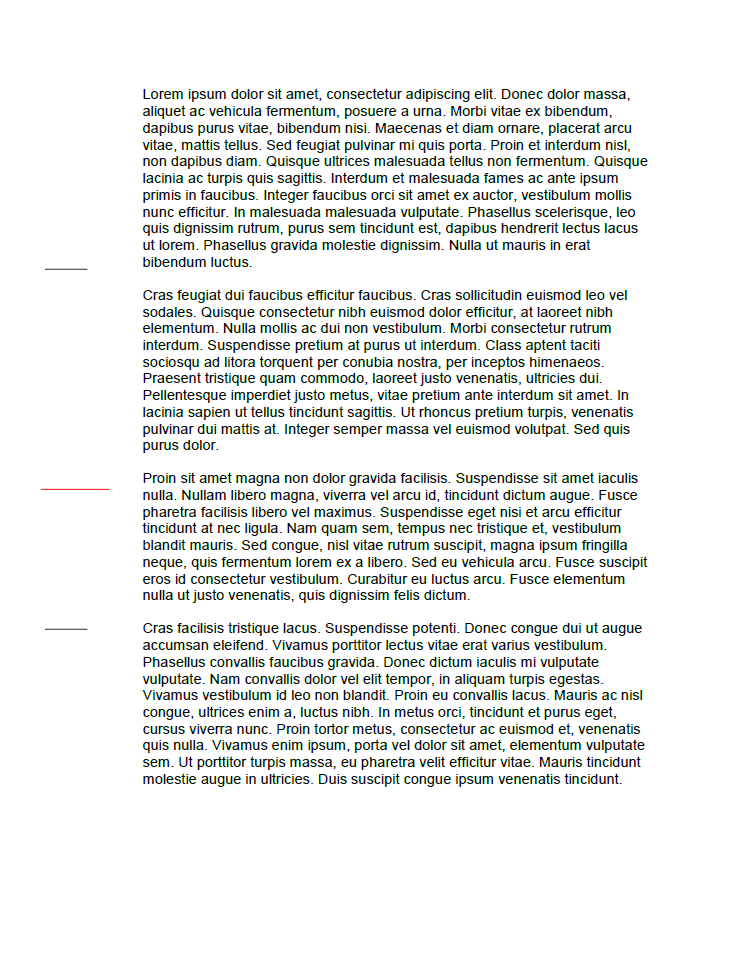
Especially important for letters that need to fit into standard envelopes, fold marks are guidelines that help you fold documents accurately. DIN 5008:2011 is a German standard ("Falzmarken") that provides guidelines for document layout and formatting. These marks are used to ensure that when a document is folded, the text will remain in alignment and will fit properly in a standard DL envelope (220 x 110 mm).
Inserting Drawings
To create these marks, you can use the drawing feature of TX Text Control and insert these marks in the header to position them behind the text, overlapping the left margin. The following code shows how to create these fold marks using TX Text Control:
private void InsertFoldingMark(double top, int width, Color color, HeaderFooter headerFooter, TextControl textControl)
{
        textControl.PageUnit = MeasuringUnit.Twips;

        // create a new drawing control
        TXTextControl.Drawing.TXDrawingControl drawing =
                new TXTextControl.Drawing.TXDrawingControl(3000, 1000);

        // create a new line shape object
        TXTextControl.Drawing.Shape shape =
                new TXTextControl.Drawing.Shape(TXTextControl.Drawing.ShapeType.Line);

        // set the color and border width
        shape.ShapeOutline.Color = color;
        shape.ShapeOutline.Width = 20;
        shape.Angle = -45;
        shape.Movable = false;
        shape.Sizable = false;

        // add the shape to the drawing control
        drawing.Shapes.Add(
                shape,
                TXTextControl.Drawing.ShapeCollection.AddStyle.Fill);
        shape.Size = new Size(width, width);

        // create a new drawing frame object from the created drawing control
        TXTextControl.DataVisualization.DrawingFrame frame =
                new TXTextControl.DataVisualization.DrawingFrame(drawing);

        frame.Sizeable = false;
        frame.Moveable = false;

        var leftOffset = textControl.Sections[headerFooter.Section].Format.PageMargins.Left - MmToTwips(12);
        var topOffset = textControl.Sections[headerFooter.Section].Format.PageMargins.Top;

        // add the frame to the document
        headerFooter.Drawings.Add(
                frame,
                new Point(-(int)leftOffset,
                (int)(MmToTwips(top) - topOffset)),
                FrameInsertionMode.BelowTheText | FrameInsertionMode.FixedOnPage);
}

public static double MmToTwips(double mm)
{
        const double mmPerInch = 25.4;
        const double twipsPerInch = 1440;

        double inches = mm / mmPerInch;
        double twips = inches * twipsPerInch;
        return twips;
}
The above function can be called to insert the two typical fold marks and a punch mark:
textControl1.Sections.GetItem().HeadersAndFooters.Add(HeaderFooterType.Header);

HeaderFooter header = textControl1.Sections.GetItem().HeadersAndFooters.GetItem(HeaderFooterType.Header);

// folding mark 1
InsertFoldingMark(87, 500, Color.Black, header, textControl1);

// folding mark 2
InsertFoldingMark(192, 500, Color.Black, header, textControl1);

// punch hole center mark
InsertFoldingMark(148.5, 800, Color.Red, header, textControl1);
These fold marks are inserted into the header of the document. The resulting document looks like this:
Conclusion
Using TX Text Control, you can easily create fold marks for your documents. These marks are especially useful for letters that need to be folded and inserted into standard envelopes. The fold marks are inserted into the header of the document and are positioned behind the text, overlapping the left margin.
ASP.NET
Integrate document processing into your applications to create documents such as PDFs and MS Word documents, including client-side document editing, viewing, and electronic signatures.





- Angular
- Blazor
- React
- JavaScript
- ASP.NET MVC, ASP.NET Core, and WebForms
Related Posts
Why HTML to PDF Conversion is Often the Wrong Choice for Business Documents…
In this article, we explore the challenges of HTML to PDF conversion for business documents in C# .NET and present alternative solutions that offer better performance and reliability. Discover why…
ASP.NETASP.NET CoreTracked Changes
Inspect and Process Track Changes in DOCX Documents with TX Text Control…
Collaborative document editing is a core requirement in many modern applications. In this article, we will explore how to inspect and process track changes in DOCX documents using TX Text Control…
Text Control at BASTA! Spring 2026 in Frankfurt
This week, we sponsored the BASTA! Spring 2026 conference in Frankfurt, Germany. We had a booth in the exhibition area and presented our products to the attendees. We also had the opportunity to…
From Legacy Microsoft Office Automation to a Future-Ready Document Pipeline…
In this article, we will explore how to transition from traditional office automation to a modern document pipeline using C# and .NET. We will discuss the benefits of adopting a future-ready…
We are Gold Partner at Techorama Belgium 2026
Text Control has officially signed the contract to become a Gold Partner of Techorama Belgium 2026! Techorama is one of the largest and most prestigious technology conferences in Belgium,…