


Sharing Documents with ReportingCloud

ReportingCloud introduces a DocumentViewer widget that embeds shared documents into any website. The new document/share endpoint returns an encrypted hash pointing to a template in cloud storage. Adding the widget requires only a script tag and a data-document attribute in HTML.

We just published a new beta feature of ReportingCloud that enables developers to embed the ReportingCloud DocumentViewer using a lightweight widget into any website.
This way, you can show your created documents on your website using a fully-featured, HTML/JavaScript-based and responsive DocumentViewer. The following sample document is delivered directly from ReportingCloud through the DocumentViewer widget:
Technically, all you need to do is to include the widget code into your website:
<div data-document="" id="reportingcloud-documentviewer"></div>
<script async src="https://portal.reporting.cloud/scripts/reportingcloud.js" charset="utf-8">
</script>
The new endpoint document/share returns the encrypted document share path that needs to be added to the data-document attribute.
https://api.reporting.cloud/v1/document/share
| Query Parameter | Value Type | Value |
|---|---|---|
| templateName | String | Specifies the template name in the template storage. |
Consider the following workflow: In an online store, a customer is buying products and receives an invoice for the purchased products. The invoice template is created in advance using the ReportingCloud template designer. After the transaction, the template is merged with the transaction data to create an invoice. This invoice can be delivered to the buyer via e-mail or it can be linked to be downloaded. Additionally, the ReportingCloud DocumentViewer widget can be used to share the document immediately on the website.
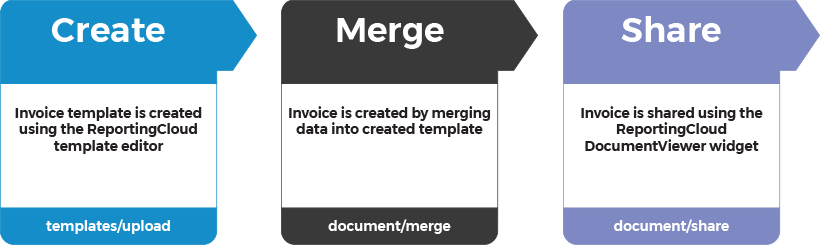
The document is stored in the private ReportingCloud template storage and delivered directly through ReportingCloud. The document share location is encrypted in the hash value that is returned by the endpoint document/share.
Just another great idea to provide a fully-featured document workflow directly delivered through the cloud.
Test this on your own and create a ReportingCloud trial account today.
Happy coding!
Cloud
Are we moving to the cloud? This question is changing from "if" to "when" and "how". Text Control ReportingCloud brings complete reporting functionality to the cloud so all developers can use it, irrespective of the platform or language they're using. Its highly RESTful API can be used to merge Microsoft Word compatible templates with JSON data from all clients including .NET, Javascript, PHP, Node.JS, jQuery, Ruby, Python, Android, Java and iOS.
Related Posts
CloudMicroservicesReportingCloud
The End of Monolithic Applications? Outsource Your Document Generation and…
Microservices decompose monolithic applications into independently deployable components that scale and update without affecting the full system. ReportingCloud operates as a document generation…
CloudReportingCloudSample Templates
ReportingCloud: Sample Template Gallery Launched
The ReportingCloud portal now features a sample template gallery with tagged, filterable entries. Each template includes a description and animated merge preview. The Add to My Templates button…
ReportingCloud .NET Core Wrapper Released: Creating Documents on Windows,…
The ReportingCloud .NET Core wrapper ships as the TXTextControl.ReportingCloud.Core NuGet package for cross-platform document generation on Windows, macOS, and Linux. It matches the standard .NET…
Proofing Tools Available As ReportingCloud Web API Endpoints
ReportingCloud introduces three proofing Web API endpoints for cloud-based spell checking. The proofing/check endpoint detects misspelled words and duplicates, proofing/suggestions returns ranked…
All Google Fonts Now Available in ReportingCloud
ReportingCloud now includes over 2000 Google Fonts on its servers, ensuring consistent rendering across merged documents. The fonts/list endpoint returns all available font names for programmatic…