


Creating Conference Badges with Text Control Reporting

TX Text Control Reporting generates double-sided conference badges using merge blocks and XML data sources. Each badge template includes attendee names, ticket types, badge numbers, and vCard-encoded QR codes. The Magdeburger Developer Days 2017 attendee badges demonstrate the workflow.

On May 10-11 2017, the Magdeburger Developer Days are taking place the second time in Magdeburg, Germany. In 40+ sessions, top speakers talk about .NET, Java, web technologies, databases and ALM. Our MVP André Krämer is giving a talk about cross-platform app development.
As one of the main sponsors, we are also sponsoring the attendee badges. And of course, these badges are created with Text Control Reporting. In this article, we would like to explain how easy it is to create fully-featured conference badges with TX Text Control.
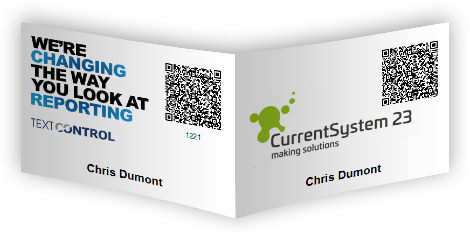
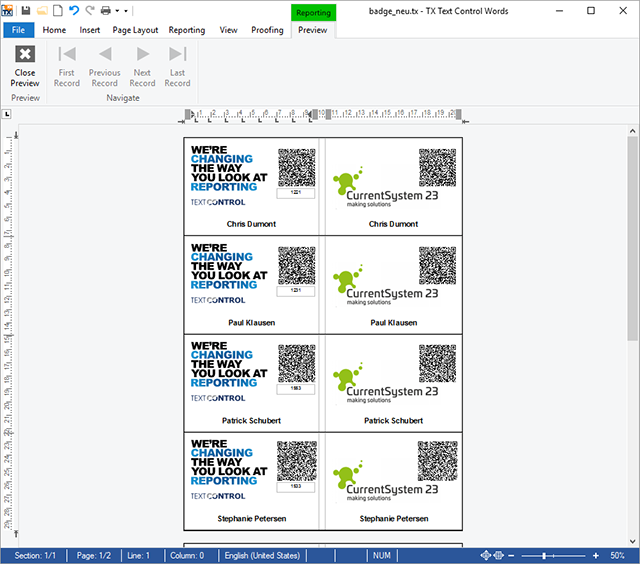
The badges should have two sides and will be folded in the middle to fit into the double-sided badge holders. Both sides should have a sponsor logo, the attendee name, the attendee vCard information encoded in a QR Code and a badge number. The QR Code allows attendees an easy exchange of contact information simply by scanning the code using their smartphones.
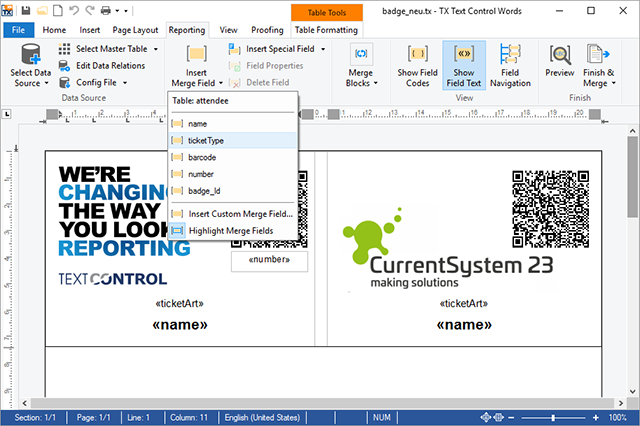
The template consists of a table with 2 columns with the exact required height for the badge. Each column represents a side of the badge and therefore contains data from the same data row. Additionally, it contains the merge fields for the name, ticket type and badge number. The QR Code contains the encoded vCard information.
This complete table will be converted into a merge block that gets repeated for all attendees in the data source.
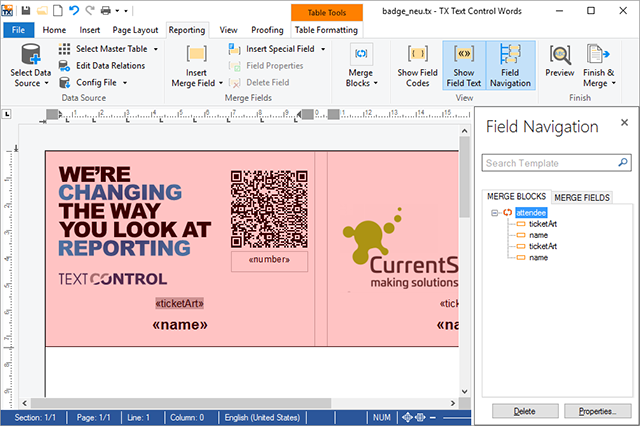
The following is an excerpt of the XML data source. The name of the repeating block is attendee that holds the data for each badge instance:
<badges>
        <badge>
                <attendee>
                        <name>Chris Dumont</name>
                        <ticketType>Mo - Di</ticketType>
                        <barcode>
                                BEGIN:VCARD
                                VERSION:2.1
                                FN:Chris Dumont
                                N:Dumont;Chris
                                EMAIL;WORK;
                                ORG:ACME Inc.
                                END:VCARD
                        </barcode>
                        <number>1221</number>
                </attendee>
                <attendee>
                        <name>Paul Klausen</name>
                        <ticketType>Mo - Di</ticketType>
                        <barcode>
                                BEGIN:VCARD
                                VERSION:2.1
                                FN:Paul Klausen
                                N:Klausen;Paul
                                EMAIL;WORK;
                                ORG:ACME Inc.
                                END:VCARD
                        </barcode>
                        <number>1231</number>
                </attendee>
        </badge>
</badges>
Merging this template results in perfectly sized, print-ready badges:
If you plan to attend this conference, the ticket sales open March 1st.
See you in Magdeburg!
Reporting
The Text Control Reporting Framework combines powerful reporting features with an easy-to-use, MS Word compatible word processor. Users can create documents and templates using ordinary Microsoft Word skills. The Reporting Framework is included in all .NET based TX Text Control products including ASP.NET, Windows Forms and WPF.
Related Posts
Impressions from NDC London 2020
We sponsored NDC London 2020 and exhibited at the 3 day event showing our latest Angular and Node.js versions of TX Text Control.
What a Year! 2019 Recap and Outlook 2020
Text Control shipped TX Text Control X17 with high DPI support, launched Angular and Node.js technology previews, and sponsored 14 developer conferences globally in 2019. Version X18 will…
Impressions from DDC in Cologne
Text Control exhibited at DDC (.NET Developer Conference) in Cologne, presenting early TX Text Control X18 betas with forms processing and the Angular technology preview. The week-long event…
See Text Control at DDC in Cologne
Text Control exhibits at the .NET Developer Conference (DDC) in Cologne, closing the 2019 conference season. The event covers Architecture, Backend, Frontend, and Tooling tracks, while the booth…
Impressions from DEVintersection Fall 2019
Text Control exhibited at DEVintersection Fall 2019 at the MGM Grand in Las Vegas, demonstrating the Angular technology preview and early TX Text Control X18 builds. The booth featured product…