


Special Offer: Free Barcode Control when Pre-ordering TX Text Control X9

TX Text Control X9 released alongside TX Barcode .NET in April 2013, adding improved odd and even page headers and footers, a new header frame style with section labels, native barcode support, built-in context menus with icon sets, and MailMerge chart and barcode merging.

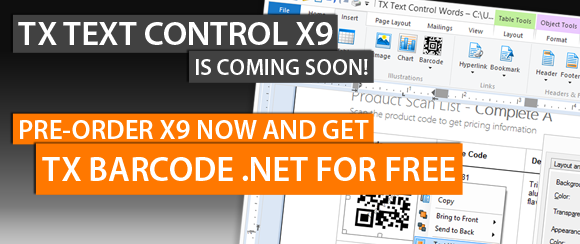
We just entered the final testing phase for our new release TX Text Control X9 (19.0). At the same time, we will release a new product to integrate barcodes into documents: TX Barcode .NET.
TX Text Control X9 and TX Barcode .NET will be released in April 2013.
The special offer:
Pre-order TX Text Control X9 Subscription now and get TX Barcode .NET for free
How does it work?
- Simply order a TX Text Control X8 (18.0) Subscription (Full, Update or Renewal)
- You will get TX Text Control X9 immediately on release day
- You will get TX Barcode .NET Subscription (value: $698) for free on release day
Pre-order TX Text Control X9 Subscription
Or Call: +1 704 544 7445 (US), +49 421 427067 10 (Europe)
New and Improved Features in TX Text Control X9
Below is only a small selection of new and updated features of TX Text Control X9:
-
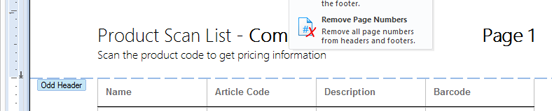
Improved Headers and Footers: Odd and Even Pages
Text Control now supports different headers and footers for the even and odd pages of the whole document or of a single section.
-
Headers and Footers: New Frame Style with Information Area
A new frame style is available for activated headers and footers. A dividing line has a label indicating the type of the header or footer (even, odd, first page).
Additionally, the label displays the current section number and if the header or footer is connected to the previous header or footer. This gives the user a much better overview of the current document settings and layout.

-
Native support for barcodes from TX Barcode .NET
Using TX Barcode .NET for Windows Forms you can add fast and accurate 1D and 2D barcodes to your .NET based applications. TX Barcode .NET for Windows Forms has been designed for the specific requirements when integrated in documents such as invoices.

-
Built-in Context Menus and Icon Sets
TX Text Control .NET for Windows Forms X9 now implements built-in, ready-to-use and customizable context menus. Depending on the area where the right mouse button has been clicked, a menu with standard options for this area is shown.


-
Reporting: MailMerge Supports Charts and Barcodes Natively
The MailMerge component is now merging data into DataVisualization.ChartFrame and DataVisualization.BarcodeFrame objects.

The special offer:
Pre-order TX Text Control X9 Subscription now and get TX Barcode .NET for free
How does it work?
- Simply order a TX Text Control X8 (18.0) Subscription (Full, Update or Renewal)
- You will get TX Text Control X9 immediately on release day
- You will get TX Barcode .NET Subscription (value: $698) for free on release day
Pre-order TX Text Control X9 Subscription
Or Call: +1 704 544 7445 (US), +49 421 427067 10 (Europe)
Related Posts
Announcing TX Text Control DS Server 5.0
We are excited to announce the release of TX Text Control DS Server 5.0. This release focuses on extensibility, plugin integration, and developer productivity while continuing to improve the…
TX Text Control 34.0 SP2 is Now Available: What's New in the Latest Version
TX Text Control 34.0 Service Pack 2 is now available, offering important updates and bug fixes for all platforms. If you use TX Text Control in your document processing applications, this service…
TX Text Control 34.0 SP1 is Now Available: What's New in the Latest Version
TX Text Control 34.0 Service Pack 1 is now available, offering important updates and bug fixes for all platforms. If you use TX Text Control in your document processing applications, this service…
Introducing TX Text Control 34.0: Your Next Leap in Document Processing
We are happy to announce the release of TX Text Control 34.0. This version is packed with new features and enhancements that will elevate your document processing experience. This version…
PDF/UA vs. PDF/A-3a: Which Format Should You Use for Your Business Application?
In this blog post, we will explore the differences between PDF/UA and PDF/A-3a, helping you choose the right format for your business needs. We will discuss the key features, benefits, and use…