


X8 Service Pack 2: New MailMerge Features in TX Words

TX Text Control X8 Service Pack 2 updates the TX Words template designer with a redesigned Mailings ribbon tab that separates Merge Block controls from merge fields. Users can insert repeating blocks from database tables, choose paragraph or table layouts, and preview merged data.

Service Pack 2 for TX Text Control .NET X8 doesn't include only bug fixes and the Visual Studio 2012 Compatibility Pack. It comes with a new version of the MailMerge/Reporting template designer TX Words with an updated Mailings ribbon tab.

The Merge Block menu actions are separated out from the merge fields. You can easily insert merge blocks from existing data tables or you can add custom blocks by specifying a name.
Given that a database has been selected using the Select Data Source button, the Insert Merge Block drop down button lists all available tables.
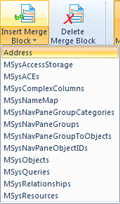
When selecting a table in that list, a dialog opens and can be used to choose the table columns for the new merge block.
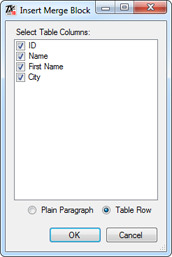
Additionally, you can specify whether the repeating block should be inserted as a paragraph or as a table with columns for each database field. When confirming with OK, a new merge block is added to the template:

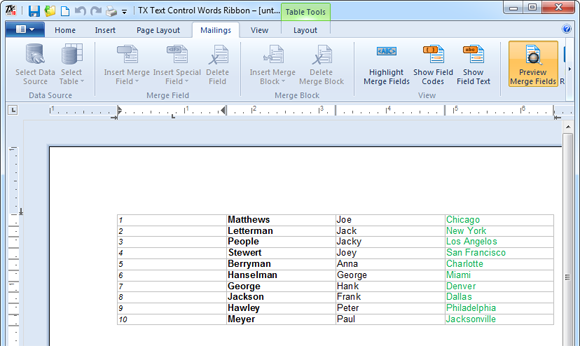
This repeating block is also included in the Preview functionality now. Click on Preview Merge Fields and see how the repeating block looks like:
If you did not download and install Service Pack 2 yet, please read the instructions here:
TX Text Control X8 SP2 - Visual Studio 2012 Compatibility Pack released
Related Posts
Announcing TX Text Control DS Server 5.0
We are excited to announce the release of TX Text Control DS Server 5.0. This release focuses on extensibility, plugin integration, and developer productivity while continuing to improve the…
TX Text Control 34.0 SP2 is Now Available: What's New in the Latest Version
TX Text Control 34.0 Service Pack 2 is now available, offering important updates and bug fixes for all platforms. If you use TX Text Control in your document processing applications, this service…
TX Text Control 34.0 SP1 is Now Available: What's New in the Latest Version
TX Text Control 34.0 Service Pack 1 is now available, offering important updates and bug fixes for all platforms. If you use TX Text Control in your document processing applications, this service…
Introducing TX Text Control 34.0: Your Next Leap in Document Processing
We are happy to announce the release of TX Text Control 34.0. This version is packed with new features and enhancements that will elevate your document processing experience. This version…
PDF/UA vs. PDF/A-3a: Which Format Should You Use for Your Business Application?
In this blog post, we will explore the differences between PDF/UA and PDF/A-3a, helping you choose the right format for your business needs. We will discuss the key features, benefits, and use…