


Upcoming TX Spell .NET 3.0 Features

TX Spell .NET 3.0 achieves 97 percent suggestion accuracy using keyboard distance analysis and large typo datasets. New features include a standalone event-based spell check dialog usable with any control, customizable context menus via the GetMenuItems method, and dictionary events.

Version 2.0 of our very own spell checking component already set new standards in spell checking performance and accuracy. For 7 months, the TX Spell .NET team has been working on improvements and fantastic new features coming in version 3.0 that we plan to simship with the new TX Text Control release.
I thought to give you a quick overview of what we did and what you can expect.
Suggestion Quality
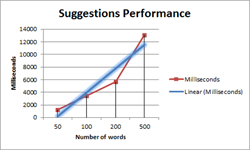
Version 2.0 delivered very good quality in suggestion results for misspelled words. The team did a great job on doing research on how to improve the suggestions even more. The goal was to have the desired suggestion of the misspelled word ranked at position 1 or 2 in the list of suggestions in more than 90% of all cases. We analyzed internal chat protocols and loads of test documents for misspelled words and typical typos. The distance between the keys on the currently used keyboard is measured and the results are evaluated and rated. Based on our huge collection of test documents with thousands of typos and misspelled words, our engineers reached a level of 97%.
If you want to learn more about the science behind suggestions, read this article:
TX Spell .NET: Exploring the science behind suggestions
Event-based Spell Check Dialog
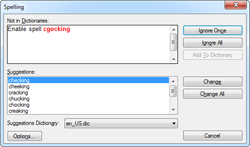
Currently, the spell check dialog is integrated into TX Text Control and can be used in combination with TX Spell .NET. In version 3.0, TX Spell .NET provides a user dialog that can be customized and used with TX Text Control or any other controls such as the RichTextBox, a simple TextBox or a GridView.
Each dialog action fires an event that can be handled based on the used control.
Customized Context Menus
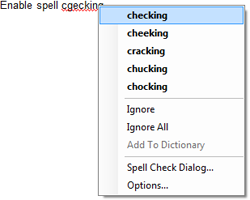
The new GetMenuItems method returns valid MenuItems that can be used to easily fill your own context menu.
This gives the possibility to build a MenuStrip with the most common TX Spell .NET features. Effortlessly, you can create a customizable context menu with the incorrect word, the ranked suggestions and you can define the number of suggestions.
New Events for TX Spell .NET
Version 3.0 provides the following events for several scenarios:
- DictionaryAdded
Occurs when a dictionary is added to the TXSpellChecker.Dictionaries DictionaryCollection. - DictionaryRemoved
Occurs when a dictionary is removed from the TXSpellChecker.Dictionaries DictionaryCollection. - UserDictionaryWordAdded
Occurs when a word is added to a user dictionary. - UserDictionaryWordRemoved
Occurs when a word is removed from a user dictionary. - Complete events for all spell check dialog buttons and context menu items.
These are just some of the new and improved features of TX Spell .NET 3.0. Stay tuned to learn more.
++ NEW RELEASE PREVIEW ++ NEW RELEASE PREVIEW ++ NEW RELEASE PREVIEW ++
TX Spell .NET 3.0 is not released yet. Make sure that you have a valid subscription to get hands on this new version immediately when it is released. Login to your store account to verify your subscription status and update today: Text Control Store.
Related Posts
Announcing TX Text Control DS Server 5.0
We are excited to announce the release of TX Text Control DS Server 5.0. This release focuses on extensibility, plugin integration, and developer productivity while continuing to improve the…
TX Text Control 34.0 SP2 is Now Available: What's New in the Latest Version
TX Text Control 34.0 Service Pack 2 is now available, offering important updates and bug fixes for all platforms. If you use TX Text Control in your document processing applications, this service…
TX Text Control 34.0 SP1 is Now Available: What's New in the Latest Version
TX Text Control 34.0 Service Pack 1 is now available, offering important updates and bug fixes for all platforms. If you use TX Text Control in your document processing applications, this service…
Introducing TX Text Control 34.0: Your Next Leap in Document Processing
We are happy to announce the release of TX Text Control 34.0. This version is packed with new features and enhancements that will elevate your document processing experience. This version…
PDF/UA vs. PDF/A-3a: Which Format Should You Use for Your Business Application?
In this blog post, we will explore the differences between PDF/UA and PDF/A-3a, helping you choose the right format for your business needs. We will discuss the key features, benefits, and use…