


TX Text Control Smart-Tags: Connecting the Controls with Ease

Visual Studio Smart-Tags in TX Text Control .NET for Windows Forms 15.0 provide design-time access to ViewMode, Dock, and Text properties. A built-in wizard automatically arranges ButtonBar, RulerBar, and StatusBar on the form and generates the required code to connect these controls.

In TX Text Control .NET for Windows Forms 15.0, we introduced the Visual Studio Smart-Tags. This tag is a menu-like interface that supply commonly used design-time options like changing the Dock property.
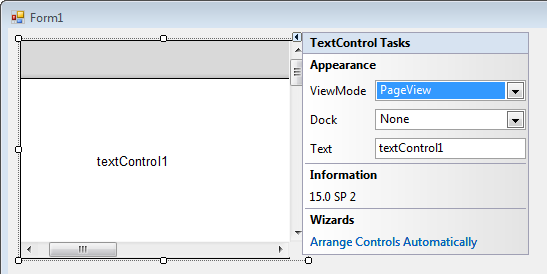
In TX Text Control .NET for Windows Forms 15.0, we implemented a Smart-Tag that helps to adjust the control with the typical settings. Possible settings are:
- ViewMode
- Dock
- Text
Additionally, the Smart-Tag always shows the current version of TX Text Control including the installed service pack.
A very nice feature is the wizard to connect the different controls such as ButtonBar, RulerBar and StatusBar automatically. To use this wizard, you need to drag and drop all controls to the form and click Arrange Controls Automatically.
The wizard looks for existing controls and arranges them in the current parent container like a form or a panel control. Additionally, the wizard inserts the required code to connect these controls.
The screencast video shows this wizard in action.
Related Posts
TX Text Control .NET for Windows Forms Help and Support Center
A newly published video tours the Help and Support Center bundled with TX Text Control .NET for Windows Forms and TX Text Control Server for ASP.NET (incl. Windows Forms). It covers the API…
New Sample: Implementing a 'paste Special' Dialog Box
A Paste Special dialog for TX Text Control lets users select which clipboard format to insert: RTF, plain text, or Unicode text. Since MS Word stores all three simultaneously on copy, the dialog…
Resize Images to Fit into Page
Pasted screenshots that exceed the page width can be automatically scaled via the ImageCreated event in TX Text Control for Windows Forms. The handler converts twips to pixels, computes a ratio…
Getting Started Video Tutorial: Using DS Server with Docker
This video tutorial demonstrates how to quickly set up a Docker container with your own on-premises DS Server backend. You'll learn how to spin up the container in just seconds and configure it to…
ASP.NETASP.NET CoreDocument Editor
Getting Started Video Tutorial: Document Editor in ASP.NET Core C# on Linux
This video tutorial shows how to use the Document Editor in an ASP.NET Core application using C# and deploy on Linux using Docker. This tutorial is part of the TX Text Control Getting Started…