


New Sample: Printing to Different Paper Trays

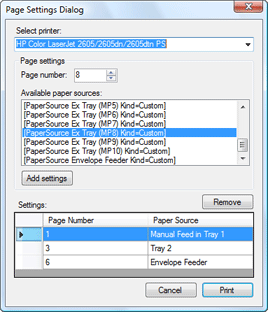
A new TX Text Control .NET for Windows Forms sample demonstrates printing specific document pages to different paper sources on the current printer. The project includes a configurable dialog box for per-page paper tray assignments that can be reused in custom applications.

We just released a new sample for TX Text Control .NET for Windows Forms. This sample shows how to print specific pages of a document to different paper sources of the current printer.
The sample implements a very nice dialog box to adjust these settings. Feel free to use and modify it in your application.
Related Posts
Batch Printing: How to Print Documents in One Print Job
Batch printing multiple documents as a single print job using TX Text Control relies on a .NET PrintDocument with PrintPage and QueryPageSettings events. Each page is rendered individually via the…
Printing into a PrintPreview Control
TX Text Control .NET for Windows Forms provides a built-in PrintPreview method, but the standard .NET PrintPreviewDialog offers broader customization options. This sample shows how to use the…
Printing Without the Status Dialog
The default .NET print controller displays a progress status dialog during printing operations. Replacing PrintControllerWithStatusDialog with StandardPrintController from System.Drawing.Printing…
Landscape Printing with a PrintDocument
When printing with a PrintDocument object in TX Text Control .NET for Windows Forms, page orientation is not transferred automatically. This C# function creates a PrintDocument, compares page…
Printing into a PrintDocument
TX Text Control .NET for Windows Forms prints into a standard .NET PrintDocument object, giving full control over page size, margins, and printer settings. To print a single page, set PrintRange…