


AI-Ready Legal Documents: What to Fix Before Adding AI

Summerization, analysis, and risk detection: AI can help legal professionals process documents faster and more efficiently. However, before integrating AI into your legal document workflows, it's crucial to ensure the documents are properly prepared. This article explores key areas to address to make your legal documents AI-ready.

AI is becoming increasingly integrated into legal workflows. Summarization, clause analysis, risk detection, and change explanation are now technically possible. However, many legal AI initiatives either stall or produce unreliable results, not because the AI is inadequate, but because the documents are.
Before adding AI to legal workflows, the document layer must be improved. Text Control plays a decisive role here by turning legal documents into structured, reliable, machine-readable assets that AI can safely build on.
Documents are the hidden bottleneck of legal AI
Large language models do not actually understand documents. They interpret text. If the structure, semantics, and intent of a legal document are implicit, inconsistent, or lost during processing, the AI's output will be vague, unverifiable, and legally risky.
Legal AI only succeeds when documents are treated as data, not files.
Text Control was built around this principle long before legal AI became popular. Its document processing engine preserves structure, metadata, changes, and compliance signals throughout the entire document lifecycle.
Fix the format before you fix the model
Legal departments work with various file types, including DOCX, PDF, scanned documents, and sometimes Markdown. From an AI perspective, these formats are not equivalent.
For example, a visually correct PDF may contain no structural information. A scanned contract with OCR text may appear usable, yet it may still lack reliable clause boundaries, headings, and references.
With TX Text Control, however, documents are processed at a semantic level. Rather than treating a DOCX file as a block of text, Text Control treats it as a hierarchy of sections, paragraphs, tables, fields, and styles. This approach preserves the document's structure and intent, making it more suitable for AI analysis.
When a DOCX contract is loaded into TX Text Control, its structural elements, such as clause headings, numbered sections, definition tables, and footnotes, remain directly addressable. Therefore, an AI system can analyze a specific clause, such as "Section 5.2 - Termination," rather than inferring context from the surrounding text.
With TX Text Control, individual sections can be cleanly extracted and passed to an LLM without transmitting the entire document. This approach ensures that only well-defined, structured content is sent, enabling the model to return precise, properly formatted results. For example, the results could be returned as a JSON object. This workflow is demonstrated in the referenced article below.
Learn more
Learn how to use AI and .NET C# to automatically explain changes to contracts, improving the document review and collaboration processes. This comprehensive guide provides practical implementation strategies and best practices.
Explaining Contract Tracked Changes Automatically Using .NET C# and AI
Structure is not formatting
Many legal documents rely on visual cues rather than structure. For example, bold text is used instead of headings. Line breaks replace paragraphs. Indentation is created with spaces.
Humans can interpret these cues. However, AI cannot do so reliably. TX Text Control enforces and preserves true document semantics. A clause heading is a heading element, not bold text. A definition list is a structured construct, not aligned paragraphs. Numbering follows document logic rather than visual appearance.
For example, when a term such as "Confidential Information" appears multiple times in a contract, TX Text Control ensures that it is consistently treated as a defined term. Then, an AI system can resolve each reference deterministically rather than guessing its meaning from context.
Versions and tracked changes must stay intact
Legal work is inherently iterative. Contracts evolve through negotiation, review cycles, and risk assessment. Flattening documents too early removes critical context and valuable intelligence embedded in the drafting process.
TX Text Control preserves all tracked changes, comments, authorship, and timestamps throughout the document lifecycle. This enables AI to analyze the entire negotiation history, not just the final text. Rather than merely identifying what changed, AI can explain why a change matters, who introduced it, and its impact on legal or commercial risk. These capabilities enable more informed reviews, clearer audit trails, and meaningful decision support, rather than shallow text comparison.
Instead of asking AI for a generic summary of changes, a legal team can ask specific questions, such as, "Explain all counterparty changes that affect liability clauses." Since tracked changes are preserved as structured elements, the AI can link each explanation to the relevant clause and its author. As the referenced article above shows, this structured information can be used to produce a well-defined JSON object containing all explanations and related metadata.
The following JSON example illustrates the expected structure of the output.
{
  "overallSummary": "Most edits were made to clarify liability wording and align definitions with the latest company template. Two changes lack clear comment justification and should be confirmed with the author.",
  "changeAnalyses": [
    {
      "changeNumber": 5,
      "explanation": "The limitation-of-liability clause was reworded to align with the standard template language requested by external counsel.",
      "supportingComments": [
        {
          "author": "External Counsel",
          "quote": "Align this section with the standard limitation-of-liability language from the template."
        },
        {
          "author": "Internal Legal",
          "quote": "Accepted. Updated clause to match our current template wording."
        }
      ],
      "confidence": 0.9,
      "openQuestions": []
    },
    {
      "changeNumber": 12,
      "explanation": "The change appears to narrow the scope of indemnification, but the attached comments do not clearly explain the intent behind this adjustment.",
      "supportingComments": [
        {
          "author": "Procurement",
          "quote": "Can we make this less strict?"
        }
      ],
      "confidence": 0.52,
      "openQuestions": [
        "Was the intent to narrow indemnification scope (legal risk change) or to simplify wording without changing meaning?",
        "Which template or precedent clause should this indemnification language match?"
      ]
    }
  ]
}
Metadata is not optional in legal AI
File names are not metadata. Folder structures are not a form of classification. AI requires explicit and reliable signals in order to reason correctly and consistently.
TX Text Control allows you to embed legal metadata directly within documents or manage it in a structured, machine-readable form alongside them. This includes attributes such as contract type, jurisdiction, governing law, risk category, effective dates, and expiration dates. Since this information is authoritative and tied to the document itself, AI systems can use it for filtering, comparison, lifecycle management, and risk analysis rather than attempting to infer meaning from unreliable file paths or naming conventions.
In legal and contract-centric document workflows, metadata usually falls into a few specific categories. Common examples include:
| Metadata Category | Description | Example Fields |
|---|---|---|
| Document identification metadata | Identifies what the document is and how it is referenced | Document title, document ID, contract type, version, language, status |
| Parties and roles | Defines involved parties and their responsibilities | Party names, counterparty ID, internal owner, signatory, business unit |
| Jurisdiction and legal framework | Specifies the legal context of the document | Governing law, jurisdiction, venue, regulatory regime, compliance standard |
| Lifecycle and date metadata | Describes validity and timing of the contract | Effective date, execution date, expiration date, renewal date, notice period |
| Risk and classification metadata | Supports review, prioritization, and risk assessment | Risk category, confidentiality level, materiality, approval level |
| Negotiation and authorship metadata | Captures document evolution and review history | Author, editor, tracked-change author, comment author, timestamps |
| Financial and commercial metadata | Represents monetary and commercial obligations | Contract value, currency, payment terms, liability cap, penalties |
| Technical and system metadata | Supports system integration and processing | File format, checksum, creation date, source system, retention policy |
Compliance signals are AI foundations
The output of AI must be defensible. This requires complete confidence in the input documents and how their content is represented.
Text Control supports generating and validating documents that meet legal and regulatory expectations. These include accessible, fully tagged PDFs and long-term archival formats, such as PDF/A. These formats are designed to preserve structure, semantics, and meaning over time, rather than just visual appearance.
Therefore, accessibility and archiving are more than just compliance checkboxes. They enforce explicit structure, semantic tagging, and unambiguous content relationships. The qualities that make a document accessible to assistive technologies and resilient for long-term preservation also make it far more reliable as input for AI systems. The result is more predictable analysis, fewer misinterpretations, and outputs that can withstand legal scrutiny.
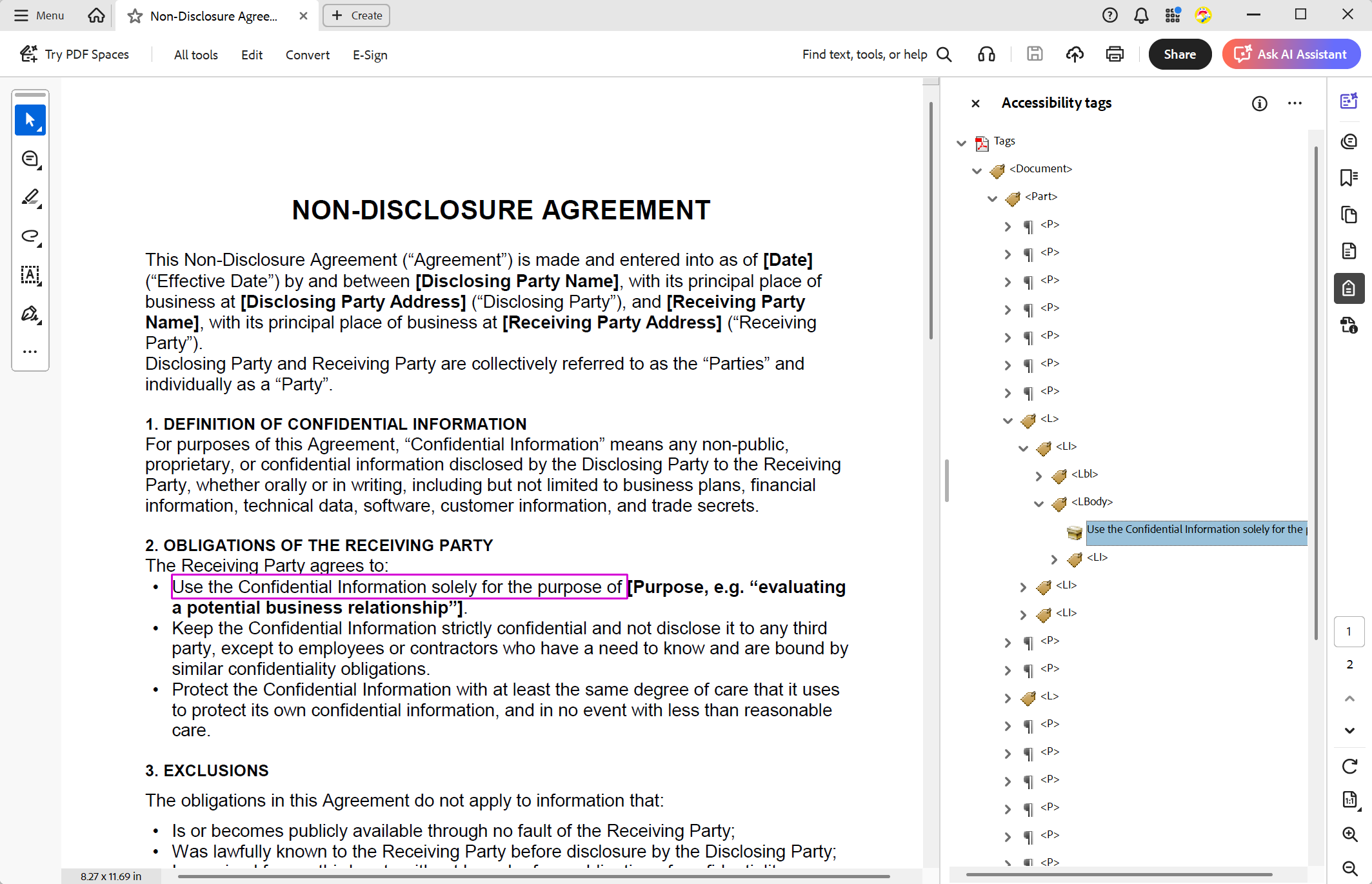
A tagged PDF generated by TX Text Control makes structural elements, such as headings, tables, lists, and alternative texts, machine-readable. This enables AI systems to navigate the document logically, understand hierarchies and relationships, and interpret content based on structure instead of relying on unreliable text-order heuristics.
Consequently, AI can distinguish between headings and body text, associate table headers with their cells, correctly interpret lists, and understand the purpose of images through alternative descriptions. These capabilities lead to more accurate extraction, summarization, and reasoning, especially in complex legal documents, where the structure conveys meaning that plain text alone cannot.
Learn more
Most organizations use AI on documents that were never designed for machines. PDFs without tags, inconsistent templates, undescribed images, and disorganized reading orders are still common. This article explains why structured documents are important for AI, presents the available evidence, and describes how organizations can start creating "AI-ready" documents.
The following screenshot shows a fully tagged, PDF/UA-compliant document generated with TX Text Control. This document contains the structure and metadata necessary for reliable AI processing.
Separate deterministic processing from AI reasoning
Not everything in legal document processing can be probabilistic. Many core tasks require exactness, repeatability, and auditability, not statistical interpretation.
TX Text Control handles these responsibilities with absolute precision. These include document generation, clause numbering, formatting, validation, versioning, and merging structured data into controlled templates. The output is predictable, verifiable, and compliant by design. Then, AI is layered on top to perform higher-level tasks, such as interpretation, summarization, comparison, and explanation, where probabilistic reasoning adds real value.
This clear separation of responsibilities significantly reduces legal risk. Deterministic systems ensure the document's accuracy and defensibility, and AI operates on a stable, trustworthy foundation. The result is a controlled hybrid approach that combines reliability with intelligence rather than replacing certainty with probability.
Build AI on the document, not around it
Copying document text into prompts disrupts traceability and cuts the connection between the analysis and the authoritative source. In legal workflows, AI must be anchored to the document itself to ensure transparency, accountability, and defensibility.
TX Text Control enables precise, clause-level anchoring within documents. AI responses can reference exact sections, paragraphs, tables, and tracked changes, including their authorship and timestamps. This allows every explanation or recommendation to be traced back to a specific location in the source document, preserving context and auditability. Consequently, AI insights can be reviewed, verified, and trusted rather than existing as detached interpretations with no clear linkage to the underlying contract.
A practical AI-readiness checklist
To prepare legal documents for AI integration, consider the following checklist:
| # | ✔ | Checklist item |
|---|---|---|
| 1 | Documents are editable and structurally intact | |
| 2 | Styles and headings are used consistently | |
| 3 | Tracked changes are preserved, not flattened | |
| 4 | Legal metadata is explicit and reliable | |
| 5 | PDFs are tagged and archivable | |
| 6 | Deterministic processing is separated from AI interpretation |
Conclusion
Legal AI initiatives often fail not because of limitations in AI technology, but rather due to inadequately prepared documents. TX Text Control transforms legal documents into reliable, structured, machine-readable assets that provide a solid foundation for AI applications.
ASP.NET
Integrate document processing into your applications to create documents such as PDFs and MS Word documents, including client-side document editing, viewing, and electronic signatures.





- Angular
- Blazor
- React
- JavaScript
- ASP.NET MVC, ASP.NET Core, and WebForms
Related Posts
Introducing Text Control Agent Skills
Text Control Agent Skills are structured definitions that teach AI coding assistants how to build applications with the TX Text Control Document Editor. Each skill contains step-by-step…
Explaining Contract Tracked Changes Automatically Using .NET C# and AI
Learn how to use AI and .NET C# to automatically explain changes to contracts, improving the document review and collaboration processes. This comprehensive guide provides practical implementation…
Automating PDF/UA Accessibility with AI: Describing DOCX Documents Using TX…
This article shows how to use TX Text Control together with the OpenAI API to automatically add descriptive texts (alt text and labels) to images, links, and tables in a DOCX. The resulting…
Transforming Legal Review with AI and TX Text Control: A Smarter, Faster…
AI is revolutionizing legal document review by providing faster, more consistent, and cost-effective analysis to help legal professionals identify risks and streamline workflows. TX Text Control…
Intelligent Document Processing (IDP) using TX Text Control in .NET C#
Intelligent Document Processing (IDP) is a new technology that is used to extract data from documents. This article shows how to use TX Text Control to create IDP solutions in .NET C#.