









Implementing Text-As-You-Type Auto Correct Replacements using JavaScript

Text-As-You-Type Auto Correct is a popular feature that replaces a specific phrase or character combination with a longer text while typing. This sample shows how to implement this feature using JavaScript.

Text-as-you-type auto correct is a popular feature that replaces a specific phrase or character combination with a longer text while typing. Consider you are repeating specific phrases again and again such as "Thanks for your request". In this case, auto correct would convert the typed characters TY into this phrase while typing text.
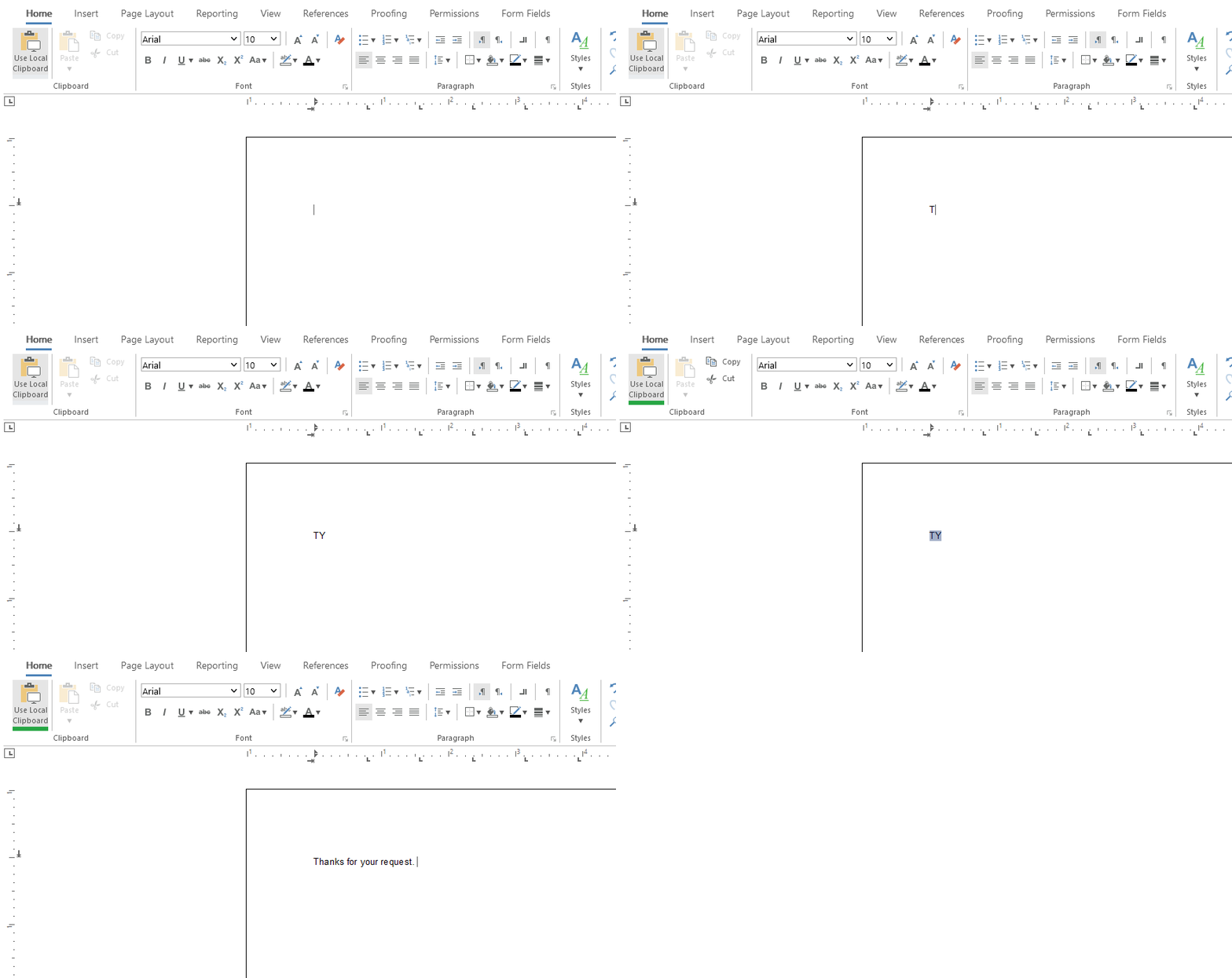
Keypress Event
For performance reasons, the JavaScript keypress event is used to store contiguous character codes. If the SPACE key is pressed, the function is trynig to find the typed word in the dictionary of shortcuts. In case the word has been found, the shortcut is selected and replaced with the long text.
// dynamic character array
var charCodes = [];

// shortcut dictionary
var dict = {
    "TY": "Thanks for your request.",
    "AQ": "Let me know if you have additional questions.",
    "MY": "I look forward to meeting you.",
    "GD": "Have a great day.",
    "LONG": "This is another longer text.",
};

document.getElementById("txTemplateDesignerContainer").addEventListener("keypress", (event) => {

    // if SPACE is pressed
    if (event.charCode === 32) {

        // convert array to string to get typed word
        var typedWord = String.fromCharCode(...charCodes);

        // check word in dictionary
        if (dict[typedWord] != undefined) {

            // cancel SPACE for TXTextControl
            event.cancelBubble = true;

            // select shortcut and replace with long text
            TXTextControl.inputPosition.getTextPosition(function (startPos) {
                TXTextControl.select(startPos - typedWord.length, typedWord.length, function () {
                    TXTextControl.selection.setText(dict[typedWord] + " ");
                })
            })

        }

        // reset character array
        charCodes = [];
    } else {
        // add character to array
        charCodes.push(event.charCode);
    }

}, true);
Exceptions
The shortcut should be only replaced in case the SPACE key is pressed. In other situations such as the ENTER or TAB key, the shortcut should be ignored. The same is valid in case the input position has been changed to another location. In these cases, the character array charCodes of typed characters is emptied again.
TXTextControl.addEventListener("inputPositionChanged", function (position) {

    // if input position is is not coherent, reset character array
    if (position.textPosition < trackedInputPosition - 1 || position.textPosition > trackedInputPosition + 1) {
        charCodes = [];
    }

    // set current input position
    trackedInputPosition = position.textPosition;
})

document.getElementById("txTemplateDesignerContainer").addEventListener("keydown", (event) => {

    // reset character array for all keys including ENTER, TAB and others except SPACE
    if (event.keyCode < 0x30 && event.keyCode != 32) {
        charCodes = [];
    }

}, true);
Live Demo
We implemented this code as part of our online demos. Test this live by launching the demo application.
ASP.NET
Integrate document processing into your applications to create documents such as PDFs and MS Word documents, including client-side document editing, viewing, and electronic signatures.





- Angular
- Blazor
- React
- JavaScript
- ASP.NET MVC, ASP.NET Core, and WebForms
Related Posts
Text Control Proudly Sponsors .NET Conf 2026
Text Control is proud to sponsor .NET Conf 2026, the annual virtual conference bringing together developers, Microsoft engineers, and industry experts from around the world. Taking place November…
Introducing TX Sheet Control: Excel Compatible Spreadsheets and Interactive…
We are pleased to introduce TX Sheet Control, the latest addition to the Text Control product family. TX Sheet Control brings together Excel-compatible spreadsheet editing, a powerful calculation…
ASP.NETASP.NET CoreDocument Conversion
Convert DOCX to PDF, PDF/A and PDF/UA in C# Using TX Text Control
Learn how to convert Word DOCX documents to PDF in C# using TX Text Control .NET Server. This tutorial covers file-based and in-memory conversion, PDF/A export, document metadata, font deployment,…
ASP.NETASP.NET CoreContent Controls
How to Extract Structured Data from Word Documents in C#
Learn how to extract tables, content controls, legacy form fields, and document metadata from Word documents with TX Text Control. This generic C# sample preserves the structure of documents and…
Reliable Document AI in .NET: LLM Tool Calling vs. LLM-Generated Files
Reliable document AI needs a deterministic engine. With LLM tool calling, the LLM decides what the document should contain, and TX Text Control generates the file.