


Implementing Text-As-You-Type Auto Correct Replacements using JavaScript

Text-As-You-Type Auto Correct is a popular feature that replaces a specific phrase or character combination with a longer text while typing. This sample shows how to implement this feature using JavaScript.

Text-as-you-type auto correct is a popular feature that replaces a specific phrase or character combination with a longer text while typing. Consider you are repeating specific phrases again and again such as "Thanks for your request". In this case, auto correct would convert the typed characters TY into this phrase while typing text.
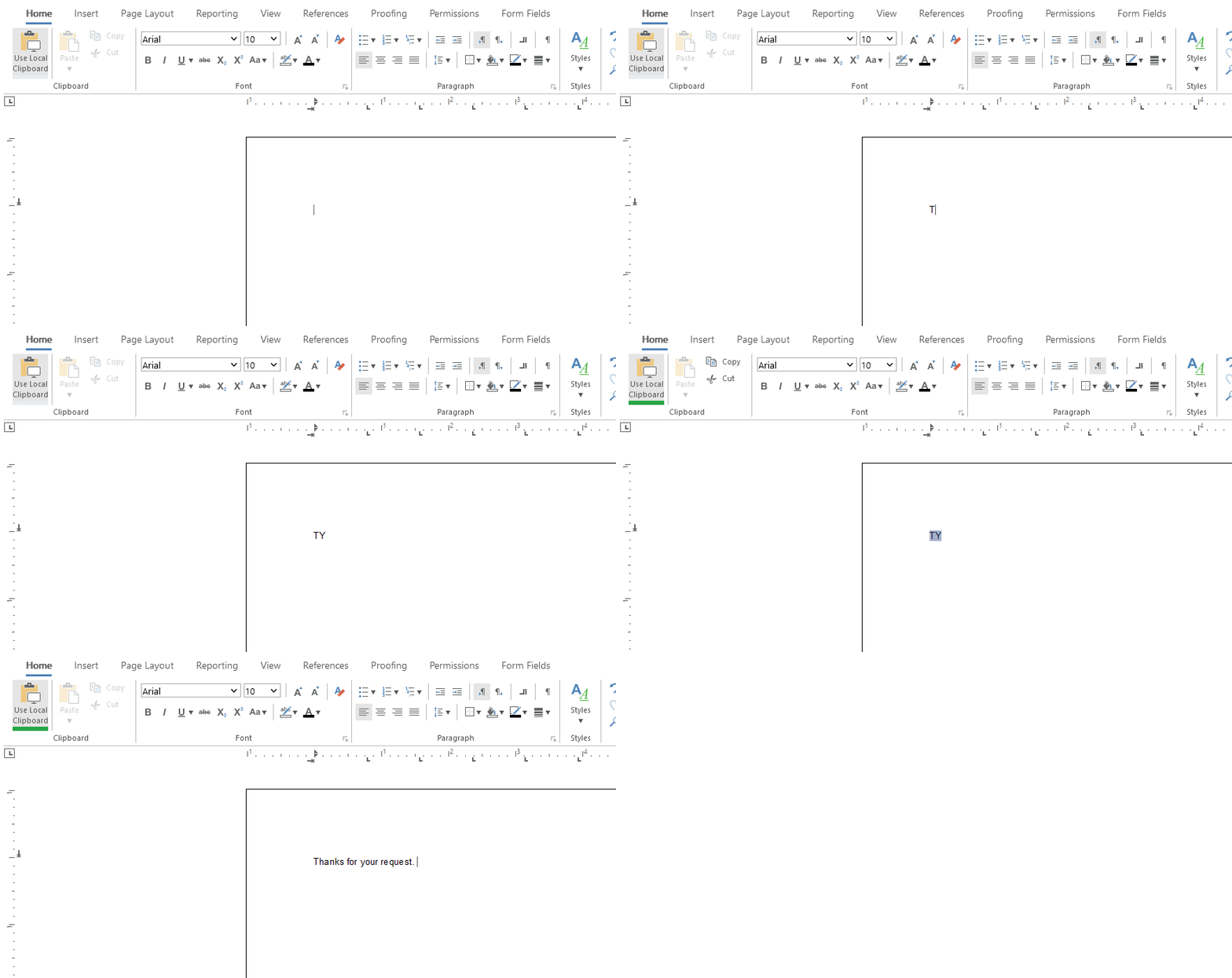
Keypress Event
For performance reasons, the JavaScript keypress event is used to store contiguous character codes. If the SPACE key is pressed, the function is trynig to find the typed word in the dictionary of shortcuts. In case the word has been found, the shortcut is selected and replaced with the long text.
// dynamic character array
var charCodes = [];

// shortcut dictionary
var dict = {
    "TY": "Thanks for your request.",
    "AQ": "Let me know if you have additional questions.",
    "MY": "I look forward to meeting you.",
    "GD": "Have a great day.",
    "LONG": "This is another longer text.",
};

document.getElementById("txTemplateDesignerContainer").addEventListener("keypress", (event) => {

    // if SPACE is pressed
    if (event.charCode === 32) {

        // convert array to string to get typed word
        var typedWord = String.fromCharCode(...charCodes);

        // check word in dictionary
        if (dict[typedWord] != undefined) {

            // cancel SPACE for TXTextControl
            event.cancelBubble = true;

            // select shortcut and replace with long text
            TXTextControl.inputPosition.getTextPosition(function (startPos) {
                TXTextControl.select(startPos - typedWord.length, typedWord.length, function () {
                    TXTextControl.selection.setText(dict[typedWord] + " ");
                })
            })

        }

        // reset character array
        charCodes = [];
    } else {
        // add character to array
        charCodes.push(event.charCode);
    }

}, true);
Exceptions
The shortcut should be only replaced in case the SPACE key is pressed. In other situations such as the ENTER or TAB key, the shortcut should be ignored. The same is valid in case the input position has been changed to another location. In these cases, the character array charCodes of typed characters is emptied again.
TXTextControl.addEventListener("inputPositionChanged", function (position) {

    // if input position is is not coherent, reset character array
    if (position.textPosition < trackedInputPosition - 1 || position.textPosition > trackedInputPosition + 1) {
        charCodes = [];
    }

    // set current input position
    trackedInputPosition = position.textPosition;
})

document.getElementById("txTemplateDesignerContainer").addEventListener("keydown", (event) => {

    // reset character array for all keys including ENTER, TAB and others except SPACE
    if (event.keyCode < 0x30 && event.keyCode != 32) {
        charCodes = [];
    }

}, true);
Live Demo
We implemented this code as part of our online demos. Test this live by launching the demo application.
ASP.NET
Integrate document processing into your applications to create documents such as PDFs and MS Word documents, including client-side document editing, viewing, and electronic signatures.





- Angular
- Blazor
- React
- JavaScript
- ASP.NET MVC, ASP.NET Core, and WebForms
Related Posts
ASP.NETASP.NET CoreTracked Changes
Inspect and Process Track Changes in DOCX Documents with TX Text Control…
Collaborative document editing is a core requirement in many modern applications. In this article, we will explore how to inspect and process track changes in DOCX documents using TX Text Control…
Text Control at BASTA! Spring 2026 in Frankfurt
This week, we sponsored the BASTA! Spring 2026 conference in Frankfurt, Germany. We had a booth in the exhibition area and presented our products to the attendees. We also had the opportunity to…
From Legacy Microsoft Office Automation to a Future-Ready Document Pipeline…
In this article, we will explore how to transition from traditional office automation to a modern document pipeline using C# and .NET. We will discuss the benefits of adopting a future-ready…
We are Gold Partner at Techorama Belgium 2026
Text Control has officially signed the contract to become a Gold Partner of Techorama Belgium 2026! Techorama is one of the largest and most prestigious technology conferences in Belgium,…
Text Control Sponsors & Exhibits at BASTA! Spring 2026 in Frankfurt
Text Control is proud to announce that we will be sponsoring and exhibiting at BASTA! Spring 2026 in Frankfurt. We will be showcasing our latest products and features, and we look forward to…