


MailMerge: Table Headers and Repeating Blocks

Repeating table headers appear at the top of each page when tables span multiple pages during a MailMerge process. When combining table headers with nested merge blocks, the complete table must be placed inside the block so each block instance maintains its own correct header.

When using table headers and repeating blocks in combination in a MailMerge process, there are some things you need to know before creating your templates.
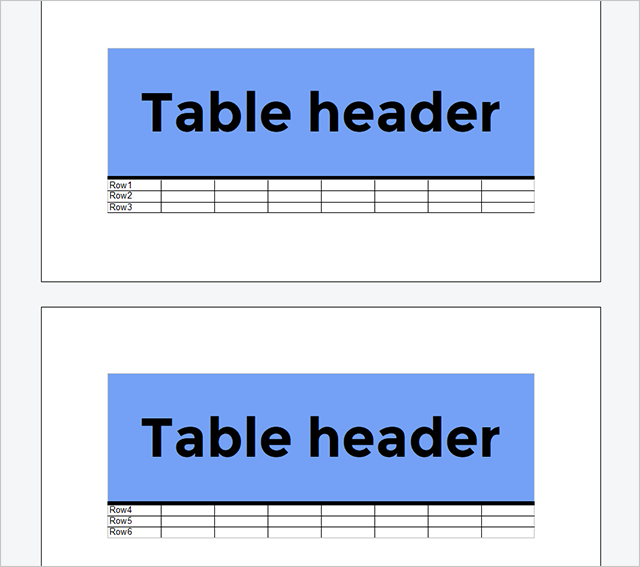
A table header can consist of n number of rows in a table that get repeated as header rows at the top of each page when tables break across pages. The following screenshot shows a repeated table header:
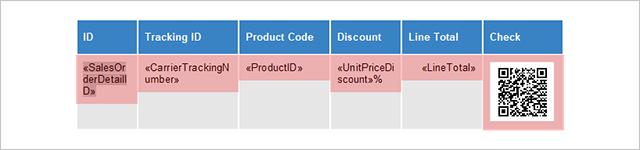
Repeating blocks or merge blocks is a very flexible feature within Text Control Reporting. The content of a block is repeated based on the number of data rows that are passed in the merge process. Generally, a block can repeat anything: A table row, a complete table, paragraphs or a single word. All break characters are repeated and applied automatically. The following screenshot shows a merge block in a template. The highlighted area in red defines the repeating block.
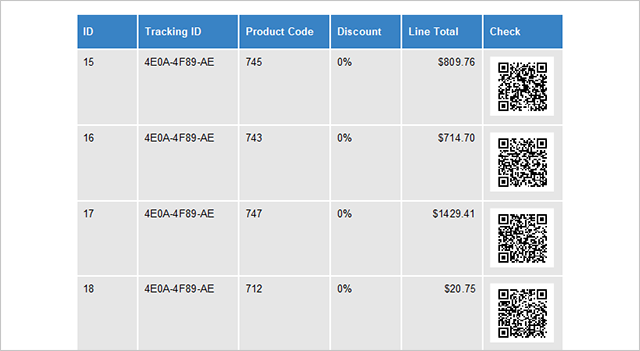
After merging data into the template, the merge block is perfectly repeated:
A merge block can be part of a table that has a table header that gets repeated automatically when a table breaks across pages. As you can see in the sample template above, the second table row (highlighted in red) represents the merge block. The block is part of a table that has been created with a repeating table header. This table header is valid for the complete table and is repeated for each page the table is extended to.
The table header can contain merge fields from the master table or related tables.
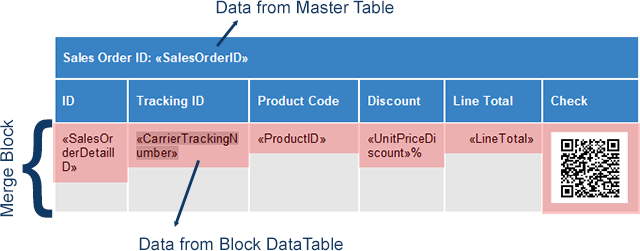
It is also possible to include the table header into the merge block in order to insert the block data merge fields into the table header.
Now, consider a nested merge block that contains block data in a table header:

In this case, you have to be careful with the merge block setup. As the outer table is expanded over pages, it will have a static table header with the same content for all pages. In the results, you can see that the header on the second page still reads status AA, even if the data rows are already coming from the third merge block CC.
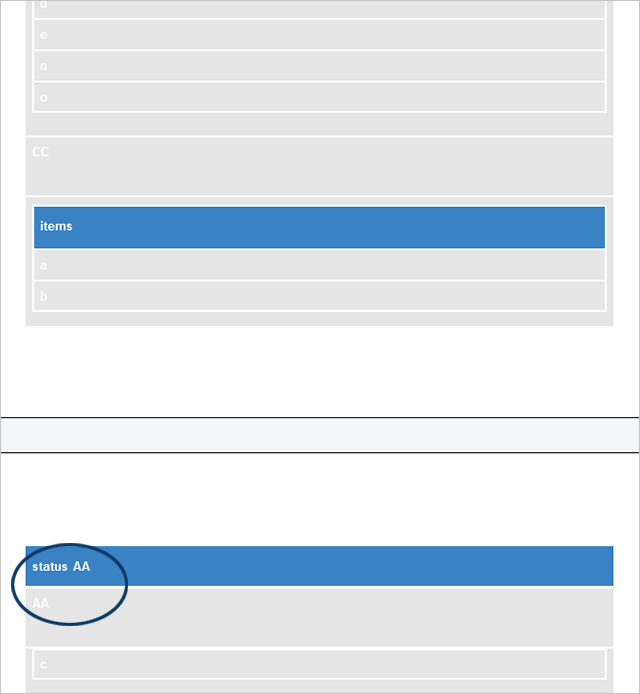
In order to solve this issue, the complete table should be embedded into the block. Each block table has it's own table header, in case a block table breaks across pages.
Also See
This post references the following in the documentation:
- TXText
Control. Document Server. Mail Merge Class
Cloud
Are we moving to the cloud? This question is changing from "if" to "when" and "how". Text Control ReportingCloud brings complete reporting functionality to the cloud so all developers can use it, irrespective of the platform or language they're using. Its highly RESTful API can be used to merge Microsoft Word compatible templates with JSON data from all clients including .NET, Javascript, PHP, Node.JS, jQuery, Ruby, Python, Android, Java and iOS.
Related Posts
ReportingCloud: Uploading Templates Vs. Sending Templates Inside MergeBody
ReportingCloud offers two template delivery methods: uploading to persistent storage via the /templates/upload endpoint, or embedding Base64-encoded template data in the MergeBody POST request.…
ReportingCloud: Conditional Text Blocks Based on Merge Blocks
Conditional text rendering in ReportingCloud uses merge blocks combined with the RemoveEmptyBlocks setting. When the data source provides an empty object for a named block and RemoveEmptyBlocks is…
Web API Test Sandbox Released on ReportingCloud Portal
The ReportingCloud portal includes a Web API Test Sandbox for running endpoint calls against your own account data and template storage without affecting document quota. Each endpoint in the Web…
ReportingCloud: New Test Parameter for Document Quota Related Endpoints
ReportingCloud merge, convert, and findandreplace endpoints now accept an optional test parameter. Test calls bypass the document quota and produce watermarked output with a TEST MODE label,…
ReportingCloud: The MergeData JSON Object Format Explained
ReportingCloud merge operations accept a JSON object containing data for all merge fields and blocks. The .NET wrapper serializes typed business objects to JSON automatically via MergeBody and…