


TX Text Control Format Painter Sample Released

A sample project implements a Format Painter feature for TX Text Control .NET for Windows Forms using a context menu. Formatting attributes are copied only when the selection contains uniform values, verified via the IsCommonValueSelected method, and applied to subsequent selections.

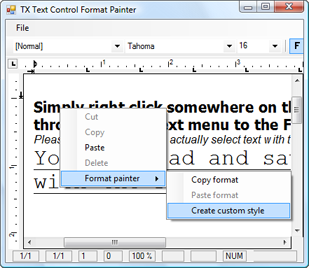
We have recently been asked if TX Text Control has a similar feature as Microsoft Word's Format Painter feature, so we decided to create a new sample project for our valued customers.
In this project, we use a context menu to provide the option to copy text formatting. If you like, you can also use a button, it's up to you.
You will notice that text formatting information can only be saved if the selection contains only the same formatting, e.g. if the whole selected text has the same font, font size, is bold, and so on. This is due to the fact that we need a defined return value, which would not be the case if the selection would contain different fonts or font sizes. Here comes the IsCommonValueSelected function into play, which we use to check the selection on same attributes.
You can download the sample from our Source Code Library.
If you have any suggestions or comments please feel free to drop us a line.

Download and Fork This Sample on GitHub
We proudly host our sample code on github.com/TextControl.
Please fork and contribute.
Requirements for this sample
- Visual Studio 2017 or better
- TX Text Control .NET for Windows Forms (trial sufficient)
Related Post
Table Indent Alignment Sample Available
TX Text Control .NET for Windows Forms supports aligning inserted tables to the surrounding paragraph indent. The alignTable method takes a table ID and a boolean flag that controls whether…