


TX Text Control vs iText: Understanding Template-Based Document Generation in .NET

This article explores how both approaches work, what the common workflows look like in real projects, and why template-based document generation often leads developers toward TX Text Control. We will compare the two approaches, discuss their advantages and disadvantages, and provide insights into how they can be used effectively in .NET applications.

When evaluating PDF libraries for .NET, developers often consider pricing as one of the first aspects. In recent years, many teams have started questioning the cost structure of libraries such as iText, especially since licensing has shifted toward subscription models and usage-based pricing. For organizations that generate large volumes of documents, these costs can quickly escalate and become a significant factor in technology decisions.
However, cost is only one part of the equation. An equally important consideration is how documents are created and maintained. In many business applications, documents are not hard-coded layouts, but rather templates that change frequently. For example, legal teams update contracts, finance departments modify invoices, and HR departments maintain offer letters. Ideally, these templates can be edited by non-developers without requiring code changes.
iText is a powerful PDF library, but document creation is code-driven and lacks a native template mechanism like Microsoft Word templates for business-editable layouts.
While iText is a powerful and mature PDF library, it primarily uses a code-driven approach to document creation. Typically, developers construct document layouts programmatically or generate PDFs from HTML. What is missing is a native template mechanism comparable to Microsoft Word templates, which allow business users to directly edit the document layout.
This becomes especially important in enterprise environments where document templates constantly evolve and development teams want to avoid rebuilding document structures in code.
In this article, we examine how documents are typically generated with iText and compare this process with a template-driven workflow using TX Text Control. With TX Text Control, Microsoft Word documents can be used as templates and merged with structured data, such as JSON.
The Typical iText Approach: Programmatic PDF Generation
iText is primarily a library for generating and manipulating PDFs. Rather than using templates created in Word or another document editor, developers typically build documents entirely in code. This means defining the document's structure programmatically. For example, to create an invoice, a developer would write code to add text, tables, images, and formatting directly using iText's API. This approach can be powerful and flexible but often requires significant development effort to maintain and update document layouts.
Example: Creating a simple document using iText in C#.
using iText.Kernel.Pdf;
using iText.Layout;
using iText.Layout.Element;

var writer = new PdfWriter("invoice.pdf");
var pdf = new PdfDocument(writer);
var document = new Document(pdf);

document.Add(new Paragraph("Invoice"));
document.Add(new Paragraph("Customer: John Doe"));
document.Add(new Paragraph("Amount: $500"));

Table table = new Table(3);
table.AddCell("Product");
table.AddCell("Price");
table.AddCell("Total");

table.AddCell("Software License");
table.AddCell("$500");
table.AddCell("$500");

document.Add(table);
document.Close();
In this workflow, the developer defines the layout, inserts the content directly into the code, and assembles the document structure programmatically. This model is ideal for invoices, reports, automated statements, and other layouts controlled by developers. However, the development team is entirely responsible for designing the document layout. If the business needs to change the layout, the development team must modify the code, which can lead to delays and increased maintenance overhead.
The responsibility for designing the document layout falls entirely on the development team.
Template-Based Workflows in iText
iText users employ templating by designing PDF forms with AcroForm fields. The process typically begins when a designer creates a PDF document containing predefined form fields in specific positions within the layout. These fields act as placeholders for dynamic values.
Then, the application loads the PDF and fills the form fields with data at runtime. This approach works well for relatively simple documents with fixed layouts and limited fields. However, it is still not comparable to a true document template system. The document's structure cannot easily adapt to dynamic content, such as repeating sections, conditional blocks, or complex tables. Consequently, developers often need to handle layout logic and document generation in code.
using iText.Kernel.Pdf;
using iText.Forms;

var pdf = new PdfDocument(new PdfReader("template.pdf"), new PdfWriter("output.pdf"));

var form = PdfAcroForm.GetAcroForm(pdf, true);

form.GetField("CustomerName").SetValue("John Doe");
form.GetField("Amount").SetValue("$500");

pdf.Close();
While this allows basic data insertion, there are limitations:
- Layout is static
- Dynamic tables are difficult to implement
- Conditional content requires code logic
- Templates cannot grow with the data
For this reason, many iText users combine HTML templating and PDF conversion using the iText pdfHTML add-on. In this workflow, developers create HTML templates that can be edited by non-developers. Then, the application fills the HTML template with data and converts it to a PDF using iText. This approach provides more flexibility in terms of layout and allows for more complex documents. However, developers must still manage the HTML templates and conversion process, which can introduce additional complexity and maintenance overhead.
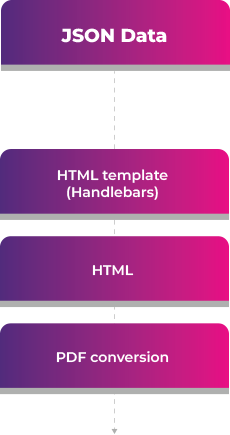
This introduces another rendering layer, shifting the design of documents to HTML and CSS. While this allows for more complex layouts, it also complicates the development process and may necessitate expertise in HTML and CSS. Additionally, converting from HTML to PDF can sometimes lead to rendering issues or inconsistencies, particularly with complex layouts or dynamic content.
What About iText DITO?
At one point, iText attempted to address the missing template workflow by creating a separate product called iText DITO. DITO introduced a visual template designer through which users could design document layouts and bind data from JSON structures. The goal was to offer a more business-friendly approach to document generation than writing layout logic entirely in code.
However, iText DITO is no longer an actively developed product. It reached the end of its life cycle in November 2023 and is now only maintained with the occasional security and dependency update. No new features are being added, and it is no longer considered a strategic product in the iText ecosystem.
Since Apryse acquired iText, the company has recommended other products from its broader portfolio as potential successors. While this makes sense from a portfolio perspective, it also highlights a common challenge that can arise after acquisitions. Product strategies change, roadmaps shift, and previously promoted technologies may be discontinued or replaced. For development teams building long-term document pipelines, this can significantly complicate planning and technology decisions.
Therefore, developers evaluating document generation solutions should know that the core iText workflow is still primarily code-driven and that the only template product in the ecosystem is no longer being developed.
The TX Text Control Approach: Word-Based Templates
TX Text Control follows a completely different philosophy. Instead of generating documents in code, the workflow revolves around document templates created in familiar tools such as Microsoft Word. Because TX Text Control is fully compatible with the DOCX format, these Word documents can be used directly as templates in the document generation pipeline.
Learn more
This article shows how to create professional PDF and PDF/A documents using ASP.NET Core C# on Linux. TX Text Control enables the creation of pixel-perfect PDF documents on any Linux environment that supports .NET, including Debian, Ubuntu, and Azure App Services.
How to Create PDF Documents with TX Text Control using C# .NET on Linux
These templates can contain merge fields, repeating regions, conditional content, as well as full formatting and styles. At runtime, structured data such as JSON can be merged directly into the template to generate the final document.
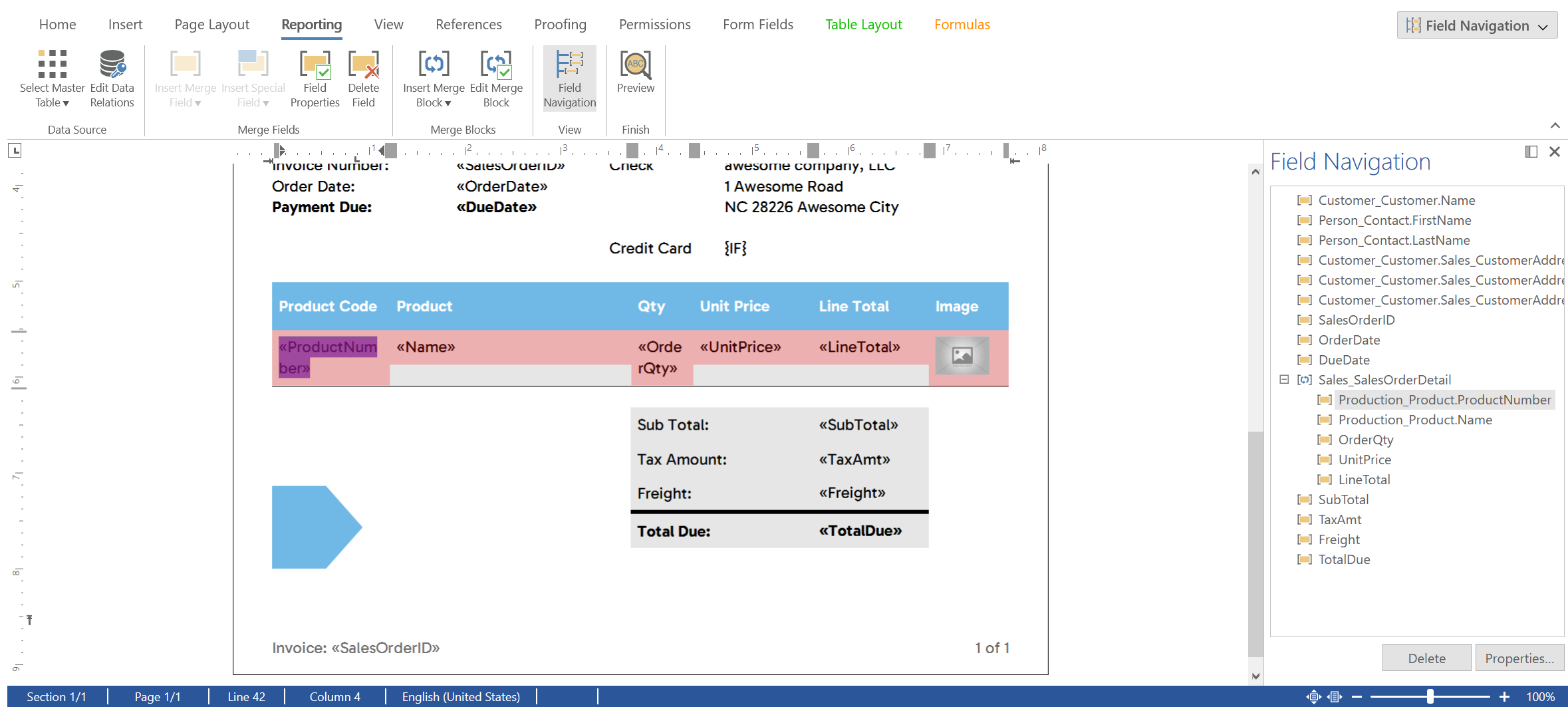
In addition to using Word as a template design tool, TX Text Control also provides a fully featured document editor that can be embedded directly into business applications. This allows development teams to build their own template designers tailored to their specific workflows. Business users can create and modify templates within the application itself, while developers maintain full control over the document generation process and data integration.
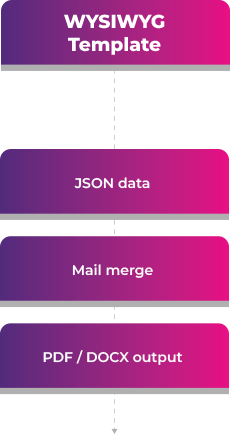
At runtime, structured data, such as JSON, can be merged directly into the template.
Example using TX Text Control in C#.
using TXTextControl;

using (var serverTextControl = new ServerTextControl())
{
    serverTextControl.Create();

    serverTextControl.Load("template.docx",
        new LoadSettings { ApplicationFieldFormat = ApplicationFieldFormat.MSWord });

    string json = File.ReadAllText("data.json");

    serverTextControl.MailMerge.MergeJsonData(json);

    serverTextControl.Save("result.pdf", StreamType.AdobePDF);
}
In this workflow:
- The document layout is defined in the template
- Business users can edit templates
- Developers simply provide structured data
- The engine merges the content into the template
The architecture becomes much simpler. The document layout is defined in the template, and business users can edit the templates without needing to involve developers. Developers simply provide structured data, and the engine merges the content into the template to generate the final document. This approach significantly reduces development effort and maintenance overhead while empowering business users to manage their own document templates.
Why Template-Based Document Generation Matters
In many business applications, document templates are not static. They evolve over time as business needs change, regulations update, and branding guidelines shift. A template-based document generation approach allows organizations to adapt quickly without needing to involve development teams for every change.
Typical challenges include:
- Conditional sections
- Large dynamic tables
- Localized templates
- Legal teams editing document wording
- Version management of document layouts
In these scenarios, template-based systems dramatically reduce development effort because they separate the document design from the application logic. Rather than modifying code each time a document is updated, teams simply update the template.
Architectural Comparison
To summarize the architectural differences between iText and TX Text Control, we can compare the two approaches across several dimensions:
| Capability | iText | TX Text Control |
|---|---|---|
| Core focus | PDF generation | Document processing |
| Primary workflow | Programmatic layout | Template-based generation |
| Template format | PDF or HTML | Word templates |
| JSON data merge | External templating | Built-in MailMerge |
| Designer-friendly | Limited | High |
| Dynamic document logic | Developer code | Template logic |
The difference is fundamental: iText focuses on PDF construction, while TX Text Control focuses on document assembly. With iText, developers build documents programmatically using either static PDFs with form fields or HTML documents as templates. With TX Text Control, developers define the document layout in Word templates, and the engine merges structured data directly into these templates to generate the final document.
Choosing the Right Tool
If your application needs to generate or manipulate PDFs programmatically or apply digital signatures, iText is a powerful library.
However, TX Text Control is not limited to template-driven workflows. It can perform the same types of operations typically associated with PDF libraries. Developers can generate documents fully programmatically, process existing documents, or generate documents from HTML as needed.
However, when your application revolves around dynamic document templates, editable layouts, and structured data merging, an essential component is a document processing engine.
TX Text Control is designed to solve that exact problem.
By combining Word-based templates with powerful mail merge capabilities, TX Text Control enables developers and business users to work together on document generation workflows without embedding complex layout logic in code.
For modern applications that generate contracts, invoices, reports, and other legally sensitive documents, template-driven document generation provides a more scalable and maintainable architecture. TX Text Control clearly stands apart in this regard.
Frequently Asked Questions
ASP.NET
Integrate document processing into your applications to create documents such as PDFs and MS Word documents, including client-side document editing, viewing, and electronic signatures.





- Angular
- Blazor
- React
- JavaScript
- ASP.NET MVC, ASP.NET Core, and WebForms
Related Posts
ASP.NETASP.NET CoreTable Extraction
Extracting Structured Table Data from DOCX Word Documents in C# .NET with…
In this article, we build a domain-aware table extraction system using TX Text Control in C# .NET. The system automatically detects the table's domain, understands column semantics, and produces…
Introducing Text Control Agent Skills
With the introduction of Text Control Agent Skills, AI coding assistants can now understand how to correctly work with the TX Text Control Document Editor and its APIs. This means that developers…
ASP.NETApp ServicesASP.NET Core
Deploying the TX Text Control Document Editor from the Private NuGet Feed to…
This tutorial shows how to deploy the TX Text Control Document Editor to Azure App Services using an ASP.NET Core Web App. The Document Editor is a powerful word processing component that can be…
ASP.NETASP.NET CoreE-Invoicing
Why Structured E-Invoices Still Need Tamper Protection using C# and .NET
ZUGFeRD, Factur-X, German e-invoicing rules, and how to seal PDF invoices with TX Text Control to prevent tampering. Learn how to create compliant e-invoices with C# and .NET.
ASP.NETAccessibilityASP.NET Core
AI Generated PDFs, PDF/UA, and Compliance Risk: Why Accessible Document…
Ensuring that PDFs are accessible and compliant with standards like PDF/UA is crucial. This article explores the risks of non-compliance and the importance of integrating accessible document…