


Extracting Structured Table Data from DOCX Word Documents in C# .NET with Domain-Aware Table Detection

In this article, we build a domain-aware table extraction system using TX Text Control in C# .NET. The system automatically detects the table's domain, understands column semantics, and produces clean JSON output suitable for analytics systems, data imports, or AI pipelines.
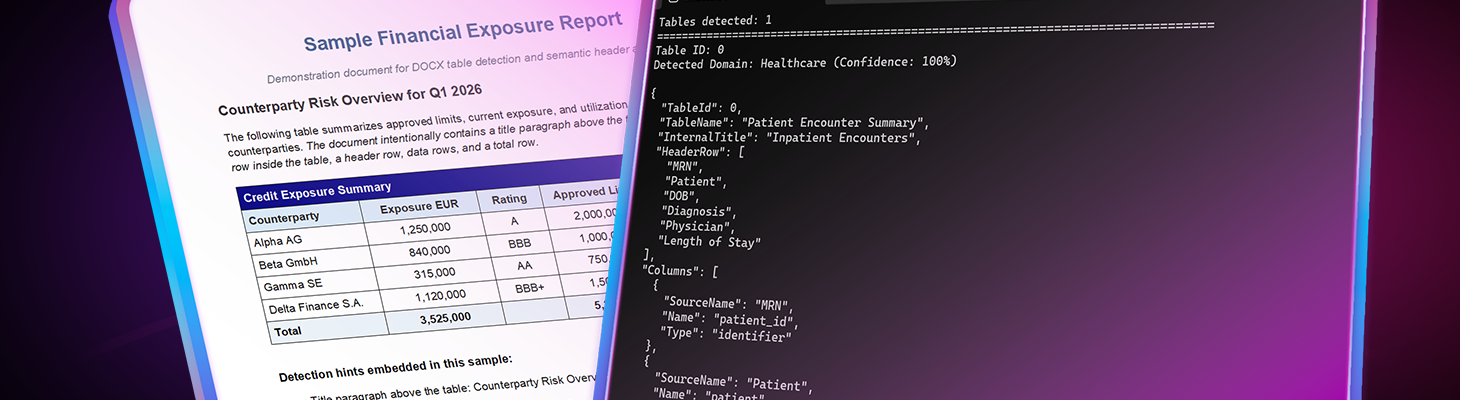
Business documents often contain tables representing structured data. Financial reports, medical records, manufacturing inventories, and other internal business documents often store critical information in tables.
At first glance, extracting this data seems straightforward. After all, tables already have rows and columns. In reality, however, the problem is much more complex.
Real-world tables often contain merged headers, inconsistent column names, domain-specific terminology, summary rows, and formatting artifacts. Two documents representing the same data can look completely different.
Therefore, applications that need to extract structured data require a semantic understanding of the table content, not just positional parsing.
In this article, we will build a domain-aware table extraction system using TX Text Control in C# .NET. The system automatically detects the domain of the table, understands the semantics of the columns, and produces clean JSON output suitable for analytics systems, data imports, or AI pipelines.
Why Extract Structured Data from Word Documents?
Organizations are sitting on large amounts of valuable data inside documents. Over years or even decades, companies have accumulated Word files containing operational data, financial reports, medical records, product inventories, and administrative tables.
These documents were created for human consumption, not machine processing.
However, modern enterprise systems increasingly require structured data. Analytics platforms, automation systems, and AI applications all depend on reliable datasets. Before these systems can use the data, it must be extracted and cleaned.
This is exactly the type of problem many forward deployed engineers and consulting teams are currently solving for enterprises. Their job is to take existing document workflows and convert the information into structured datasets that can power modern systems.
In many organizations, the first step toward an AI-ready data infrastructure is simply cleaning and structuring the data that already exists inside documents.
TX Text Control plays an important role in this process by providing the document processing layer required to extract reliable structured information from tables.
Typical Scenarios for Table Extraction
Semantic table extraction is used in many industries and applications.
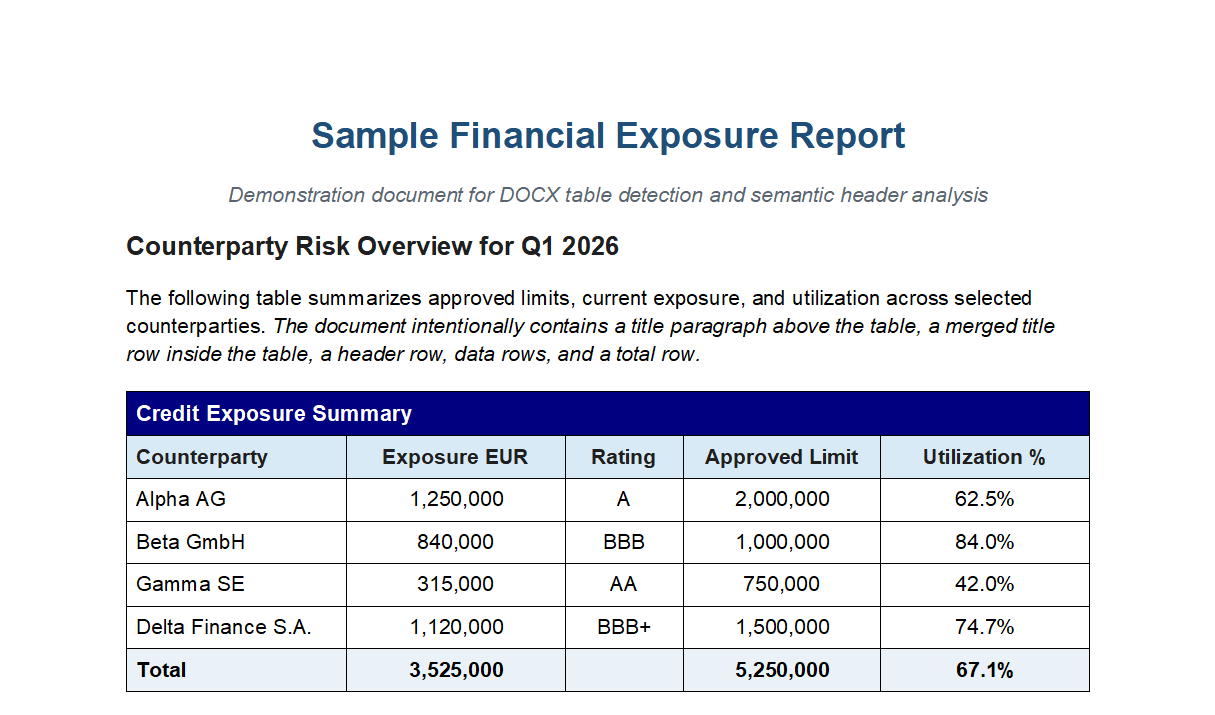
For example, financial institutions often receive documents containing tables that describe exposures, ratings, and limits. For example:
| Counterparty | Exposure EUR | Rating | Limit |
|---|---|---|---|
| Alpha AG | 1,250,000 | A | 2,000,000 |
A risk management system must extract and convert this information into structured records. The semantic analyzer interprets the table and produces normalized output.
{
  "columns": [
    { "name": "counterparty", "type": "identifier" },
    { "name": "exposure_amount_eur", "type": "amount" },
    { "name": "rating", "type": "rating" },
    { "name": "approved_limit_amount", "type": "amount" }
  ]
}
Financial tables are recognized because the system understands terms such as exposure, rating, utilization, and limit.
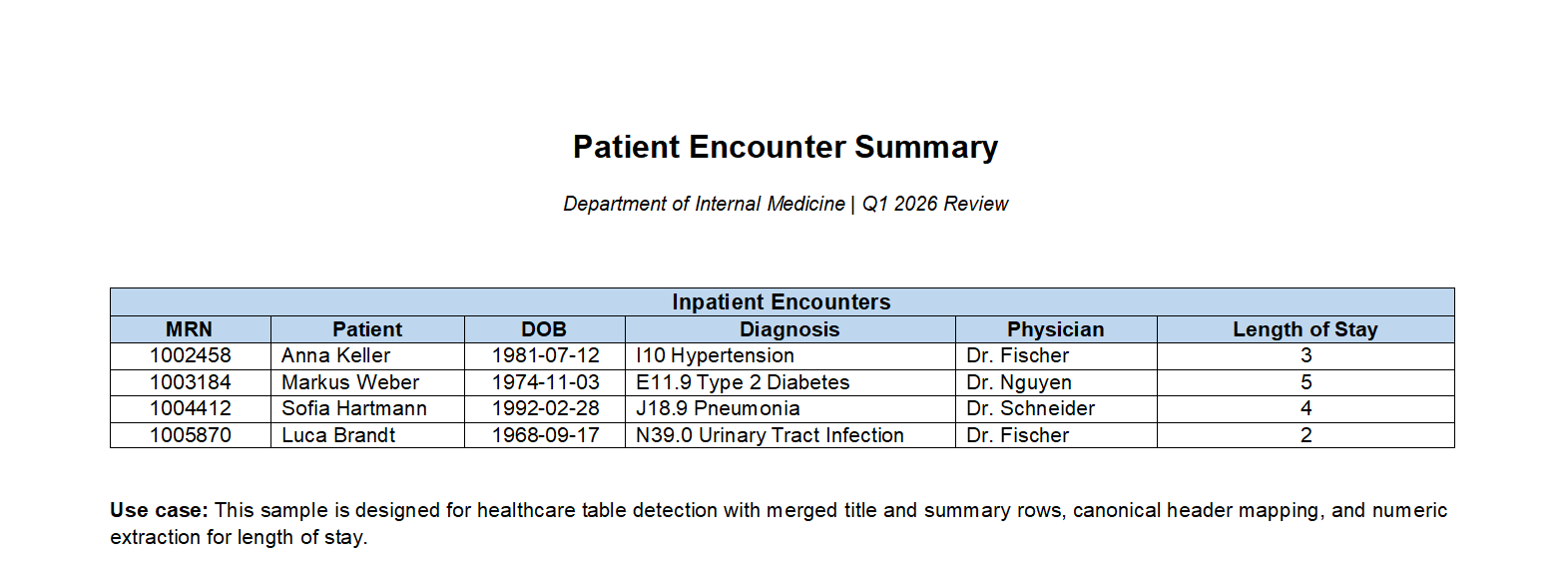
Healthcare systems face similar challenges. Medical documents often include tables that describe patient visits, diagnoses, and medications.
A simple clinical table might look like this:
| Patient ID | MRN | Diagnosis | Physician |
|---|---|---|---|
| P001 | 123456 | E11.9 | Dr. Smith |
These tables contain domain terminology such as MRN (Medical Record Number), ICD diagnosis codes, and physician identifiers.
The healthcare configuration recognizes these terms and maps them automatically to canonical data fields such as patient_id, diagnosis_code, and date_of_birth.
Another common scenario is importing enterprise data.
Organizations often receive documents from partners, regulators, or suppliers containing structured tables. These tables must then be imported into business systems.
Without semantic analysis, this process becomes difficult because the same concept may appear under different header names.
For example, one document may use "Qty," another "Quantity," and a third "Units." The semantic analyzer resolves these variations and maps them to a consistent schema.
This ability to normalize inconsistent data sources is particularly valuable when preparing data for analytics or AI systems.
Preparing Enterprise Data for AI Systems
One of the fastest-growing applications of document table extraction is preparing enterprise data for AI. Many companies have extensive document repositories containing operational data, but this information is trapped inside Word tables. Before machine learning systems can use the data, it must undergo several transformations.
First, the tables must be extracted from the documents. Then, the column semantics must be interpreted. Next, synonyms must be normalized, and totals must be removed. Finally, the cleaned data must be exported into structured datasets. This process transforms document-based information into machine-readable data. Forward-deployed engineers and consulting teams often implement these types of pipelines when modernizing enterprise systems. Rather than manually cleaning data in spreadsheets, they build automated extraction workflows that convert document tables directly into structured datasets.
TX Text Control provides the foundation for these workflows by enabling reliable document parsing and semantic analysis.
Handling Domain-Specific Semantics
One of the biggest challenges when extracting data from document tables is inconsistent terminology. Two tables may contain the same information but have completely different header names. People immediately understand that "MRN," "Patient Number," and "Medical Record Number" all refer to the same concept, but software cannot make this connection without additional semantic knowledge.
This is where domain-specific configurations become important. Each configuration contains knowledge about the terminology used in a given industry and provides the information required to correctly interpret table headers. Rather than relying purely on text matching, the analyzer understands how specific fields relate to standardized data concepts.
A domain configuration typically contains four types of information:
- Keywords that indicate the domain of a table
- Synonym mappings for header names
- Rules for identifying identifier columns
- Keywords used to detect summary rows such as totals
Header normalization is the most important component for data pipelines. During this process, different header variations are mapped to a canonical field name.
For instance, the healthcare sector recognizes and automatically converts several common medical abbreviations into standardized identifiers.
MRN → patient_id
DOB → date_of_birth
ICD → diagnosis_code
LOS → length_of_stay
Manufacturing tables often contain similar variations. Depending on the source system, product identifiers may appear under different names. The semantic analyzer resolves these variations.
SKU → product_id
Qty → quantity
UOM → unit_of_measure
Vendor → supplier
Normalization is critical because downstream systems depend on consistent schemas. Analytics pipelines, databases, and machine learning systems cannot easily work with dozens of slightly different column names representing the same concept.
Without normalization, importing data from multiple document sources quickly becomes problematic. Even a small change in header wording can break data pipelines or necessitate manual adjustments.
The analyzer maps domain terminology to canonical column names, ensuring that extracted data remains consistent, even when documents use different wording. This enables reliable data aggregation across multiple documents, sources, and organizations, which is essential for large-scale analytics and AI workloads.
Automatic Domain Detection
One of the key features of our table extraction system is automatic domain detection. The system can analyze the content of the table and determine which domain it belongs to, such as finance, healthcare, or manufacturing. This allows the system to apply domain-specific configurations for interpreting column semantics.
To make the system flexible, the analyzer automatically determines the table's domain based on its content.
Supported domains include:
- Financial: Recognizes terms like exposure, rating, and limit.
- Healthcare: Recognizes terms like MRN, diagnosis, and physician.
- Manufacturing: Recognizes terms like part number, quantity, and supplier.
Rather than requiring developers to configure the domain manually, the system analyzes table headers and selects the most likely domain. The detection algorithm scans the first rows of the table and assigns a score to each domain based on keyword matches.
Exact keyword matches receive higher scores, while partial matches receive smaller scores. Identifier columns such as patient IDs or product SKUs contribute additional weight. The domain with the highest score is selected, and the system returns a confidence value between 0 and 1.
Implementing Table Extraction with TX Text Control
TX Text Control exposes tables directly through the document object model, allowing applications to iterate through document tables.
A basic extraction loop looks like this:
foreach (Table table in textControl.Tables)
{
    var result = analyzer.Analyze(table);
}
The analyzer performs several steps internally. It identifies header rows, determines identifier columns, detects summary rows, and normalizes column names. The output is a clean JSON structure that can be easily consumed by downstream systems.
The Table Extraction Pipeline
Extracting structured data from documents is more challenging than just reading table cells. The system must also understand the meaning of the table, identify headers, normalize column names, and convert the result into usable, structured data.
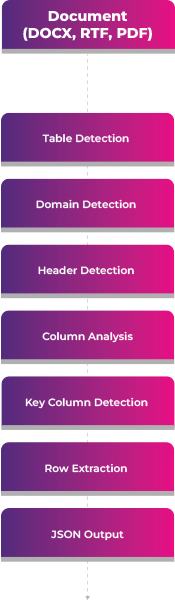
The table detection system uses a structured pipeline to transform raw document tables into semantic JSON.
- Table Detection: Identify tables in the document and process them independently.
- Domain Detection: Analyze table content to determine the most likely domain.
- Header Detection: Identify the actual header row, even in the presence of title rows or merged cells.
- Column Analysis: Normalize column headers and infer semantic types.
- Key Column Detection: Determine which column represents the primary identifier.
- Row Extraction: Extract cell values, convert data types, and separate summary rows.
- Structured JSON Output: Produce a normalized JSON representation of the table.
Configuring the Analyzer
In most cases, the analyzer can run with automatic domain detection. However, developers can also configure the domain explicitly if desired. This provides more control in cases where the domain may not be easily detectable.
var options = new TableSemanticAnalysisOptions
{
    AutoDetectDomain = true
};

var analyzer = new TableSemanticAnalyzer(options);
When processing documents from a known industry, developers can also configure the domain explicitly.
var options = new TableSemanticAnalysisOptions
{
    AutoDetectDomain = false,
    Domain = new HealthcareDomainConfiguration()
};
This allows the analyzer to apply healthcare-specific semantics when interpreting the table. For example, it will recognize MRN columns and map them to patient identifiers.
Generating JSON Output
In the following example, we run the analyzer and convert the results to JSON. The output includes the detected domain, column mappings, and row data. In this example, we are loading a healthcare document.
The code below runs the analyzer and produces JSON output:
using ServerTextControl tx = new ServerTextControl();
tx.Create();
tx.Load("documents/sample_healthcare_table_detection.tx", StreamType.InternalUnicodeFormat);

Console.WriteLine($"Tables detected: {tx.Tables.Count}");

if (tx.Tables.Count == 0)
{
    Console.WriteLine("No tables found.");
    return;
}

// Mode 1: Auto-detect domain (recommended)
var options = new TableSemanticAnalysisOptions
{
    SkipNestedTables = true,
    MaxHeaderRowsToInspect = 3,
    AutoDetectDomain = true,
    Domain = null  // Let it auto-detect
};

var analyzer = new TableSemanticAnalyzer(options);
var extractor = new TableJsonExtractor();

foreach (Table table in tx.Tables)
{
    var analysis = analyzer.Analyze(table);
    var result = extractor.Extract(table, analysis, options);

    Console.WriteLine(new string('=', 80));
    Console.WriteLine($"Table ID: {result.TableId}");
    Console.WriteLine($"Detected Domain: {analysis.DetectedDomain} (Confidence: {analysis.DomainConfidence:P0})");
    Console.WriteLine();
    Console.WriteLine(result.ToJson());
    Console.WriteLine();
}
The resulting JSON includes the detected domain, column mappings, and row data. The analyzer correctly identifies the healthcare domain and maps columns such as MRN to patient identifiers.
Tables detected: 1
================================================================================
Table ID: 0
Detected Domain: Healthcare (Confidence: 100%)

{
  "TableId": 0,
  "TableName": "Patient Encounter Summary",
  "InternalTitle": "Inpatient Encounters",
  "HeaderRow": [
    "MRN",
    "Patient",
    "DOB",
    "Diagnosis",
    "Physician",
    "Length of Stay"
  ],
  "Columns": [
    {
      "SourceName": "MRN",
      "Name": "patient_id",
      "Type": "identifier"
    },
    {
      "SourceName": "Patient",
      "Name": "patient",
      "Type": "identifier"
    },
    {
      "SourceName": "DOB",
      "Name": "date_of_birth",
      "Type": "date"
    },
    {
      "SourceName": "Diagnosis",
      "Name": "diagnosis",
      "Type": "text"
    },
    {
      "SourceName": "Physician",
      "Name": "physician",
      "Type": "text"
    },
    {
      "SourceName": "Length of Stay",
      "Name": "length_of_stay",
      "Type": "percentage"
    }
  ],
  "Rows": [
    {
      "patient_id": "1002458",
      "patient": "Anna Keller",
      "date_of_birth": "1981-07-12",
      "diagnosis": "I10 Hypertension",
      "physician": "Dr. Fischer",
      "length_of_stay": 3
    },
    {
      "patient_id": "1003184",
      "patient": "Markus Weber",
      "date_of_birth": "1974-11-03",
      "diagnosis": "E11.9 Type 2 Diabetes",
      "physician": "Dr. Nguyen",
      "length_of_stay": 5
    },
    {
      "patient_id": "1004412",
      "patient": "Sofia Hartmann",
      "date_of_birth": "1992-02-28",
      "diagnosis": "J18.9 Pneumonia",
      "physician": "Dr. Schneider",
      "length_of_stay": 4
    },
    {
      "patient_id": "1005870",
      "patient": "Luca Brandt",
      "date_of_birth": "1968-09-17",
      "diagnosis": "N39.0 Urinary Tract Infection",
      "physician": "Dr. Fischer",
      "length_of_stay": 2
    }
  ]
}
Extending the System for Other Industries
Although the built-in configurations cover common domains such as financial reporting, healthcare records, manufacturing data, and generic business tables, the system is designed to be easily expanded.
Every industry has its own terminology. Retail systems, for example, use concepts like UPC codes, store locations, and product categories. Logistics companies work with shipment identifiers, tracking numbers, and delivery routes. Insurance documents include policy numbers, claim identifiers, and coverage types.
To support these scenarios, developers can implement custom domain configurations by providing their own semantic definitions.
A domain configuration describes the vocabulary used in a particular industry. It defines which keywords are typical for the domain, which headers represent identifiers, how header synonyms should be normalized, and which keywords indicate summary rows, such as totals.
The following example shows how a retail domain can be implemented.
public class RetailDomainConfiguration : IDomainConfiguration
{
    public ISet<string> HeaderKeywords { get; } = new HashSet<string>(StringComparer.OrdinalIgnoreCase)
    {
        "product", "sku", "barcode", "upc",
        "price", "cost", "margin", "discount",
        "store", "location", "sales", "units sold",
        "category", "brand", "supplier"
    };

    public ISet<string> TotalRowKeywords { get; } = new HashSet<string>(StringComparer.OrdinalIgnoreCase)
    {
        "total", "subtotal", "grand total"
    };

    public IDictionary<string, string> HeaderSynonyms { get; } = new Dictionary<string, string>(StringComparer.OrdinalIgnoreCase)
    {
        ["upc"] = "barcode",
        ["product code"] = "sku",
        ["retail price"] = "price",
        ["units"] = "quantity_sold"
    };

    public ISet<string> IdentifierHeaders { get; } = new HashSet<string>(StringComparer.OrdinalIgnoreCase)
    {
        "product", "sku", "barcode", "upc"
    };
}
Once defined, the custom configuration can be passed to the analyzer:
var options = new TableSemanticAnalysisOptions
{
    Domain = new RetailDomainConfiguration()
};

var analyzer = new TableSemanticAnalyzer(options);
With this configuration, the analyzer recognizes retail-specific terminology and can normalize tables containing headers such as SKU, UPC, and retail price.
This extensibility is important for real-world enterprise environments. Document processing systems often need to support highly specialized datasets that differ across industries and organizations.
The semantic analyzer allows developers to define their own domain configurations, enabling it to adapt to virtually any document format while producing consistent, normalized output.
Conclusion
Extracting structured data from Word documents is a common requirement for modern enterprise systems. However, real-world tables often contain inconsistent formatting, domain-specific terminology, and variations in header names. A semantic understanding of the table content is required to reliably extract and normalize this information.
TX Text Control provides the foundation for building domain-aware table extraction systems in C# .NET. By leveraging domain-specific configurations, the analyzer can automatically detect the domain of a table, interpret its semantics, and produce clean JSON output suitable for analytics and AI applications.
Whether you are working with financial reports, healthcare records, manufacturing data, or any other type of document, the semantic analyzer can help you unlock the structured information hidden inside tables and prepare it for modern data-driven systems.
To get started, check out the documentation and sample code for the semantic analyzer. With a few lines of code, you can begin extracting structured data from your documents and powering your analytics and AI workflows.

Download and Fork This Sample on GitHub
We proudly host our sample code on github.com/TextControl.
Please fork and contribute.
Requirements for this sample
- TX Text Control .NET Server for ASP.NET 34.0
- Visual Studio 2026
ASP.NET
Integrate document processing into your applications to create documents such as PDFs and MS Word documents, including client-side document editing, viewing, and electronic signatures.





- Angular
- Blazor
- React
- JavaScript
- ASP.NET MVC, ASP.NET Core, and WebForms
Related Posts
Introducing Text Control Agent Skills
With the introduction of Text Control Agent Skills, AI coding assistants can now understand how to correctly work with the TX Text Control Document Editor and its APIs. This means that developers…
ASP.NETApp ServicesASP.NET Core
Deploying the TX Text Control Document Editor from the Private NuGet Feed to…
This tutorial shows how to deploy the TX Text Control Document Editor to Azure App Services using an ASP.NET Core Web App. The Document Editor is a powerful word processing component that can be…
ASP.NETASP.NET CoreE-Invoicing
Why Structured E-Invoices Still Need Tamper Protection using C# and .NET
ZUGFeRD, Factur-X, German e-invoicing rules, and how to seal PDF invoices with TX Text Control to prevent tampering. Learn how to create compliant e-invoices with C# and .NET.
ASP.NETAccessibilityASP.NET Core
AI Generated PDFs, PDF/UA, and Compliance Risk: Why Accessible Document…
Ensuring that PDFs are accessible and compliant with standards like PDF/UA is crucial. This article explores the risks of non-compliance and the importance of integrating accessible document…
ASP.NETASP.NET CoreDocument Repository
File Based Document Repository with Version Control in .NET with TX Text Control
In this article, we will explore how to implement a file-based document repository with version control in .NET using TX Text Control. This solution allows you to manage and track changes to your…