


File Based Document Repository with Version Control in .NET with TX Text Control

In this article, we will explore how to implement a file-based document repository with version control in .NET using TX Text Control. This solution allows you to manage and track changes to your documents effectively.

Applications that generate, edit, review, or archive documents require more than basic file storage. These applications need a way to store metadata, track versions, search for documents, and restore earlier states. All without the added complexity of a full external database.
TXTextControl.DocumentRepository is designed to provide exactly that. This .NET library implements a file-based document repository with full version control support, including metadata management, search, restoration of previous versions, and concurrent access protection.
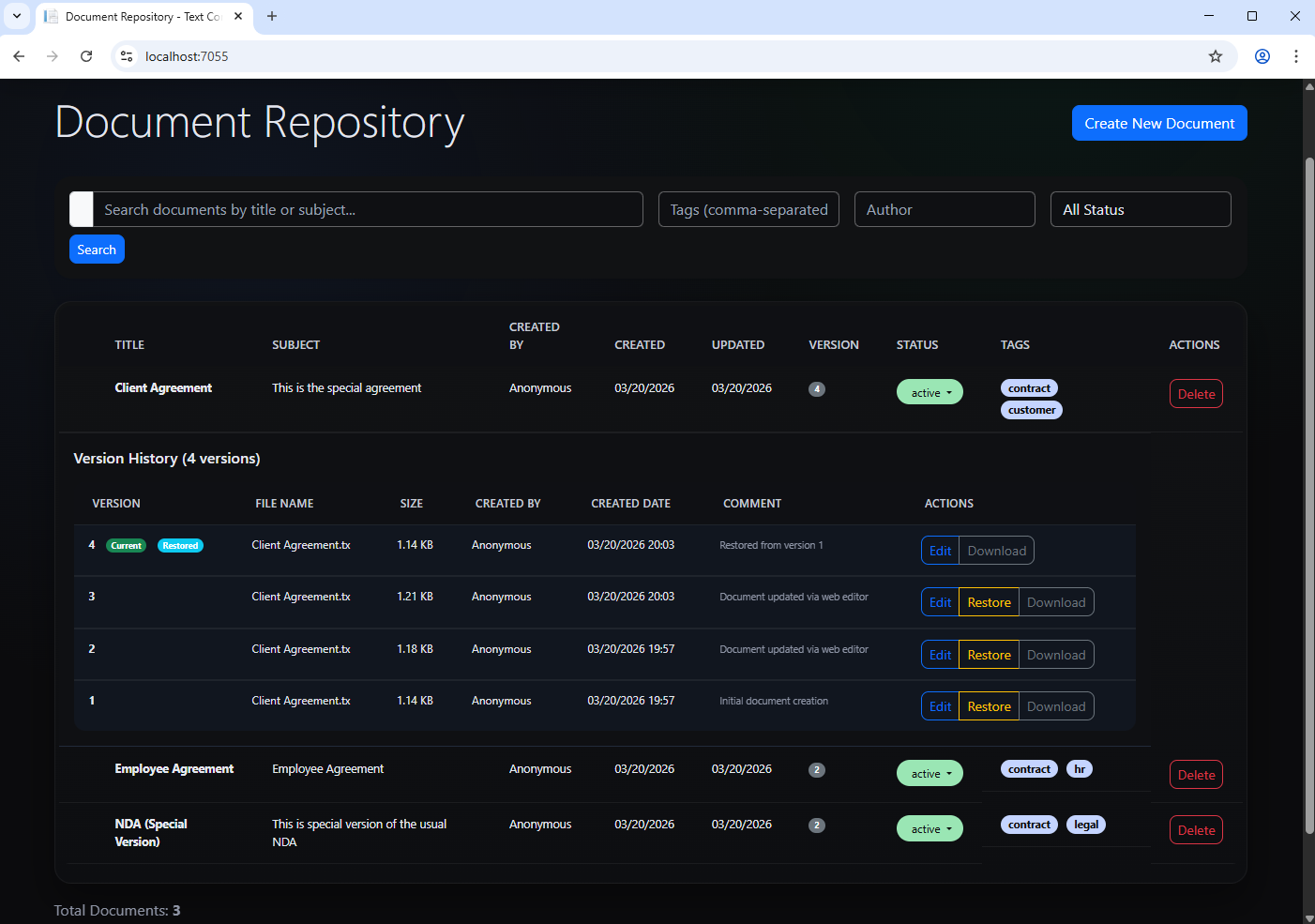
This article explains the TXTextControl.DocumentRepository library's functionality and walks through the accompanying demo application. It shows how the repository works internally and how it can be integrated into a TX Text Control-based document management workflow.
TXTextControl.DocumentRepository
TXTextControl.DocumentRepository provides a lightweight, developer-friendly implementation of such a repository that integrates directly with TX Text Control using extension methods.
https://github.com/TextControl/TXTextControl.DocumentRepository
Document Management System Sample Application
A companion sample application demonstrates the usage in a real application: A document management system with a web-based interface built with ASP.NET Core MVC.
https://github.com/TextControl/TXTextControl.DocumentRepository.Demo
What makes this especially interesting for TX Text Control users is that the repository can be used in two layers:
- First, it can be used as a standalone repository API that stores and retrieves raw document bytes.
- Second, it can be used as an integration layer for TX Text Control through extension methods for ServerTextControl, making saving and loading documents nearly frictionless.
Why a File Based Document Repository Can Be the Right Choice
A file-based document repository is useful when documents are first-class artifacts in your application. This is often the case with systems for contracts, templates, reports, generated correspondence, legal documents, HR workflows, and compliance archives.
This approach is important because the file system is optimized for storing large binary payloads. Rather than forcing every document into a database blob column, the repository stores the content on disk and adds a structured layer of metadata and versioning. In this project, each document is stored in its own folder based on a globally unique identifier (GUID), versions are stored sequentially as v1, v2, v3, and metadata is stored as JavaScript Object Notation (JSON) for inspection and portability.
That gives you several practical benefits:
- Inspectability: You can inspect the repository with normal file tools.
- Portability: You can easily move the repository or back it up without needing database dumps.
- Version Control: You get clear document history without overwriting content.
And you can keep the document storage model transparent even when the application logic becomes more advanced. For example, you can implement custom versioning strategies, add metadata fields, or integrate with external services without needing to change the underlying storage mechanism.
Repository Structure
The repository layout is as follows: a root folder named "DocumentRepository," then a folder named "Documents," and then one folder per document ID. Each folder contains a metadata.json file for document-level metadata and a "versions" subfolder containing "v1," "v2," and so on. Each version folder contains its own metadata.json file and the actual document content file.
A simplified example looks like this:
DocumentRepository/
└── Documents/
    └── 7c39c4d1-7f58-4b88-b0f0-ef4761a10c7d/
        ├── metadata.json
        └── versions/
            ├── v1/
            │   ├── metadata.json
            │   └── content.tx
            ├── v2/
            │   ├── metadata.json
            │   └── content.tx
            └── v3/
                ├── metadata.json
                └── content.tx
This is one of the project's strongest design decisions. The structure is straightforward, easy to migrate, and easy to inspect. The repository API hides the file system interactions, allowing you to focus on your application logic while still managing documents effectively.
Using the Repository Without TX Text Control
Before looking at the TX Text Control extension methods, it is important to see that the repository is perfectly usable on its own.
The main abstraction is IFileDocumentRepository, and the default implementation is FileDocumentRepository. The most important methods are CreateDocumentAsync, SaveNewVersionAsync, GetDocumentAsync, GetVersionContentAsync, ListDocumentsAsync, SearchDocumentsAsync, and RestoreVersionAsync.
Initialize the Repository
To initialize the repository, you create an instance of FileDocumentRepository and provide a root path for storage:
using TXTextControl.DocumentRepository.Repositories;

var repositoryPath = Path.Combine(
    Directory.GetCurrentDirectory(),
    "DocumentRepository");

IFileDocumentRepository repository =
    new FileDocumentRepository(repositoryPath);
The repository automatically creates the necessary directory structure in the configured location.
Create a New Document from Raw Bytes
At this level, the repository does not need a TX Text Control instance. You can create a document from any byte[] payload.
byte[] documentBytes = await File.ReadAllBytesAsync("Contract.tx");

var versionMetadata = await repository.CreateDocumentAsync(
    title: "Employment Contract",
    createdBy: "John Doe",
    fileName: "Contract.tx",
    mimeType: "application/vnd.textcontrol",
    content: documentBytes,
    subject: "New employee agreement",
    comment: "Initial draft",
    tags: new[] { "contract", "hr", "legal" },
    cancellationToken: CancellationToken.None
);

Guid documentId = versionMetadata.DocumentId;
The repository accepts documents and metadata, writing the first version to disk. The returned Document object contains the document ID and metadata, that can be used for later retrieval.
Load a Specific Version of a Document
To load a specific version of a document, you can use the GetVersionContentAsync method:
byte[] content = await repository.GetVersionContentAsync(
    documentId: documentId,
    version: 1,
    cancellationToken: CancellationToken.None
);

await File.WriteAllBytesAsync("restored.tx", content);
The repository stores the complete content of each version, not just the differences, so loading a version is straightforward. Each version contains the complete document content and version-specific metadata.
Get Document Metadata and Version History
To get the document metadata and version history, you can use the GetDocumentAsync method:
var documentInfo = await repository.GetDocumentAsync(
    documentId,
    CancellationToken.None);

Console.WriteLine(documentInfo.Metadata.Title);
Console.WriteLine($"Current version: {documentInfo.Metadata.CurrentVersion}");

foreach (var version in documentInfo.Versions)
{
    Console.WriteLine(
        $"v{version.Version} by {version.CreatedBy} on {version.CreatedAtUtc:u}");
}
This is where the repository begins to function as a true document management layer rather than merely a wrapper for file folders. You're not just loading a file. You are loading document metadata, the current state, and the version history all at once.
Saving New Versions Without TX Text Control
To save a new version of a document, you can use the SaveNewVersionAsync method:
byte[] updatedBytes = await File.ReadAllBytesAsync("Contract-Updated.tx");

var saveRequest = new SaveDocumentRequest
{
    DocumentId = documentId,
    ExpectedCurrentVersion = 1,
    FileName = "Contract.tx",
    MimeType = "application/vnd.textcontrol",
    CreatedBy = "Jane Smith",
    Comment = "Added salary details",
    Content = updatedBytes
};

await repository.SaveNewVersionAsync(
    saveRequest,
    CancellationToken.None);
There are two technical reasons why this is important. First, versioning is automatic. Rather than overwriting the old content, a new version is created.
Second, the request includes the ExpectedCurrentVersion property, a classic optimistic concurrency pattern. This helps prevent silent conflicts when multiple users or processes are working on the same document simultaneously, providing concurrent access and thread-safe operations as core capabilities.
Get All Documents and Search
To get a list of all documents, you can use the ListDocumentsAsync method:
var documents = await repository.ListDocumentsAsync(CancellationToken.None);

foreach (var doc in documents)
{
    Console.WriteLine($"{doc.Title} - {doc.CurrentVersion} version(s)");
}
This is the most basic repository browsing API, forming the foundation for dashboards, admin views, archive lists, and document pickers. ListDocumentsAsync is one of the main repository operations.
One of the strongest reasons to use a repository abstraction instead of manually scanning folders is search. Search supports title and subject matching, tag filtering, author filtering, status filtering, limiting results, and pagination via MaxResults. A typical search looks like this:
using TXTextControl.DocumentRepository.Models;

var searchRequest = new SearchDocumentsRequest
{
    TitleContains = "contract",
    RequireAllTags = new List<string> { "legal" },
    Status = "active",
    CreatedByContains = "John Doe",
    MaxResults = 50
};

var results = await repository.SearchDocumentsAsync(
    searchRequest,
    CancellationToken.None);

foreach (var doc in results.Documents)
{
    Console.WriteLine($"{doc.Title} - Version {doc.CurrentVersion}");
}
Because the demo application builds on this concept, we can observe a richer search pattern in practice. In the HomeController, the demo combines a title and subject search with optional tag parsing, author and status filtering, and sorting by the "UpdatedAtUtc" field. It also limits the number of results to 100.
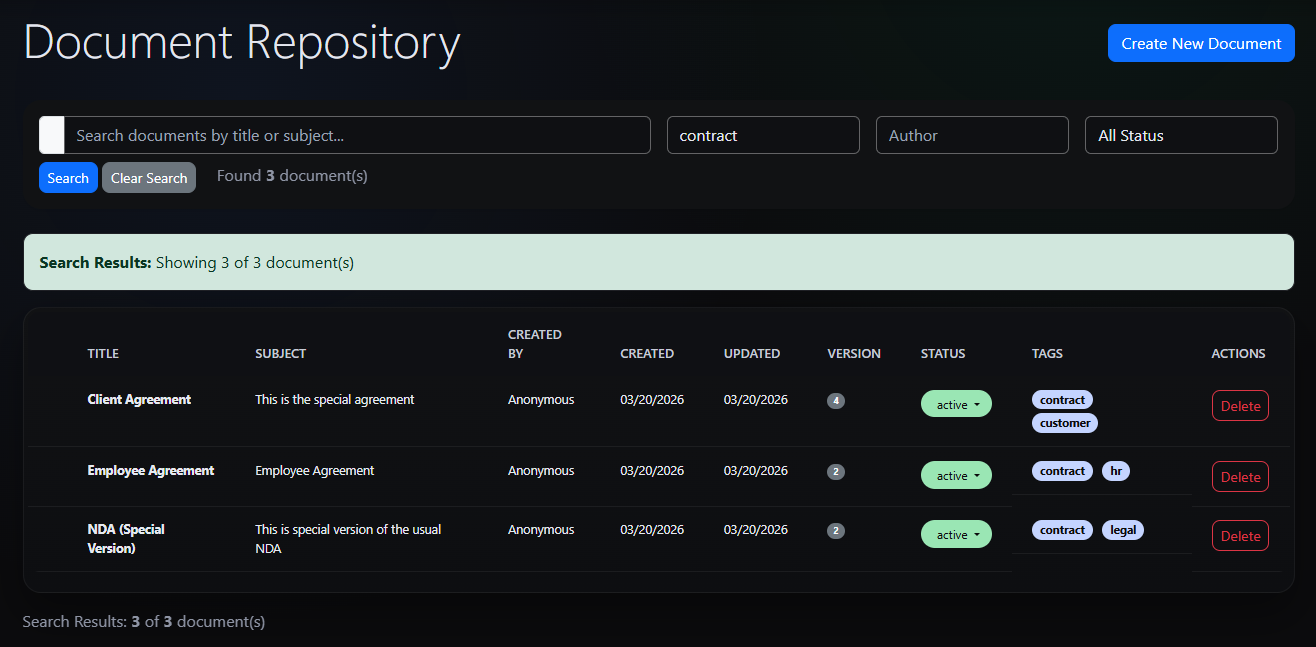
This demonstrates that the repository is not merely a passive storage mechanism. It already exposes the kinds of query operations needed for real applications.
Restore a Previous Version
To restore a previous version of a document, you can use the RestoreVersionAsync method:
await repository.RestoreVersionAsync(
    documentId: documentId,
    versionToRestore: 2,
    expectedCurrentVersion: 4,
    restoredBy: "Admin",
    comment: "Reverted to version 2",
    cancellationToken: CancellationToken.None
);
This is an excellent design detail: "restoring" does not imply a destructive rollback. In the demo UI, the "Restore" function creates a new version with the content from the selected version, while the current version remains in the history.
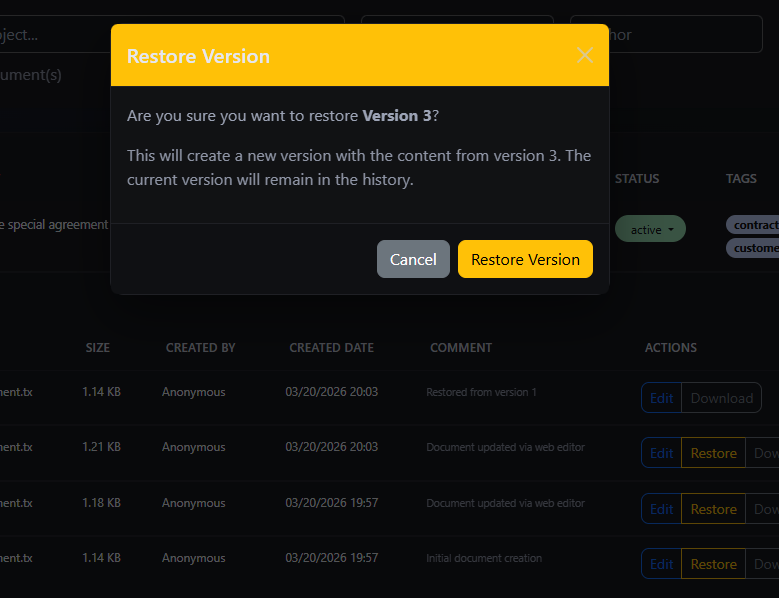
This is exactly how enterprise version restoration should work because it maintains auditability. You can always see that a restoration occurred, and you can revert the restoration if needed.
Where TX Text Control Comes In
The repository is useful up to this point. However, the project's true elegance lies in how it integrates with TX Text Control. It provides dedicated extension methods for ServerTextControl that allow you to save and load documents directly from the repository without needing to manually handle byte arrays.
These methods include:
SaveToRepositoryAsNewAsyncSaveToRepositoryAsyncLoadFromRepositoryAsync
The focus shifts from generic document bytes to a TX Text Control native workflow. Without extension methods, a TX Text Control-based application would require several manual steps to store or retrieve documents. First, the application would load the document content into a ServerTextControl instance. Then, the content would need to be exported into a byte array or stream. Additionally, the document's settings, such as the title, subject, author, and keywords, would need to be read from the document.
Then, all of this information would need to be manually passed to the repository methods responsible for storing the document. When loading the document back into the editor, the same steps would need to be repeated in reverse, recreating the necessary connections each time.
The extension methods eliminate this repetitive work and significantly simplify the process. They enable the repository to act as a natural persistence layer for TX Text Control documents, providing TX Text Control users with the core value of this project.
Save a New Repository Document from ServerTextControl
The first important integration method is SaveToRepositoryAsNewAsync. This method saves the current Server
using TXTextControl.DocumentRepository.Extensions;

var metadata = await textControl.SaveToRepositoryAsNewAsync(
    repository: repository,
    fileName: "Document.tx",
    streamType: BinaryStreamType.InternalUnicodeFormat,
    comment: "Initial version",
    cancellationToken: CancellationToken.None
);
This is a major convenience feature because the extension method connects the editor state to the repository model.
In the demo application, the HomeController.CreateNewDocument method creates a temporary ServerSaveToRepositoryAsNewAsync method to create the initial repository entry.
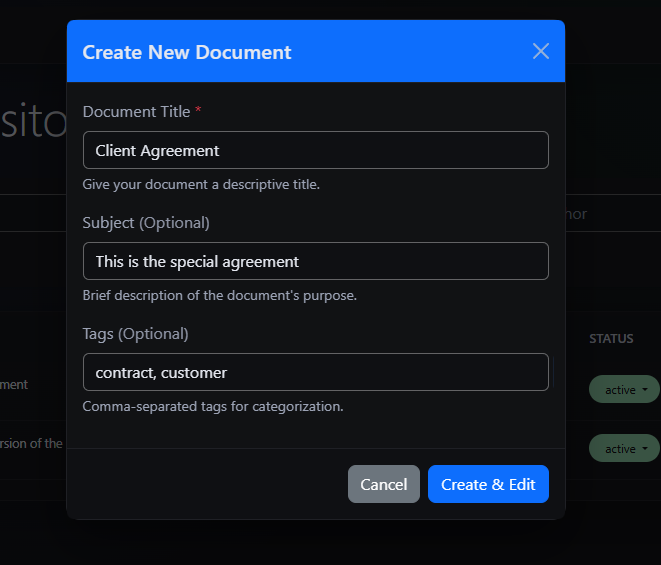
This is the ideal pattern for real applications: create a blank editor document, attach metadata through TX Text Control's document settings, and persist the entire process in one call.
Save a New Version from ServerTextControl
To save a new version of an existing document, you can use the SaveToRepositoryAsync method:
await textControl.SaveToRepositoryAsync(
    repository: repository,
    documentId: documentId,
    comment: "Updated content",
    cancellationToken: CancellationToken.None
);
This becomes clearer in the EditController.SaveDocument demo. The controller loads the repository's content into a temporary ServerSaveToRepositoryAsync to create the next version. The response also indicates whether the content was unchanged, a practical feature for web editing.
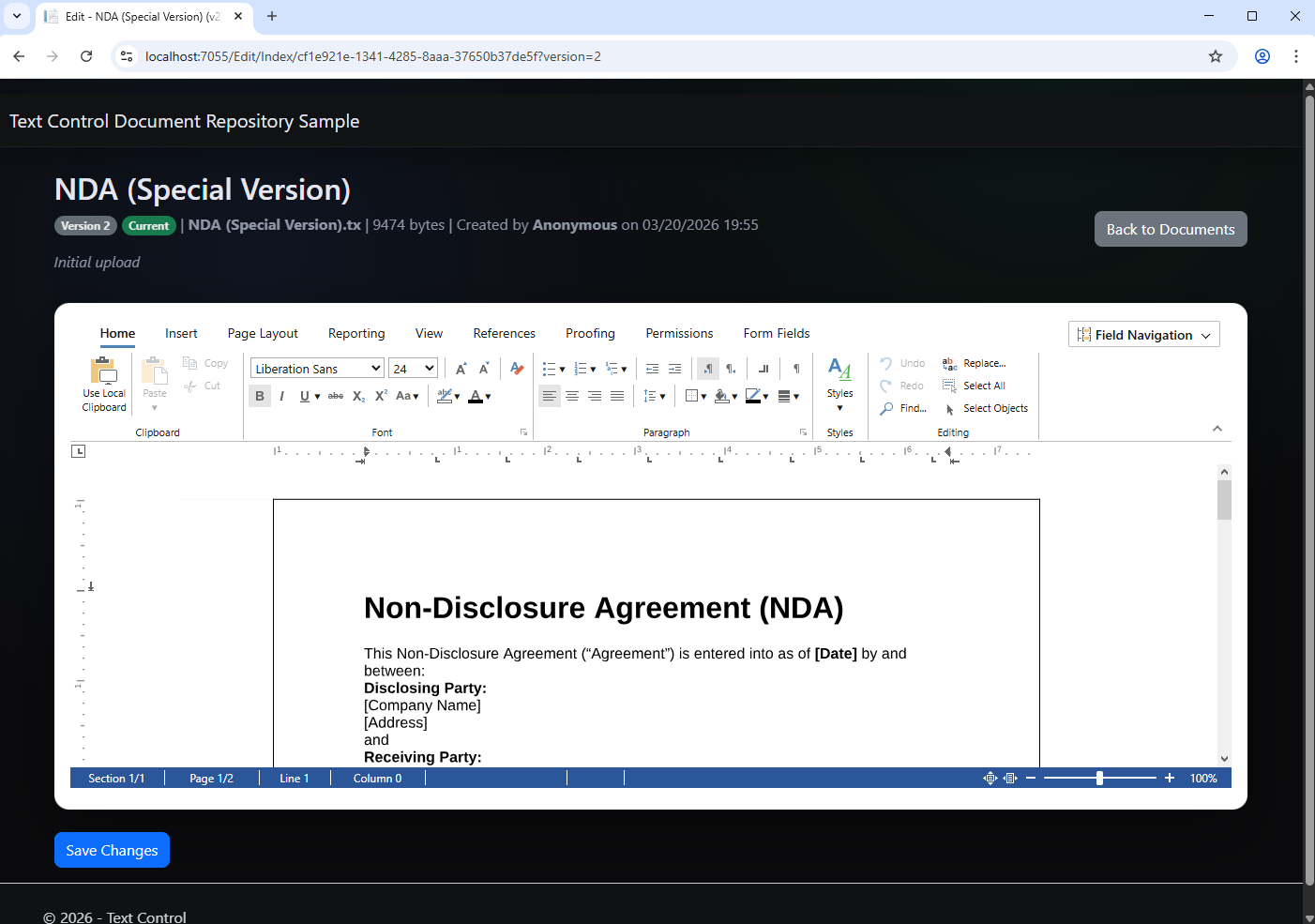
A representative pattern looks like this:
using var textControl = new TXTextControl.ServerTextControl();
textControl.Create();

textControl.Load(contentBytes, TXTextControl.BinaryStreamType.InternalUnicodeFormat);

textControl.DocumentSettings.DocumentTitle = "Updated Contract";
textControl.DocumentSettings.DocumentSubject = "Revised employee agreement";
textControl.DocumentSettings.Author = "Jane Smith";
textControl.DocumentSettings.DocumentKeywords = new[] { "contract", "hr", "legal" };

var versionMetadata = await textControl.SaveToRepositoryAsync(
    repository: repository,
    documentId: documentId,
    comment: "Added salary section",
    fileName: "Contract.tx",
    streamType: TXTextControl.BinaryStreamType.InternalUnicodeFormat,
    cancellationToken: CancellationToken.None
);
This is where the repository and TX Text Control align perfectly. The document editor serves as the definitive source for both document content and metadata.
Conclusion
The TXTextControl.DocumentRepository is a powerful yet straightforward, file-based document repository with version control. It is designed to integrate seamlessly with TX Text Control. It offers a practical solution for applications requiring robust document management without the overhead of a full database system.
This repository provides the necessary features to effectively store, version, search, and restore documents, whether you need to manage contracts, templates, reports, or any other document-centric workflow. Extension methods for ServerTextControl make it an ideal persistence layer for TX Text Control-based applications.
Frequently Asked Questions
TXTextControl.DocumentRepository is a .NET library that implements a file based document repository with version control, metadata management, and search capabilities. It allows applications to store documents on disk while maintaining a structured repository that keeps track of document versions, metadata, and history.
A file based repository is often a better architectural choice for document centric systems because large binary files are handled efficiently by the filesystem. Documents remain accessible outside the application, backup strategies are simpler, and version history can be stored without overwriting existing files. Metadata is stored alongside the documents in JSON files which keeps the repository transparent and easy to inspect.
Each document is stored in its own folder that is identified by a unique document identifier. Inside this folder the repository stores a metadata file describing the document and a versions directory containing version folders such as v1, v2, and v3. Each version folder contains its own metadata and the document content file.
Yes. The repository can store and retrieve documents as raw byte arrays, which means it can be used independently of TX Text Control. Applications can create documents, save new versions, retrieve document content, and access metadata using the repository API without using the TX Text Control editor.
Whenever a document is updated the repository creates a new version folder instead of overwriting the existing file. The updated document content and version metadata are stored in this new folder. This ensures that previous versions remain intact and that the complete history of the document is preserved.
The repository provides APIs to list all stored documents and to search documents using metadata. Developers can filter by properties such as title, subject, tags, author, or status. The search request object also supports result limits and pagination which makes it suitable for implementing document browsers or dashboards.
Restoring a document version does not overwrite the current document. Instead the repository creates a new version that contains the content of the selected earlier version. This preserves the entire document history while allowing the document to return to a previous state.
The extension methods integrate the repository directly with the TX Text Control ServerTextControl component. They allow developers to save the current document as a new repository document, create new document versions, or load repository documents directly into the editor without manually exporting streams or handling metadata.
The demo application shows how the repository can be integrated into an ASP.NET Core MVC application using TX Text Control. It demonstrates creating new documents, listing and searching documents, editing documents with the TX Text Control editor, saving new versions, restoring previous versions, and downloading stored document versions.
This approach is particularly useful for applications that generate, edit, or archive documents. Typical examples include contract management systems, document generation services, template libraries, reporting platforms, and internal document portals where maintaining version history and metadata is important.

Download and Fork This Sample on GitHub
We proudly host our sample code on github.com/TextControl.
Please fork and contribute.
Requirements for this sample
- TX Text Control .NET Server 34.0
- Visual Studio 2026
ASP.NET
Integrate document processing into your applications to create documents such as PDFs and MS Word documents, including client-side document editing, viewing, and electronic signatures.





- Angular
- Blazor
- React
- JavaScript
- ASP.NET MVC, ASP.NET Core, and WebForms
Related Posts
Create Fillable PDFs from HTML Forms in C# ASP.NET Core Using a WYSIWYG Template
Learn how to generate PDFs from HTML forms in ASP.NET Core using a pixel-perfect WYSIWYG template. Extract form fields from a document, render a dynamic HTML form, and merge the data server-side…
Why HTML to PDF Conversion is Often the Wrong Choice for Business Documents…
In this article, we explore the challenges of HTML to PDF conversion for business documents in C# .NET and present alternative solutions that offer better performance and reliability. Discover why…
ASP.NETASP.NET CoreTracked Changes
Inspect and Process Track Changes in DOCX Documents with TX Text Control…
Collaborative document editing is a core requirement in many modern applications. In this article, we will explore how to inspect and process track changes in DOCX documents using TX Text Control…
Text Control at BASTA! Spring 2026 in Frankfurt
This week, we sponsored the BASTA! Spring 2026 conference in Frankfurt, Germany. We had a booth in the exhibition area and presented our products to the attendees. We also had the opportunity to…
From Legacy Microsoft Office Automation to a Future-Ready Document Pipeline…
In this article, we will explore how to transition from traditional office automation to a modern document pipeline using C# and .NET. We will discuss the benefits of adopting a future-ready…