


Create Fillable PDFs from HTML Forms in C# ASP.NET Core Using a WYSIWYG Template

Learn how to generate PDFs from HTML forms in ASP.NET Core using a pixel-perfect WYSIWYG template. Extract form fields from a document, render a dynamic HTML form, and merge the data server-side to produce professional PDF documents.
Collecting structured data from users and producing polished documents is a common requirement. Contracts, onboarding forms, declarations, and applications often follow this pattern: Users fill out forms, and systems generate professional PDF documents.
Many systems begin with an HTML form and then try to create a document from the collected data. This approach often results in layout issues and redundant logic between the web form and the final document.
A better approach is document-first architecture.
Using TX Text Control, you can start with a pixel-perfect document template, extract the form fields from it, dynamically generate an HTML form, collect user input, and merge the data back into the document to create a PDF.
The sample application demonstrates exactly this workflow using ASP.NET Core MVC and TX Text Control.
The Core Idea
The architecture follows a simple but powerful pipeline.
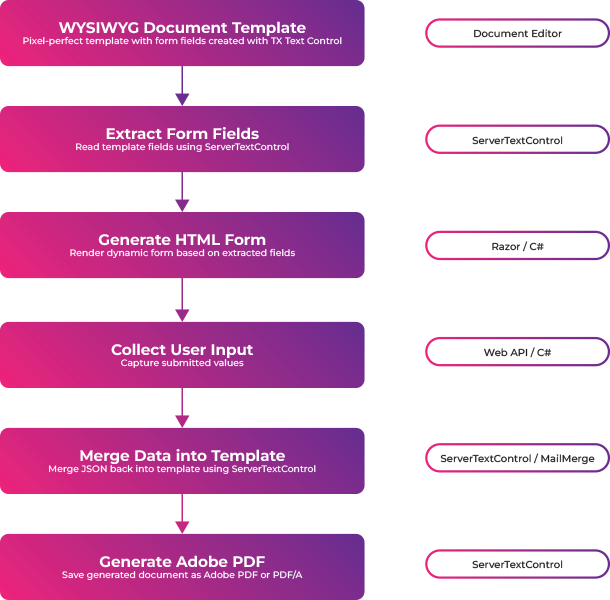
Instead of maintaining two separate definitions of the same form, one for HTML and one for the document, the document template becomes the single source of truth.
- Consistent field definitions
- Predictable document layout
- No duplication between frontend and document generation
- True WYSIWYG document output
The sample repository demonstrates how to implement this approach in a modern ASP.NET Core MVC application.
Why Server-Side Generation Matters
An important aspect of this workflow is that the final document is generated on the server. This means that the merge process, document assembly, and PDF export are all handled in a controlled back-end environment rather than in the browser.
- The document generation logic stays centralized and consistent.
- Templates, business rules, and merge behavior are easier to maintain.
- Sensitive processing does not need to be pushed to the client.
- PDF output is based on the real document engine, not browser rendering differences.
- The final result is more reliable for contracts and other business documents.
This server-side approach is especially important for generating documents in a predictable and repeatable way. It ensures that the same input always produces the same professional result.
Step 1: Design the Pixel-Perfect Template
The process begins with a TX Text Control template. Form fields are then inserted into the template wherever the document requires user input.
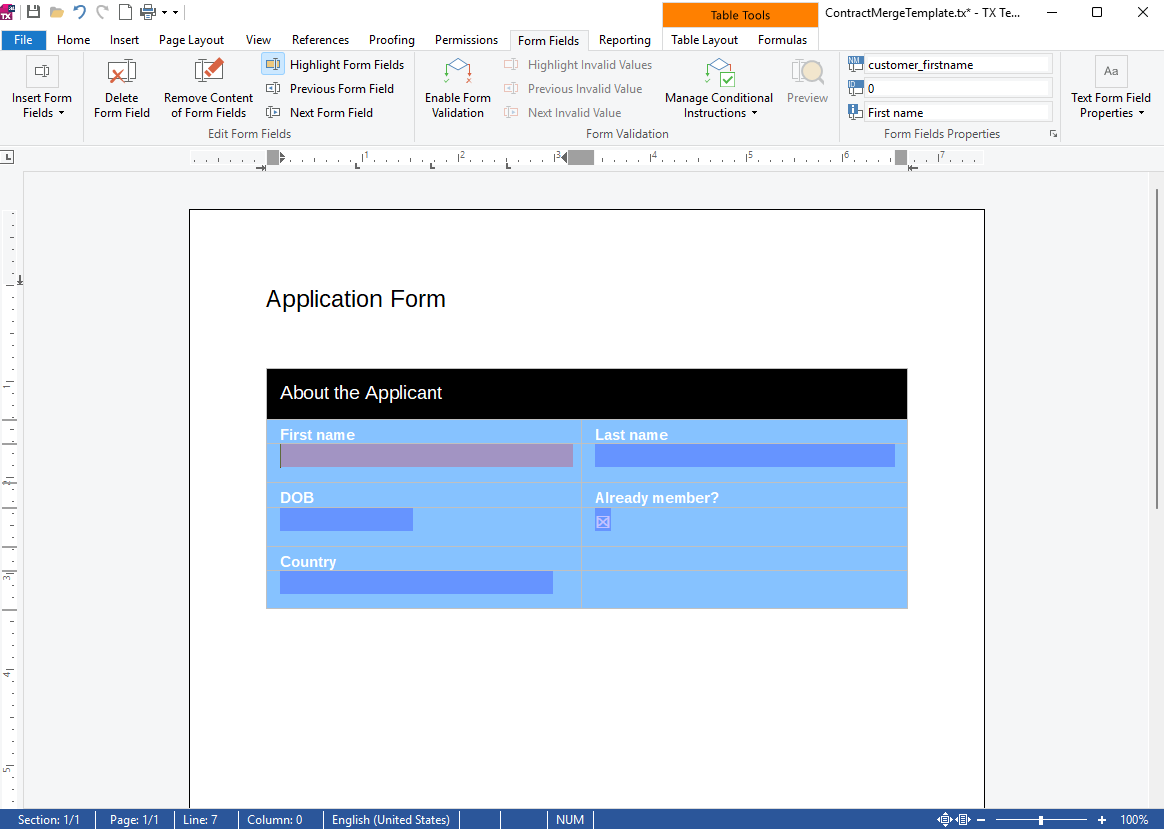
Typical examples include:
- Customer name
- Dates
- Options (Country)
- Acceptance checkboxes
Since the template was designed using a WYSIWYG editor, the final document's layout will be exactly what the user receives. This differs fundamentally from HTML-to-PDF approaches, in which the layout must be recreated later.
Step 2: Extract Form Fields from the Template
The first step of the application process is to inspect the template and extract its form fields. The sample uses a helper class called TemplateFieldExtractor to do this. The extractor loads the template with ServerTextControl and lists all the form fields.
Conceptually the process looks like this:
using var tx = new ServerTextControl();
tx.Create();

tx.Load(templatePath);

foreach (var field in tx.FormFields)
{
    // Convert TX field into a descriptor
}
Each field is converted into a TemplateFieldDescriptor object.
public class TemplateFieldDescriptor
{
    public string Name { get; set; }
    public string Description { get; set; }
    public string FieldType { get; set; }
    public bool Required { get; set; }
    public string? DefaultValue { get; set; }
    public List<string> Options { get; set; }
}
These descriptors are the bridge between the document template and the web UI.
Step 3: Generate the HTML Form
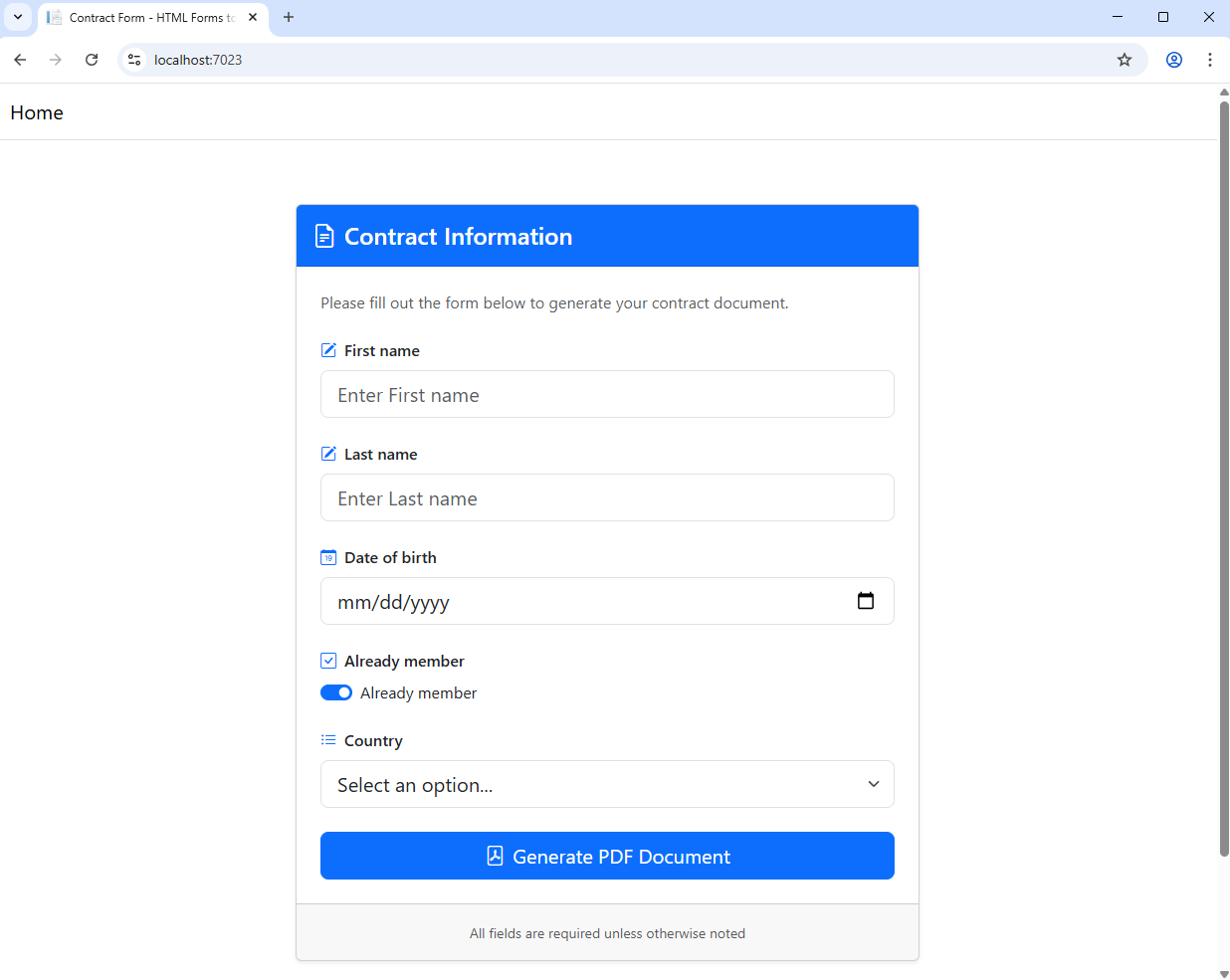
Once the fields are extracted, the application dynamically generates an HTML form. Instead of writing large conditional blocks in Razor views, the sample uses a custom Tag Helper called FormFieldTagHelper. This allows rendering a form field with a single line:
<form-field descriptor="@field></form-field>The Tag Helper internally decides which HTML element should be generated based on the field type.
- TextFormField → input type="text"
- DateFormField → input type="date"
- CheckFormField → input type="checkbox"
- SelectionFormField → select
This abstraction keeps the Razor view clean and reusable. The Tag Helper also automatically applies common UI patterns such as:
- Bootstrap styling
- Field icons
- Validation indicators
- Accessible HTML attributes
The result is a modern HTML form that reflects the document template's structure directly.
Step 4: Collect User Input
When the user submits the form, ASP.NET Core receives the values via IFormCollection. The controller converts the form values into JSON format, which is then used for the merge operation.
var values = form.Keys.ToDictionary(
    key => key,
    key => form[key].ToString());

var json = JsonSerializer.Serialize(values);
This JSON structure directly maps to the field names defined in the template.
Step 5: Merge Data into the Template
After receiving the user input, the server loads the original template again. The application then performs a MailMerge operation using TX Text Control's built-in Mail
using var tx = new ServerTextControl();
tx.Create();

tx.Load(templatePath);

var mailMerge = new MailMerge
{
    TextComponent = tx
};

mailMerge.MergeJsonData(json);
The merge operation replaces the document's merge fields with the submitted data. Since the merge occurs directly within the TX Text Control document model, the layout remains intact. Another advantage of server-side generation is that the merge logic and final rendering are handled centrally, making the output easier to validate, secure, and reproduce.
Step 6: Generate the PDF
Finally, the merged document is exported as a PDF.
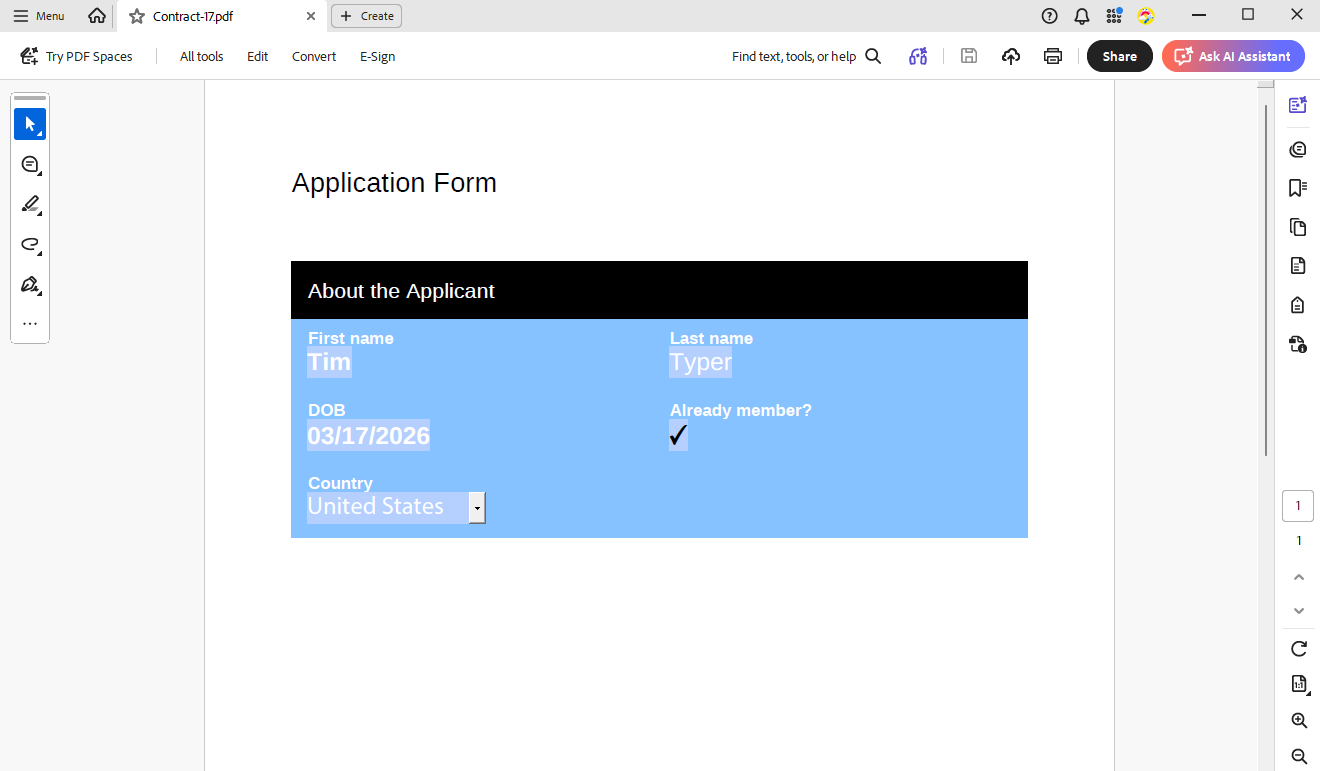
tx.Save(out byte[] data, BinaryStreamType.AdobePDF);The resulting file is returned to the browser as a download. This creates a professional, pixel-perfect document that matches the original template design exactly. Since the PDF is generated on the server, users are not dependent on browser-specific PDF behavior or client-side rendering tricks to obtain the final document.
Changing the Template
One of the key advantages of this architecture is that modifying the document template is simple. Since the template serves as the source of truth, you can modify it in TX Text Control's WYSIWYG editor without altering any code. As long as you keep the field names the same, the application will automatically adapt to the new template structure.
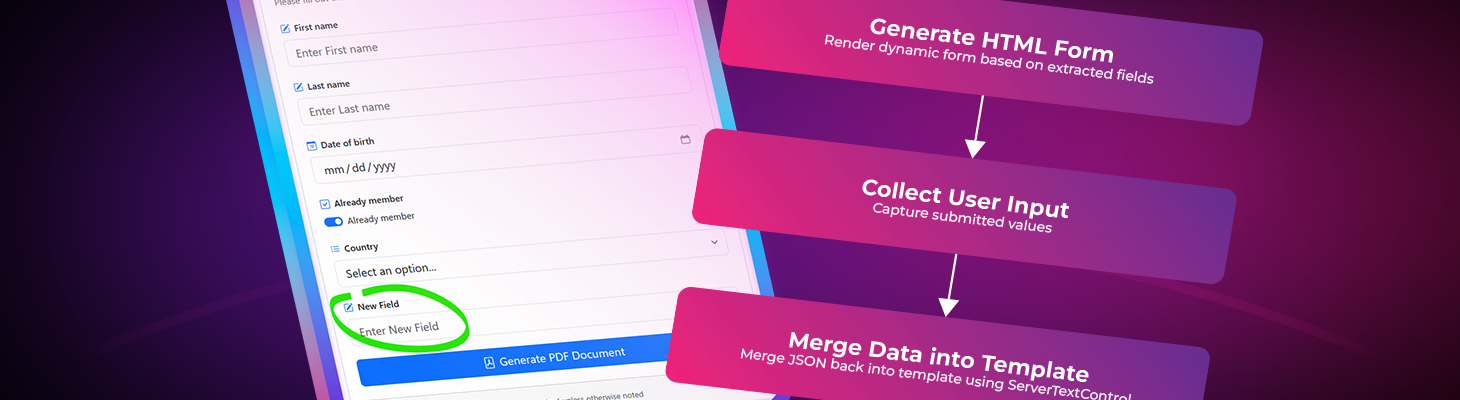
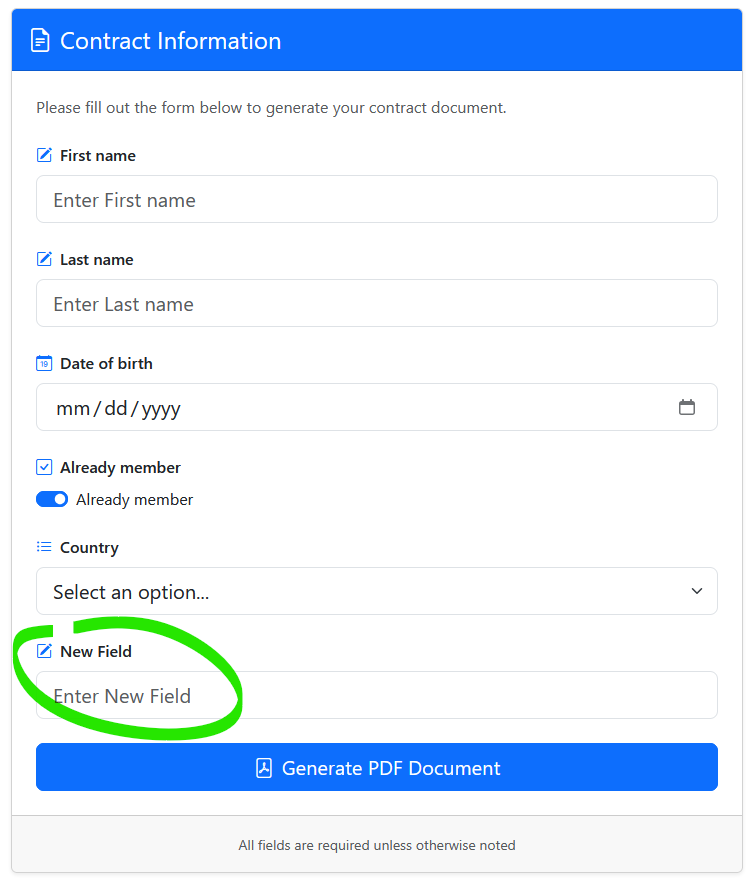
For instance, if you need to add a new field or modify the layout, you can do so directly in the template. The next time the application runs, it will extract and render the new fields in the HTML form without requiring additional coding. The following screenshot shows how a new field was added to the template and automatically appeared in the HTML form.
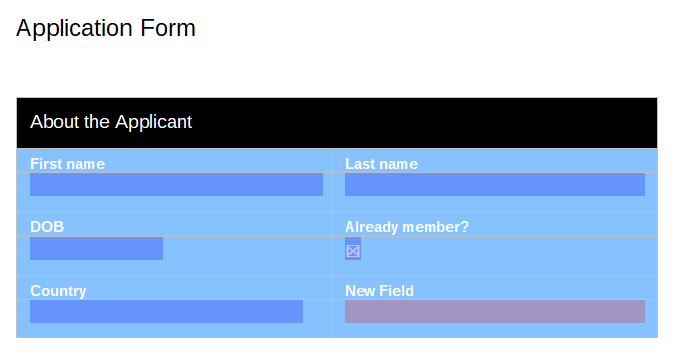
The new field is seamlessly rendered alongside the existing fields in the generated HTML form. This flexibility enables rapid iteration on document designs without modifying the underlying application logic.
Why This Architecture Is Powerful
This design solves a common problem in document applications. Without this approach, developers often struggle.
- An HTML form definition
- A document template
- Mapping logic between the two
Over time, these definitions can diverge. By establishing the document template as the definitive source, you can eliminate this duplication. The benefits are significant.
- True WYSIWYG output
- Single source of truth
- Faster development
- Maintainable architecture
- Reliable server-side PDF generation
Conclusion
Following this document-first architecture allows you to create a robust system for generating professional PDFs from user input. The sample application shows how to implement this workflow with ASP.NET Core MVC and TX Text Control. Starting with a pixel-perfect template, extracting form fields, and merging data server-side allows you to produce consistent, high-quality documents, avoiding the pitfalls of HTML-to-PDF conversion.
Frequently Asked Questions
Document-first architecture means starting with the final document template rather than the HTML form. The template defines the layout and form fields, which are then extracted to generate a dynamic HTML form. User input is collected and merged back into the template to produce the final PDF.
The application loads a TX Text Control template on the server and reads its form fields using the ServerTextControl API. Each field is converted into a descriptor object that contains metadata such as the field name, type, default value, and options. These descriptors are then used to dynamically render an HTML form in an ASP.NET Core MVC Razor view.
TX Text Control supports several form field types that can be extracted and rendered in HTML forms. Common examples include TextFormField for text inputs, DateFormField for date pickers, CheckFormField for checkboxes, and SelectionFormField for dropdown lists.
Server-side generation ensures that document creation happens in a controlled environment using a full document processing engine. This avoids browser rendering differences, keeps business logic centralized, protects sensitive processing, and guarantees that the same input produces consistent document output.
When the user submits the HTML form, ASP.NET Core collects the values through IFormCollection. These values are converted into JSON and passed to the TX Text Control MailMerge component. The MailMerge process replaces merge fields in the document template with the submitted data.
Yes. Because the template acts as the source of truth, layout changes can be made directly in the WYSIWYG editor. As long as the field names remain the same, the application will automatically extract the fields and render them in the HTML form without requiring code changes.
A WYSIWYG template ensures that the document layout is designed exactly as it will appear in the final PDF. This eliminates the need to recreate document layouts programmatically and guarantees consistent formatting, spacing, and pagination.
For many business scenarios it is. HTML-to-PDF workflows attempt to recreate document layouts from web pages, which can introduce inconsistencies in pagination and formatting. Starting with a document template ensures predictable layout and professional output.
Yes. The sample application demonstrates how to implement this architecture using ASP.NET Core MVC. The server loads the template, extracts form fields, generates the HTML form, collects user input, and merges the data into the document to generate a PDF.
This approach is ideal for systems that collect structured user input and generate formal documents. Typical examples include contract generation systems, onboarding forms, insurance applications, financial reports, and HR document workflows.

Download and Fork This Sample on GitHub
We proudly host our sample code on github.com/TextControl.
Please fork and contribute.
Requirements for this sample
- TX Text Control .NET Server 34.0
- Visual Studio 2026
ASP.NET
Integrate document processing into your applications to create documents such as PDFs and MS Word documents, including client-side document editing, viewing, and electronic signatures.





- Angular
- Blazor
- React
- JavaScript
- ASP.NET MVC, ASP.NET Core, and WebForms
Related Posts
Why HTML to PDF Conversion is Often the Wrong Choice for Business Documents…
In this article, we explore the challenges of HTML to PDF conversion for business documents in C# .NET and present alternative solutions that offer better performance and reliability. Discover why…
Designing the Perfect PDF Form with TX Text Control in .NET C#
Learn how to create and design interactive PDF forms using TX Text Control in .NET C#. This guide covers essential features and best practices for effective form design.
Streamline Data Collection with Embedded Forms in C# .NET
Discover how to enhance your C# .NET applications by embedding forms for data collection. This article explores the benefits of using Text Control's ASP.NET and ASP.NET Core components to create…
Convert MS Word DOCX to PDF with Form Fields in C# .NET: Preserve or Flatten…
TX Text Control converts DOCX to PDF while preserving or flattening form fields, ensuring accurate import and export. Its flexible API simplifies form field handling for seamless document processing.
Export and Import Adobe PDF XFDF XML Files in .NET C#
This article shows how to export and import Adobe PDF XFDF XML files in .NET C# using the TX Text Control .NET Server component. Form fields from PDF documents are exported to XFDF XML files and…