


Why HTML to PDF Conversion is Often the Wrong Choice for Business Documents in C# .NET

In this article, we explore the challenges of HTML to PDF conversion for business documents in C# .NET and present alternative solutions that offer better performance and reliability. Discover why relying on HTML to PDF conversion can lead to issues such as inconsistent rendering, performance bottlenecks, and maintenance headaches, and learn about more robust approaches to generating business documents in C# .NET.

Many applications convert HTML into PDF documents. There are numerous tools and libraries that promise a simple workflow: Render the HTML and export the result as a PDF.
This approach works well for certain use cases. However, when it comes to business documents, such as invoices, purchase orders, contracts, and financial reports, HTML-to-PDF conversion is often the wrong architectural decision.
Business documents are not webpages. They are structured, paginated documents with strict layout requirements and often regulatory constraints. Treating them as HTML snapshots can introduce serious limitations and unnecessary complexity.
In this article, we examine when HTML-to-PDF conversion is appropriate, why it often fails for business documents, and why a structured document pipeline using TX Text Control is a more reliable solution.
When HTML to PDF Can Be Acceptable
HTML-to-PDF conversion is useful when the goal is to capture a webpage exactly as it appears in the browser. In these cases, the HTML represents the final layout, and the PDF is merely a static representation of the page.
Examples include exporting internal dashboards, archiving generated reports, and capturing screenshots of applications for documentation purposes. Since the layout is defined by the HTML, converting the page into a PDF is relatively straightforward.
Business documents follow strict layout rules and are not designed to behave like responsive webpages, which HTML was never intended to support.
However, business documents are fundamentally different. They are not designed to behave like responsive webpages and must adhere to strict layout rules that HTML was never intended to support.
Why HTML to PDF Fails for Business Documents
Documents such as invoices and financial reports must adhere to predictable formatting rules. The layout is an integral part of the document's meaning, not merely visual decoration.
For example, an invoice should always have the same structure: Company information at the top, customer details in a designated section, line items in aligned tables, and totals in the correct position. Financial data must remain aligned and readable, regardless of the number of items in the document.
HTML, on the other hand, was designed for responsive layouts, in which content dynamically adapts to screen size, browser behavior, and CSS rules. Therefore, it is difficult to guarantee a consistent layout when HTML is converted into a fixed-page PDF.
Even minor changes to stylesheets can cause elements to shift unexpectedly in the final document.
Headers and Footers Are Essential
Invoices and other business documents rely on consistent headers and footers that contain information such as company branding, invoice numbers, tax identifiers, and page numbers.

In HTML-based workflows, headers and footers are often simulated using print CSS or custom rendering behavior within the PDF library. While these approaches can work for simple documents, they often malfunction when documents are longer or layouts change.
A real document engine treats headers and footers as native document elements, ensuring consistent behavior across pages.
Tables Must Behave Predictably Across Pages
Invoices rely heavily on tables. Line items, pricing details, taxes, and totals are usually presented in a table.
When these tables span multiple pages, the document must behave predictably. Table headers should automatically repeat on the next page, rows should never break awkwardly, and totals must remain aligned, no matter the document's length.
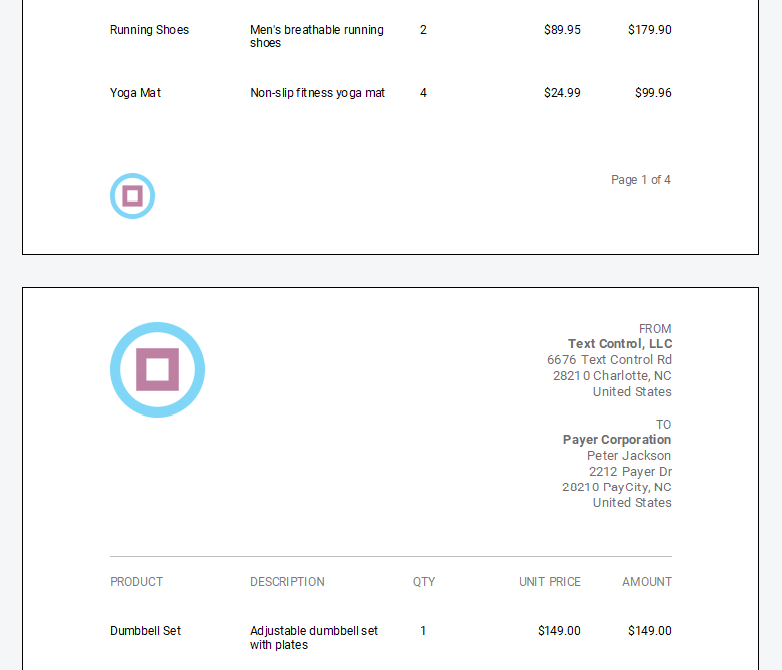
However, HTML-to-PDF converters often struggle with these scenarios because HTML tables were never designed for strict page-based rendering.
Pagination Requires Precise Control
Business documents often have strict pagination rules. Totals should not be left alone on a page, signature sections should remain intact, and related information should stay together.
Although HTML includes some CSS rules for page breaks, support for these rules varies widely between PDF converters. Consequently, developers often end up writing fragile workarounds to enforce correct pagination.
Maintenance Becomes Fragile Over Time
Even a small UI change can unexpectedly break document output.
Initially, HTML-to-PDF workflows seem straightforward because developers can reuse existing HTML templates. Over time, however, the system typically accumulates layout fixes that make maintenance increasingly difficult.
Teams often end up maintaining CSS rules for PDF output, duplicate layouts for screen and print rendering, and fixes specific to the converter for pagination issues. Even a small UI change can unexpectedly break document output.
A Simple HTML to PDF Invoice Example
Consider the following browser-based example to illustrate the challenges of converting an HTML invoice into a PDF using jsPDF and html2canvas. The example generates multiple rows to force pagination.
<!DOCTYPE html>
<html>
<head>
<meta charset="UTF-8">
<title>Multi-Page Invoice PDF</title>

<script src="https://cdnjs.cloudflare.com/ajax/libs/jspdf/2.5.1/jspdf.umd.min.js"></script>
<script src="https://cdnjs.cloudflare.com/ajax/libs/html2canvas/1.4.1/html2canvas.min.js"></script>

<style>
body {
    font-family: Arial, sans-serif;
}

#invoice {
    width: 700px;
    padding: 20px;
    box-sizing: border-box;
    border: 1px solid #ccc;
}

h1 {
    margin-top: 0;
}

table {
    width: 100%;
    border-collapse: collapse;
}

td, th {
    border: 1px solid #ccc;
    padding: 6px;
}

th {
    background: #eee;
}
</style>
</head>

<body>

<div id="invoice">

<h1>Invoice #1001</h1>
<p>Customer: ACME Corp</p>
<p>Date: 2026-03-12</p>

<table>
<thead>
<tr>
<th>Item</th>
<th>Description</th>
<th>Price</th>
</tr>
</thead>

<tbody id="items"></tbody>
</table>

<p><strong>Total: €3,980.00</strong></p>

</div>

<br>
<button onclick="generatePDF()">Download PDF</button>

<script>

const tbody = document.getElementById("items");

for (let i = 1; i <= 40; i++) {
    const row = document.createElement("tr");

    row.innerHTML = `
        <td>Item ${i}</td>
        <td>Consulting service for project module ${i}</td>
        <td>€99.00</td>
    `;

    tbody.appendChild(row);
}

async function generatePDF() {

    const { jsPDF } = window.jspdf;

    const doc = new jsPDF({
        orientation: "portrait",
        unit: "pt",
        format: "a4"
    });

    const element = document.getElementById("invoice");

    await doc.html(element, {
        x: 20,
        y: 20,
        margin: [20,20,20,20],
        width: 555,
        windowWidth: 700,
        autoPaging: "text",
        html2canvas: {
            scale: 1
        },
        callback: function (doc) {
            doc.save("invoice-multipage.pdf");
        }
    });
}

</script>

</body>
</html>
When generating the PDF, the invoice content often spans multiple pages. Depending on the browser and scaling behavior, the output is usually two or three pages.
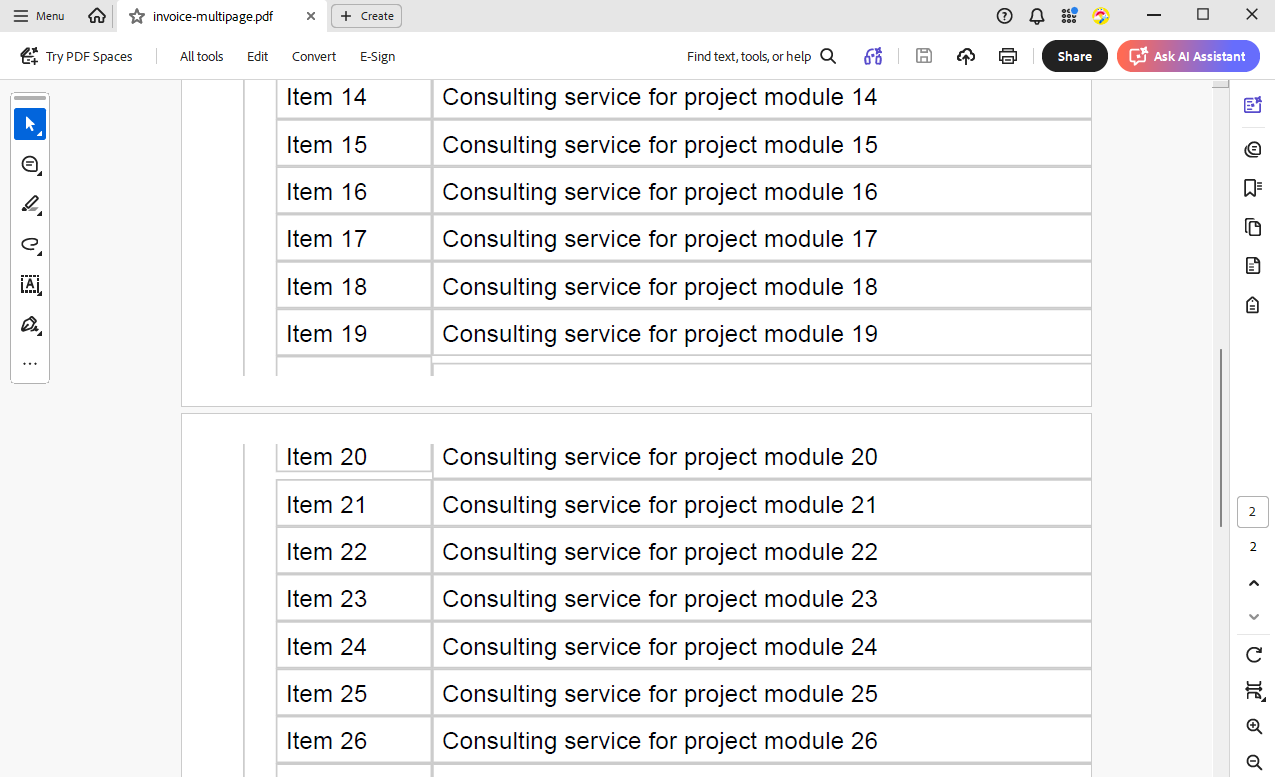
Even in this simple example, several common issues arise. For example, the table header may not repeat on the next page, rows may be cut in half during pagination, and the layout may differ between browsers. Most importantly, there is very little real control over the final page layout.
These limitations are inherent to HTML capture approaches that treat webpages as visual snapshots rather than true paginated documents.
Electronic Invoices Add Another Layer of Complexity
Business environments and legal requirements are increasingly demanding that invoices adhere to electronic invoicing standards. These standards include machine-readable data in addition to the visual document.
Important standards used in Europe include:
- ZUGFeRD
- Factur-X
- XRechnung
- PEPPOL BIS Billing
- EN 16931
In formats such as ZUGFeRD and Factur-X, the invoice becomes a hybrid document. The PDF contains a human-readable version of the invoice, and the same data is embedded inside the document as a structured XML file.
Learn more
This article shows how to create ZUGFeRD 2.3 compliant invoices using TX Text Control .NET Server. ZUGFeRD 2.3 is the latest version of the ZUGFeRD data model and complies with the European standard EN 16931. The article shows how to create ZUGFeRD 2.3 invoices and how to embed the XML invoice data in a PDF document.
Creating ZUGFeRD 2.3 (XRechnung, Factur-X) Documents with .NET C#
This enables accounting systems to automatically process invoices while people continue to read the visual PDF.
A Better Architecture: Structured Data and Document Templates
A more robust solution involves separating business data, web presentation, and document generation.
Rather than converting HTML to PDF, the application works with structured invoice data and uses dedicated templates designed specifically for paginated output to generate documents.
Step 1: Store Invoice Data in Structured Form
Invoice data should be stored in a structured format, such as a database, domain model, or JSON object. This data includes all relevant information, such as company details, customer information, line items, totals, and metadata.
[
    {
        "invoice" : {
            "number" : "R2019041151",
            "date" : "4/15/2019",
            "duedate" : "5/15/2019",
            "discount" : 15,
            "tax": 7.5
        },
        "company" : {
            "name" : "Text Control, LLC",
            "street" : "6676 Text Control Rd",
            "address" : "28210 Charlotte, NC",
            "country" : "United States"
        },
        "payer" : {
            "companyname" : "Payer Corporation",
            "name" : "Peter Jackson",
            "street" : "2212 Payer Dr",
            "address" : "28210 PayCity, NC",
            "country" : "United States"
        },
        "payment" : {
            "routing" : "7783478",
            "account" : "877874627654"
        },
        "items" : [
            {
                "product" : "Product 1",
                "description" : "Description Product 1",
                "qty" : 2,
                "unitprice": 6762
            },
            {
                "product" : "Product 2",
                "description" : "Description Product 2",
                "qty" : 1,
                "unitprice": 222
            },
            {
                "product" : "Product 3",
                "description" : "Longer Description Product 3 with more text than product 1 and 2",
                "qty" : 6,
                "unitprice": 122.88
            }
        ]
    }
]
This structured representation serves as the document's single source of truth. It allows the application to manipulate data without worrying about layout concerns.
Step 2: Render HTML for the Web Interface
The same data can be used to generate HTML for browser-based user interfaces. This enables users to preview or edit invoice data within a responsive web application without altering the final document layout. The HTML is designed for screen display and does not need to adhere to strict pagination rules.
Step 3: Generate the PDF from a Professional Template
Rather than converting HTML, the invoice is generated from a template designed specifically for paginated documents.
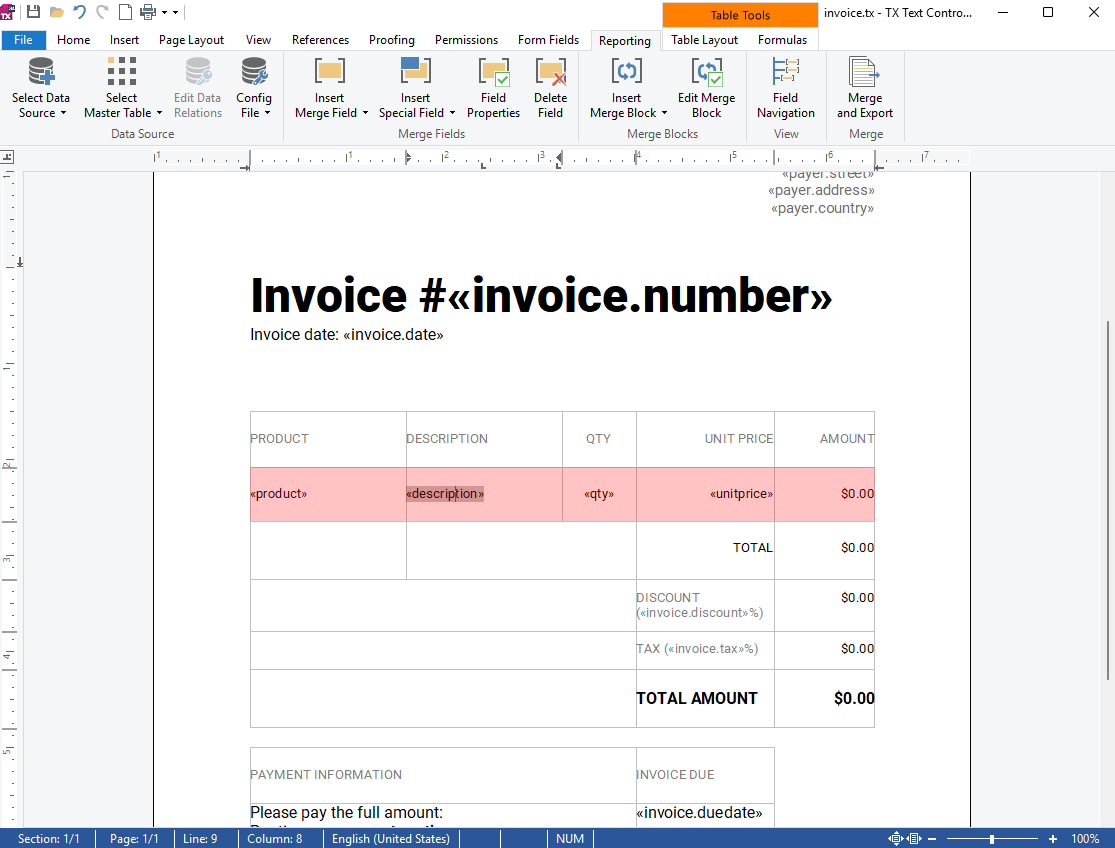
With TX Text Control, developers can create invoice templates in Microsoft Word or in the TX Text Control Document Editor that include the complete document layout, such as headers, footers, tables, branding, and totals. Structured invoice data is then merged into the template to create the final document.
The following screenshot shows the template. Red annotations highlight sub-elements in the JSON data, and a blue annotation indicates cells calculated based on merged data.
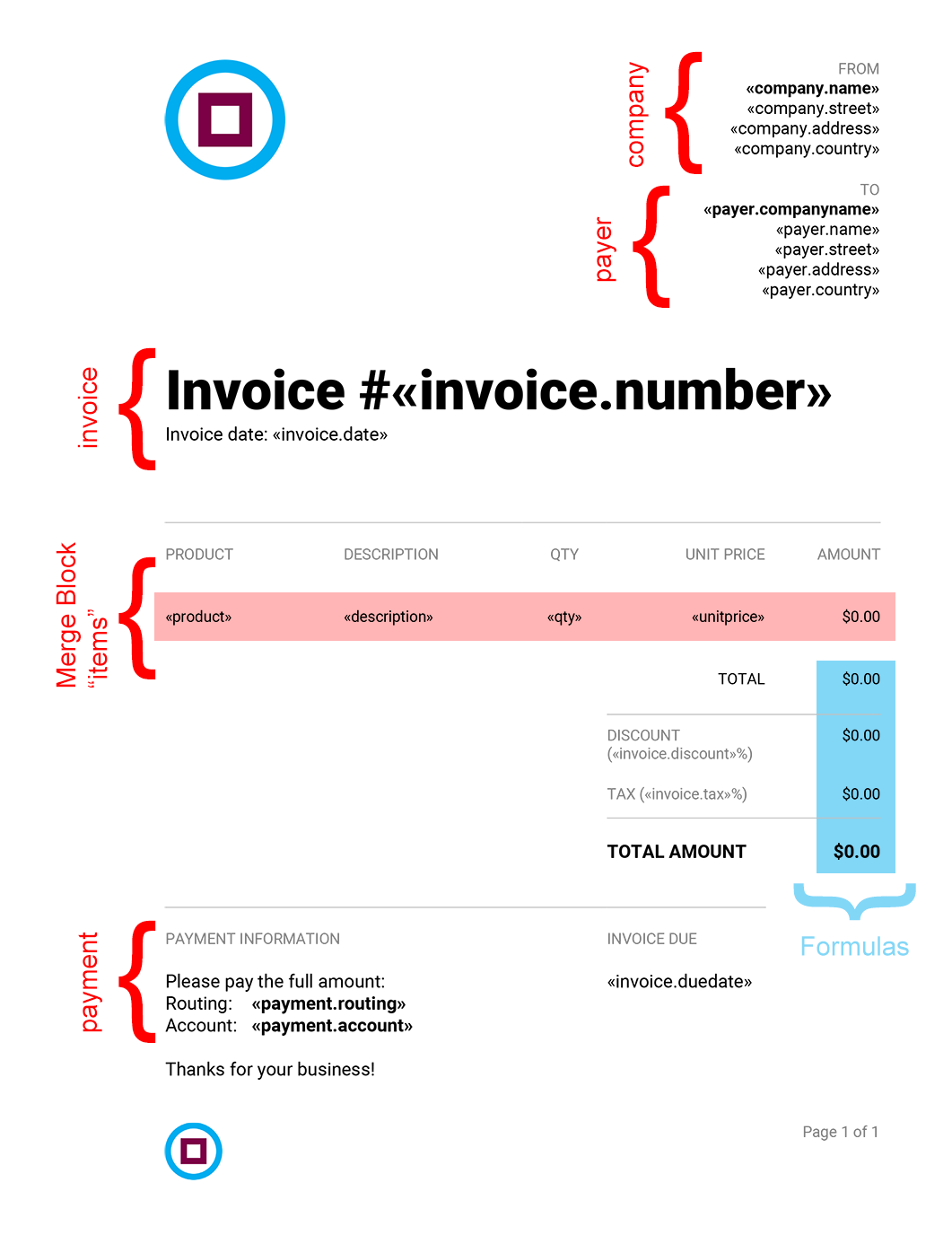
The following code snippet shows how to merge structured invoice data into a template to create a paginated PDF document. The template is designed to handle pagination and repeat table headers while maintaining consistent formatting, regardless of the number of line items.
using System.IO;
using TXTextControl;
using TXTextControl.DocumentServer;

var jsonData = File.ReadAllText("invoice-data.json");

// Enable MS Word field formatting for merge fields in the DOCX template
var loadSettings = new LoadSettings
{
    ApplicationFieldFormat = ApplicationFieldFormat.MSWord
};

using var textControl = new ServerTextControl();
textControl.Create();

textControl.Load(
    "invoice_template.docx",
    StreamType.WordprocessingML,
    loadSettings);

var mailMerge = new MailMerge
{
    TextComponent = textControl
};

mailMerge.MergeJsonData(jsonData);

textControl.Save("invoice.pdf", StreamType.AdobePDF);
This approach yields a properly paginated document with a reliable layout, repeated table headers, and consistent formatting throughout. The template can be easily updated by non-developers using the Document Editor from TX Text Control.
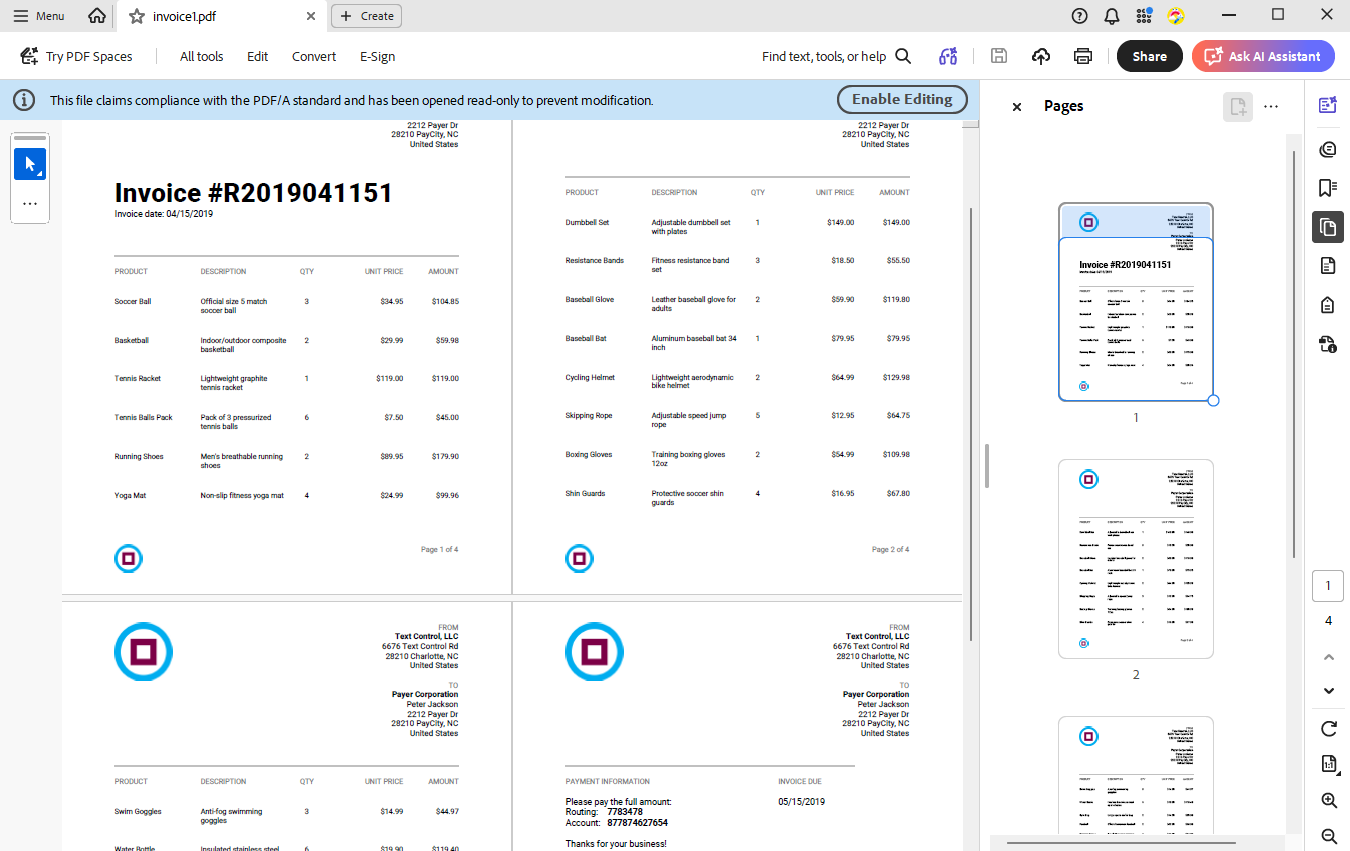
The final PDF output is a professional invoice that adheres to business document standards, regardless of the complexity of the data. In the following screenshot, the invoice contains 20 line items, which span multiple pages. The table headers repeat on each page, and the totals are correctly aligned at the bottom of the last page.
Step 4: Attach XML for Electronic Invoices
With standards like ZUGFeRD and Factur-X, structured invoice data can be serialized as XML and embedded in the generated PDF.
TX Text Control enables developers to create PDF/A documents with embedded attachments, producing hybrid invoices that contain both human- and machine-readable data. This feature is essential for electronic invoicing standards.
The following example illustrates how to implement a modern invoice generation pipeline using TX Text Control. Rather than converting HTML to PDF, the document is generated from a professional Word template and merged with structured invoice data. This approach ensures the final document's predictable layout is designed specifically for print and PDF output.
// Input files
        const string templatePath = "invoice_template.docx";
        const string jsonDataPath = "invoice-data.json";
        const string xmlInvoicePath = "factur-x.xml";
        const string metadataPath = "metadata.xml";
        const string outputPath = "invoice.pdf";

        // Load structured data
        string jsonData = File.ReadAllText(jsonDataPath);
        string xmlInvoice = File.ReadAllText(xmlInvoicePath);
        string metadata = File.ReadAllText(metadataPath);

        using var textControl = new ServerTextControl();
        textControl.Create();

        // Load the Word template
        textControl.Load(
            templatePath,
            StreamType.WordprocessingML,
            new LoadSettings
            {
                ApplicationFieldFormat = ApplicationFieldFormat.MSWord
            });

        // Merge JSON data into the template
        var mailMerge = new MailMerge
        {
            TextComponent = textControl
        };

        mailMerge.MergeJsonData(jsonData);

        // Configure PDF/A export with embedded XML
        var saveSettings = new SaveSettings();

        var xmlAttachment = new EmbeddedFile(
            "factur-x.xml",
            Encoding.UTF8.GetBytes(xmlInvoice),
            metadata)
        {
            MIMEType = "text/xml"
        };

        saveSettings.EmbeddedFiles = new[] { xmlAttachment };

        // Save as PDF/A with embedded XML attachment
        textControl.Save(outputPath, StreamType.AdobePDFA, saveSettings);
The process begins by loading a DOCX invoice template. The template defines the invoice's visual layout, including headers, footers, branding, tables, totals, and other formatting elements. Since the template is a standard Word document, it can be designed and maintained separately from the application code.
Next, structured invoice data stored as JSON is merged into the template using the Mail
After generating the document content, the example attaches an XML file to the resulting PDF using Save
This approach produces a hybrid invoice document in which the PDF provides a human-readable layout, while the embedded XML provides structured invoice data that accounting systems can automatically process.
Conclusion
HTML-to-PDF conversion works well for simple page snapshots. However, for business documents, such as invoices, it introduces layout fragility, pagination issues, and maintenance complexity.
These challenges increase when electronic invoicing standards, such as ZUGFeRD or Factur-X, must be supported.
A structured document pipeline is a far more reliable solution. Business data is stored in a structured format, and HTML is only used for the web interface. PDF documents are generated from templates designed specifically for professional document layout.
With TX Text Control, developers can build robust systems that generate professional invoices and compliant electronic documents with predictable PDF output, bypassing the limitations of HTML-to-PDF conversion.
Frequently Asked Questions
In most cases, no. HTML-to-PDF conversion treats documents as visual snapshots of webpages. Business documents such as invoices, purchase orders, or financial reports require strict pagination, consistent layout, and predictable formatting, which HTML-based rendering engines often cannot guarantee.
HTML-to-PDF conversion is suitable when the goal is to capture a webpage exactly as it appears in the browser. Typical use cases include exporting dashboards, archiving reports, or generating documentation snapshots where the HTML already represents the final layout.
HTML was designed for responsive screen layouts rather than fixed-page documents. As a result, converters often struggle with consistent pagination, repeating headers, table behavior across pages, and strict layout rules required by business documents.
Headers and footers contain critical information such as company branding, invoice numbers, tax identifiers, and page numbers. A document engine must treat them as native document elements so that they repeat consistently across pages. HTML-based approaches typically simulate them using print CSS, which can lead to unreliable results.
Invoices rely heavily on tables for line items, taxes, and totals. When these tables span multiple pages, table headers must repeat and rows must remain intact. HTML-to-PDF converters often fail to handle these scenarios reliably because HTML tables were not designed for strict paginated rendering.
Business documents often require precise pagination rules. Totals should remain together, signature sections should not break across pages, and related information must stay grouped. HTML-based approaches rely on inconsistent CSS page-break rules, which often leads to fragile workarounds.
A structured document pipeline separates business data, web presentation, and document generation. The application stores data in structured form, such as JSON or database models, uses HTML only for the web interface, and generates PDF documents from dedicated templates designed for paginated output.
TX Text Control uses professional document templates created in Microsoft Word or the TX Text Control Document Editor. Structured data is merged into these templates using MailMerge, ensuring consistent layout, predictable pagination, repeated table headers, and professional formatting.
Yes. TX Text Control can embed structured XML data inside PDF/A documents using embedded file attachments. This enables hybrid invoices that contain both a human-readable PDF layout and machine-readable data required by standards such as ZUGFeRD or Factur-X.
Separating the document layout from the web interface prevents UI changes from breaking document output. HTML remains responsible for responsive user interfaces, while dedicated document templates ensure consistent PDF generation independent of browser rendering behavior.
ASP.NET
Integrate document processing into your applications to create documents such as PDFs and MS Word documents, including client-side document editing, viewing, and electronic signatures.





- Angular
- Blazor
- React
- JavaScript
- ASP.NET MVC, ASP.NET Core, and WebForms
Related Posts
A Complete Guide to Converting Markdown to PDF in .NET C#
Learn how to convert Markdown to PDF in .NET C# using Text Control's ServerTextControl component. This guide covers setup, conversion process, and customization options for generating high-quality…
ASP.NETASP.NET CoreDocument Creation
Why PDF Creation Belongs at the End of the Business Process
This article discusses why placing PDF creation at the end of the business process is important for ensuring accuracy and efficiency. The most scalable systems delay PDF generation until the…
Designing the Perfect PDF Form with TX Text Control in .NET C#
Learn how to create and design interactive PDF forms using TX Text Control in .NET C#. This guide covers essential features and best practices for effective form design.
Why Defining MIME Types for PDF/A Attachments Is Essential
The PDF/A standard was created to ensure the long-term reliable archiving of digital documents. An important aspect of the standard involves properly handling embedded files and attachments within…
Validate Digital Signatures and the Integrity of PDF Documents in C# .NET
Learn how to validate digital signatures and the integrity of PDF documents using the PDF Validation component from TX Text Control in C# .NET. Ensure the authenticity and compliance of your…