


AI-Ready Documents in .NET C#: How Structured Content Unlocks Better Extraction, Search and Automation

Most organizations use AI on documents that were never designed for machines. PDFs without tags, inconsistent templates, undescribed images, and disorganized reading orders are still common. This article explains why structured documents are important for AI, presents the available evidence, and describes how organizations can start creating "AI-ready" documents.

It's common for organizations to use AI on documents that were never designed for machines. PDFs without tags, inconsistent templates, images without descriptions, and disorganized reading orders are still common. These issues force document-AI systems to do extra work, such as reconstructing structure, guessing relationships, repairing broken layouts, and sometimes filling in missing pieces.
However, there is a growing convergence between two previously unrelated fields:
- Accessibility and structured document standards, such as PDF/UA.
- AI systems that extract data, answer questions, and build retrieval workflows.
Recent research and modern document AI pipelines demonstrate that logical structure, accessibility information, and rich metadata significantly enhance subsequent AI tasks.
In other words, if documents are structured meaningfully, AI becomes more accurate, reliable, and scalable.
This article explains why structured documents are important for AI, presents the available evidence, and describes how organizations can start creating "AI-ready" documents.
Why AI struggles with unstructured documents
Most documents created for human consumption lack the structure necessary for AI systems to interpret them effectively. Consider, for example, a PDF invoice without tags or logical structure. An AI system attempting to extract data from such a document would face several challenges. Most AI workflows begin with a messy PDF. The system must:
- Identify reading order
- Separate lists from paragraphs
- Recover tables
- Understand figures
- Find metadata
- Resolve multi-column layouts
Research consistently shows that unstructured documents negatively impact model performance. Without logical structure, AI models must guess the hierarchy and semantics of the content.
Recent research on long-document summarization shows that traditional Transformer models struggle because they "regard the text as a sequential structure, ignoring the inherent hierarchical structure information of the text" (Wang et al. [1]). Long documents such as scientific papers or legal documents contain paragraphs, sections and local topical segments that standard sequence encoders fail to capture, which leads to sub-optimal sentence selection and shallow understanding of document organization.
To address this limitation, the authors introduce a model that injects explicit hierarchical cues, including sentence-in-paragraph positions, paragraph indices and even section-title embeddings, into the encoder. These features "enhance the representation of the inherent hierarchical structure of the text" and allow the model to better understand the document's internal organization. The approach treats each sentence not as an isolated sequence token but as part of a structured document with meaningful vertical (section/paragraph) relationships.
To achieve this, documents must be prepared in a way that is meaningful from a structural standpoint so that models can recognize and exploit their internal organization. This involves enriching documents with explicit structural cues. For instance, tagged PDFs expose paragraph boundaries, section divisions, reading order, and semantic roles in machine-readable form. Without this type of structure, models must infer relationships from raw text alone. This approach is error-prone and results in suboptimal performance.
Benefits of structured, AI-ready documents
The exposure of the semantics that AI otherwise has to infer is possible through the use of structured documents.
- Tagged PDFs (PDF/UA)
- Lists, paragraphs and reading order
- Alt text and long descriptions for images and figures
- Tables with headers, scopes and column semantics
- Document metadata: keywords, categories, language, domain
Learn more
Document metadata in PDFs and other formats is important for several reasons, including organization, searchability, authenticity, and compliance. This article shows how to import and export metadata in PDF documents using the TX Text Control .NET Server.
The Importance of Metadata in PDF Documents: Import and Export Metadata in ASP.NET Core C#
These features were originally designed for accessibility and compliance. Now, they also serve as machine-readable labels for AI systems. AI models can more easily identify important content, understand relationships, and extract relevant information by providing explicit structure.
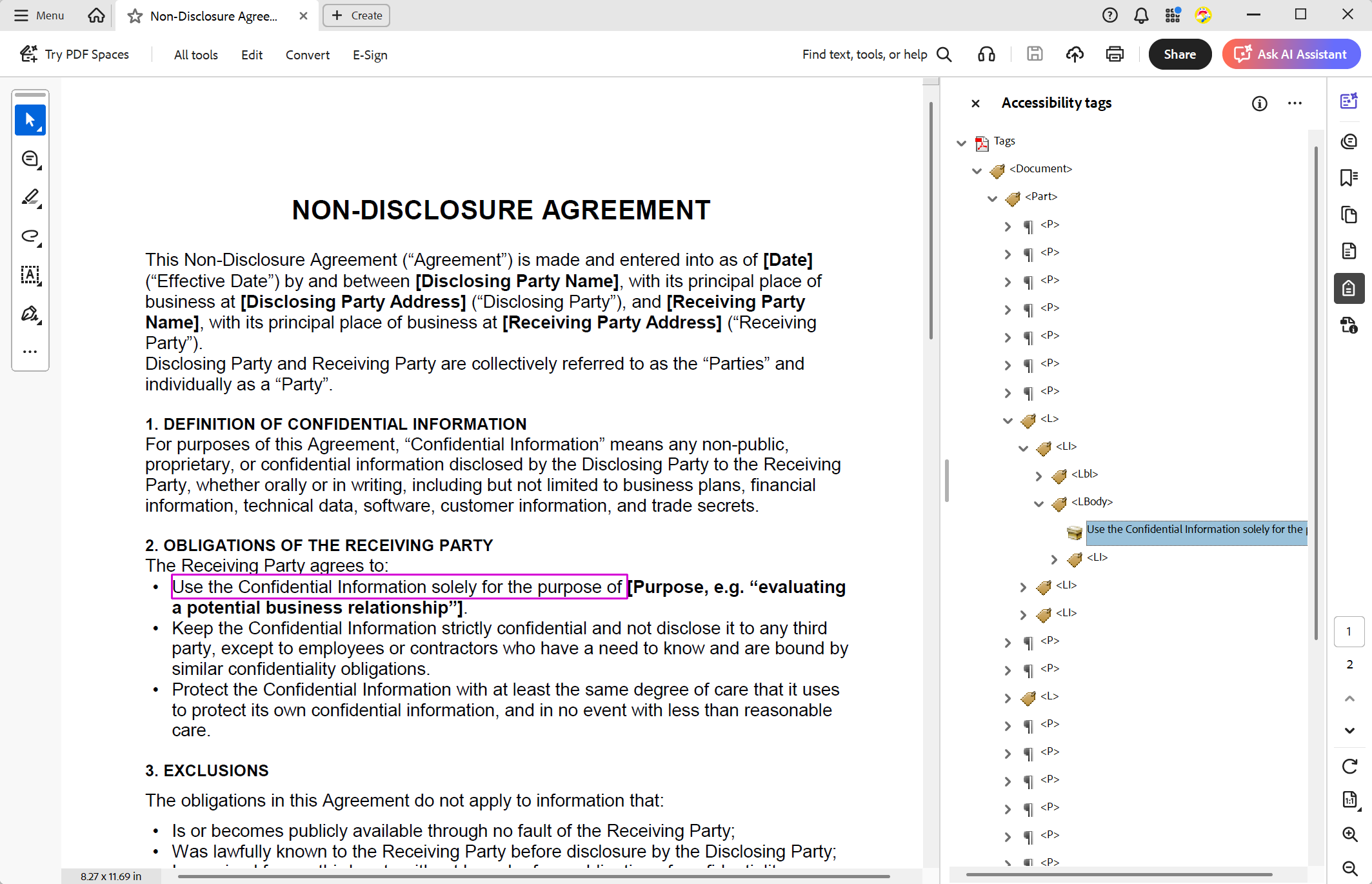
The following screenshot shows a PDF/UA-compliant, tagged document created with TX Text Control. It contains the necessary structure and metadata to be AI-ready.
How structured data improves AI outcomes
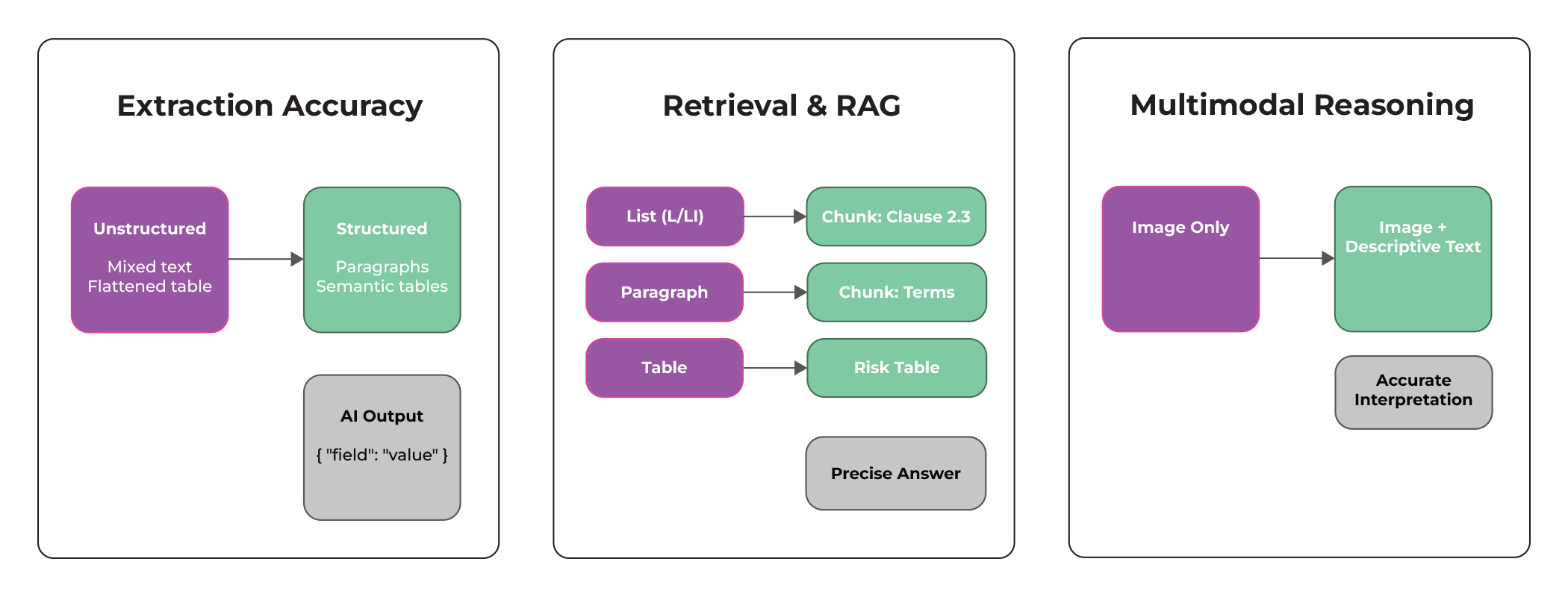
Structured documents offer several key advantages to AI systems, resulting in better performance on a variety of tasks.
Higher extraction accuracy
Structured documents dramatically increase the accuracy of data extraction. When a document clearly defines headings, paragraphs, lists, tables, and captions, AI systems can immediately grasp the content's hierarchy and relationships. Rather than guessing where a section begins or which values belong together in a table, the model receives explicit signals about the document's organization. This reduces ambiguity, minimizes errors, and allows AI to map content to structured fields much more confidently.
More accurate retrieval and RAG
Retrieval-augmented generation works best with documents divided into meaningful, well-defined segments. Structured documents naturally create these segments through heading levels, semantic containers, and metadata. Since the structure is explicit, the retrieval system can chunk the content more precisely, filter the results more effectively, and provide the model with contextually relevant information. The result is a more stable RAG pipeline with better grounding, fewer irrelevant matches, and significantly improved answer quality.
Better multimodal reasoning
Images, charts, and diagrams often convey important information, but AI systems struggle to interpret them accurately without descriptive text. Structured documents solve this problem by including alt text, captions, titles, and figure descriptions. These elements provide the semantic context necessary for AI models to understand the content of a figure and its relationship to the surrounding text. Consequently, multimodal models can provide more accurate explanations, answer questions about visuals more reliably, and incorporate visual information into reasoning processes with far greater precision.
Accessibility and AI reinforce each other
Accessibility requirements, such as proper reading order, semantic tagging, and descriptive text, align perfectly with what AI needs to effectively interpret documents. When content is structured for screen readers and assistive technologies, machine-learning systems also find it easier to process. Thus, improving accessibility automatically enhances AI readiness, creating a natural synergy. Organizations that adopt accessible document standards reap twofold benefits-their documents become more inclusive for human users and more understandable for AI systems simultaneously.
Creating AI-ready documents
To create AI-ready documents, organizations should focus on the following best practices:
- Use document libraries such as TX Text Control that support tagged PDFs (PDF/UA).
- Incorporate semantic elements like lists, tables with proper headers, and alt text for figures.
- Ensure consistent use of styles to define document structure clearly.
- Add metadata to documents, including keywords, categories, and language information.
- Regularly validate documents against accessibility standards to ensure they remain structured and compliant.
Learn more
In this blog post, we will explore the differences between PDF/UA and PDF/A-3a, helping you choose the right format for your business needs. We will discuss the key features, benefits, and use cases of each format to guide your decision-making process.
PDF/UA vs. PDF/A-3a: Which Format Should You Use for Your Business Application?
Use AI to assist in document remediation
AI tools can identify and resolve structural issues in existing documents. For instance, machine learning models can analyze untagged documents and suggest appropriate tags, reading orders, and semantic elements. Leveraging AI for remediation allows organizations to efficiently convert large volumes of legacy documents into AI-ready formats without extensive manual effort.
Developers can use TX Text Control with the OpenAI API to automatically add descriptive texts, such as alt text and labels, to images, links, and tables in DOCX documents. These documents can then be exported as PDF/UA-compliant PDFs, ensuring they are accessible and AI-ready.
Learn more
This article shows how to use TX Text Control together with the OpenAI API to automatically add descriptive texts (alt text and labels) to images, links, and tables in a DOCX. The resulting document is then exported as a PDF/UA compliant PDF document.
Automating PDF/UA Accessibility with AI: Describing DOCX Documents Using TX Text Control and LLMs
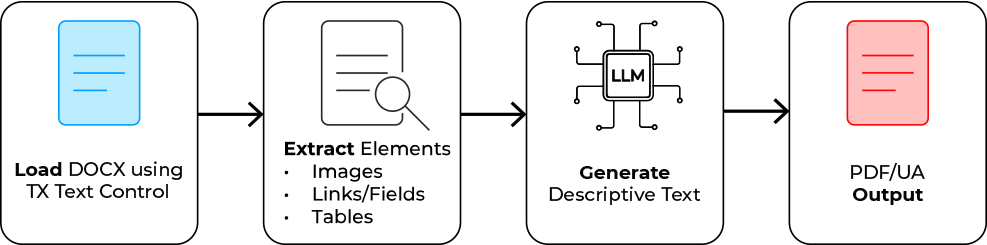
The following diagram illustrates the workflow. First, TX Text Control loads the document. Then, each relevant element is iterated and extracted for processing by the LLM. Then, the model's returned descriptions are applied to the corresponding elements. Finally, the enriched document is exported as a PDF/UA using TX Text Control.
Consider the following sample document, which includes multiple elements that require proper accessibility annotations.

The generated output will be written to the standard output stream in the console:
[IMAGE] Picture 1 -> Snow-capped mountain peak under a clear blue sky, surrounded by rugged terrain and valleys.
[LINK]  Name: ; Text: https://www.textcontrol.com; Target: https://www.textcontrol.com -> Visit Text Control for document processing solutions.
[TABLE] -> The table displays monthly sales data for three products (Alpha Widget, Beta Gadget, and Gamma Pro), along with total sales for each month and an overall total for the year.
Conclusion: Structure is the bridge between documents and AI
As AI technology continues to advance, the importance of structured, AI-ready documents becomes increasingly clear. Organizations can unlock significant improvements in AI performance across extraction, retrieval, and multimodal reasoning tasks by adopting accessibility standards and enriching documents with meaningful structure and metadata. The synergy between accessibility and AI readiness is a win-win: documents become more inclusive for human users and more interpretable for AI systems. Prioritizing structured document creation and remediation ensures that content is optimized for an AI-driven future.
Both research and industry practice agree on one message: Structured documents are essential for effective AI. By embracing this principle, organizations can harness the full potential of AI technologies while enhancing accessibility and compliance.
Sources
ASP.NET
Integrate document processing into your applications to create documents such as PDFs and MS Word documents, including client-side document editing, viewing, and electronic signatures.





- Angular
- Blazor
- React
- JavaScript
- ASP.NET MVC, ASP.NET Core, and WebForms
Related Posts
Text Control at BASTA! Spring 2026 in Frankfurt
This week, we sponsored the BASTA! Spring 2026 conference in Frankfurt, Germany. We had a booth in the exhibition area and presented our products to the attendees. We also had the opportunity to…
From Legacy Microsoft Office Automation to a Future-Ready Document Pipeline…
In this article, we will explore how to transition from traditional office automation to a modern document pipeline using C# and .NET. We will discuss the benefits of adopting a future-ready…
We are Gold Partner at Techorama Belgium 2026
Text Control has officially signed the contract to become a Gold Partner of Techorama Belgium 2026! Techorama is one of the largest and most prestigious technology conferences in Belgium,…
Text Control Sponsors & Exhibits at BASTA! Spring 2026 in Frankfurt
Text Control is proud to announce that we will be sponsoring and exhibiting at BASTA! Spring 2026 in Frankfurt. We will be showcasing our latest products and features, and we look forward to…
ASP.NETASP.NET CoreAzure DevOps
Azure DevOps with TX Text Control .NET Server 34.0: Private NuGet Feed and…
TX Text Control now offers a private NuGet feed with enhanced support for automated build pipelines. For organizations already using Azure Artifacts, that option remains fully available. This…