


Sneak Peek TX Spell 5.0: Language Detection Engine

TX Spell .NET 5.0 introduces a language detection engine that identifies over 30 languages from text with minimal sampling. Built on the Unicode Bidirectional Algorithm, it returns language scopes with start index and length, and includes Visual Studio design-time support.

In version X10 of TX Text Control, we introduced language scopes that can be defined using the Selection.Culture property. Based on this specified language, the spell checking engine is using the appropriate dictionaries and hyphenation lists for spell checking, the suggestions and hyphenation.
In TX Text Control, a new dialog has been implemented that is used to define the language at the current input position or selection:
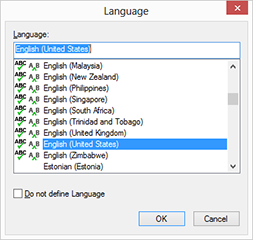
The tiny icons  in the dialog indicate that the dictionaries and hyphenation lists are available for that specific language.
Language scopes are exported by TX Text Control and MS Word automatically. But what if the document is coming from another source or if formats are loaded that doesn't have a language defined?
Version 5.0 of TX Spell .NET (for Windows Forms and WPF) will be released with a new feature: Language Detection.
Based on a very sophisticated algorithm, TX Spell .NET 5.0 is able to detect the used languages from out of more than 30 languages. Based on the detected languages, you can add the proper dictionaries to the dictionary collection or load the appropriate hyphenation lists.
The following screenshot shows a sample project that will be shipped with the installation package. The language scopes are colorized to visualize the various detected languages.
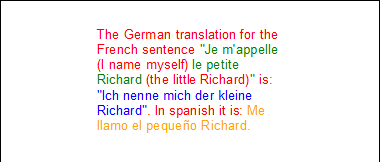
Aside from the unbeatable performance and suggestion engine quality, a unique feature of TX Spell .NET is the adaptive spell checking for multilingual users. You can use several language and user dictionaries at the same time. This new functionality makes this unique feature complete.
High Performance Engine
The language detection engine requires a very low sampling size - it can detect the language from a single sentence with 4 or more words. It is not resource intensive, and returns the detected language(s) very fast. A typical document with 100 pages and 5 languages takes only less than 500 milliseconds on a PC with average specs.
The engine is based on the Unicode Bidirectional Algorithm (UBA) and its various levels to support documents that contain text from right-to-left as well as left-to-right in the same document.
Visual Studio Design Time Support
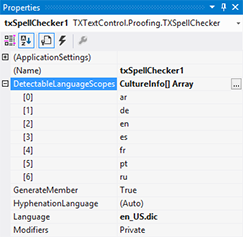
The detectable languages can be defined through the new property DetectableLanguageScopes with full design-time support in Visual Studio:
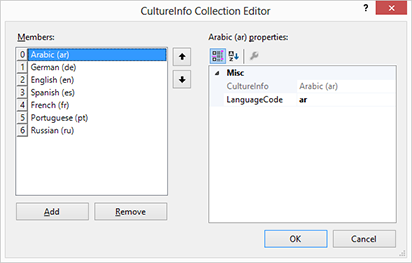
A collection editor can be used to add new languages to the DetectableLanguageScopes collection:
The following code sets the detectable languages to German and English in order to call the DetectLanguageScopes property with a multi-language text.
txSpellChecker1.DetectableLanguageScopes =
    new CultureInfo[] {
        new CultureInfo("de"),
        new CultureInfo("en"),
    };

txSpellChecker1.DetectLanguageScopes(
    "This is English text. Das ist ein deutscher Text.");

foreach (LanguageScope scope in txSpellChecker1.LanguageScopes)
{
    Console.WriteLine("Language: " + scope.Language +
        ", Start index: " +
        scope.Start.ToString() +
        ", Length: " +
        scope.Length.ToString());
}
The output of this code is:
Language: en, Start index: 0, Length: 21
Language: de, Start index: 21, Length: 28
This powerful feature of TX Spell .NET is another unique innovation of Text Control. Stay tuned for details of TX Spell .NET 5.0.
Related Posts
Service Pack 1 for TX Spell .NET 7.0 Released
Text Control released Service Pack 1 for TX Spell .NET 7.0, covering both the Windows Forms and WPF editions. The update addresses known issues since the initial release. Users should review the…
TX Text Control X11 Sneak Peek: Language Detection
TX Spell .NET 5.0, shipping with TX Text Control X11, adds automatic language detection for over 30 languages. The DetectLanguageScopes method identifies language boundaries in mixed-language text…
TX Spell .NET ActiveX Package Goes CodePlex
The TX Spell .NET ActiveX Package wraps the Windows Forms spell checker in a COM-visible user control, enabling VB6 application integration. Published on CodePlex as an open-source Visual Studio…
Converting 3rd-party User Dictionaries to TX Spell .NET
TX Spell .NET supports open dictionary formats including Hunspell from OpenOffice.org. A Dictionary Converter tool migrates third-party dictionaries like ComponentOne SpellChecker to the native…
TX Text Control RapidSpell .NET for Windows Forms 16.0 Released
TX Text Control RapidSpell .NET for Windows Forms 16.0 shipped with a spell checker interface redesigned for stable, high-speed performance. The royalty-free component ships with dictionaries for…