
In TX Text Control .NET for Windows Forms 15.0, we introduced the Visual Studio Smart-Tags. This tag is a menu-like interface that supply commonly used design-time options like changing the Dock property.
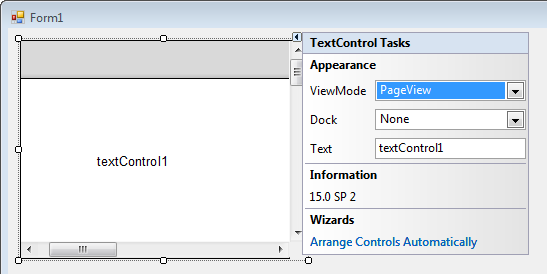
In TX Text Control .NET for Windows Forms 15.0, we implemented a Smart-Tag that helps to adjust the control with the typical settings. Possible settings are:
- ViewMode
- Dock
- Text
Additionally, the Smart-Tag always shows the current version of TX Text Control including the installed service pack.
A very nice feature is the wizard to connect the different controls such as ButtonBar, RulerBar and StatusBar automatically. To use this wizard, you need to drag and drop all controls to the form and click Arrange Controls Automatically.
The wizard looks for existing controls and arranges them in the current parent container like a form or a panel control. Additionally, the wizard inserts the required code to connect these controls.
The screencast video shows this wizard in action.
